|
VOOZH | about |
|
VOOZH | about |
The Cucumber Framework is a popular BDD automation framework used to write and execute test scenarios in a simple and understandable format. It helps teams automate application testing while improving collaboration and test maintainability.
Cucumber Testing Architecture is a layered structure that separates test scenarios from automation code to enable efficient execution of BDD test cases. It uses Feature Files, Step Definitions, and Core Implementation to execute automated tests efficiently.
1. Feature File: Contains test scenarios written in simple English using Gherkin language and describes application behavior from the user’s perspective.
File Extension:
.feature
Example:
- Feature: Login Functionality
- Scenario: Successful Login
Given User is on login page. When User enters valid username and password Then User should login successfully
2. Step Definition: Contains automation code for each step written in the Feature File and connects Gherkin steps with executable scripts.
File Extension:.java
Example:
@Given("User is on login page")
public void openLoginPage() {
driver.get("https://example.com");
}
3. Runner File: Executes Cucumber test cases and manages feature file and step definition configuration.
File Extension:.java
Example:
@RunWith(Cucumber.class)
@CucumberOptions(
features = "src/test/resources/features",
glue = "stepDefinitions"
)
public class TestRunner {
}
4. Gherkin Language: A business-readable language used to write test scenarios using keywords like Given, When, and Then.
5. Cucumber Framework: The core tool that supports BDD and enables execution of feature files.
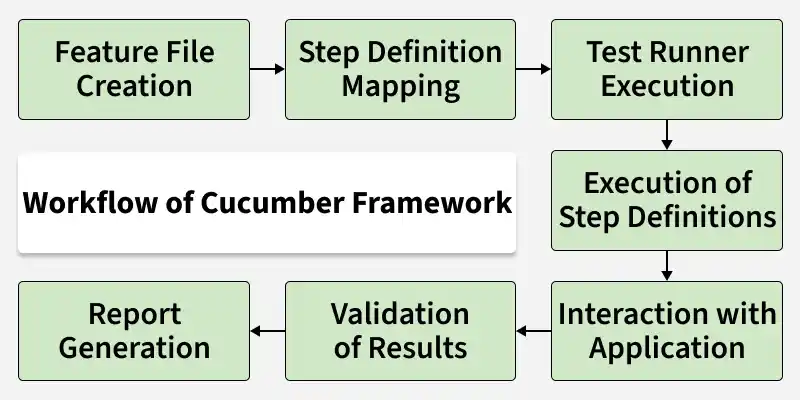
Cucumber Framework workflow defines the step-by-step process of executing test scenarios using Feature Files, Step Definitions, and automation code to validate application behavior in BDD style.
.feature file using Gherkin language (Given, When, Then).Setting up your first Cucumber test with Selenium for automated browser testing to implement Behavior-Driven Development (BDD).
Here are the steps to create and run the first Cucumber test:
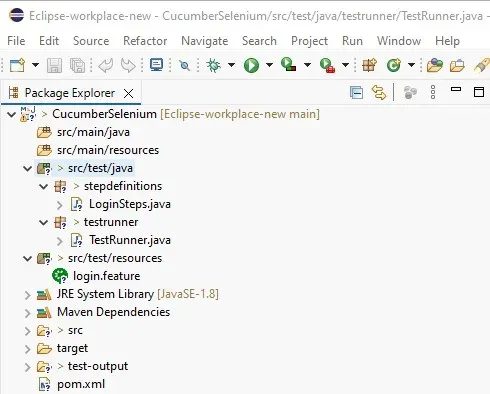
Create a Maven Project and add dependencies for Cucumber, Selenium, and TestNG in the pom.xml file:
pom.xml
Create a Feature File to define test scenarios using Gherkin syntax. The login.feature file contains a simple login scenario and is stored in the src/test/resources directory.
login.feature
Create Step Definitions file these Java methods in the LoginSteps class map to the steps in the feature file. The LoginSteps class uses Selenium WebDriver to interact with the web application during the test:
LoginSteps.java
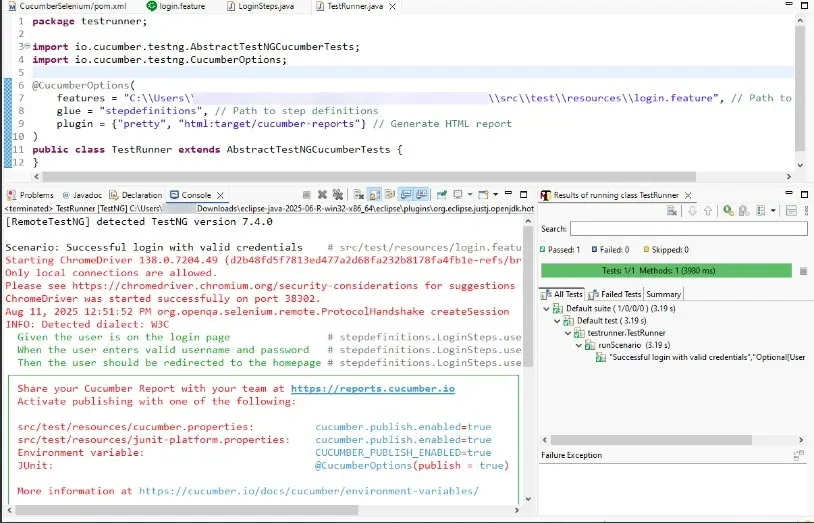
Create the TestRunner class connects the feature file and step definitions using Cucumber's @CucumberOptions annotation. It also generates HTML reports after running the tests.
TestRunner.java
After setting up the feature files, step definitions, and test runner, you can run the tests using TestNG. Right-click on the TestRunner class and select Run As TestNG Test.
Output:
Creating and running your first Cucumber test is an important step in implementing BDD in your development process. As you become more comfortable with Cucumber, you'll be able to create more complex scenarios and leverage its full potential for improving your software quality and team communication.
The Cucumber Framework improves test automation by making test cases more readable, reusable, and easier to maintain while enhancing collaboration among team members.