|
VOOZH | about |
|
VOOZH | about |
In today's digital age, creating a smart home has never been easier, especially with the help of Google Assistant. By using Google Assistant for home automation, you can control various devices and systems in your home with simple voice commands or through the Google Home app.
To achieve this, you need to automate your home using Google Assistant. Home automation with Google Assistant simplifies tasks, allowing you to execute commands using the "Ok Google" feature. However, achieving this requires purchasing specific Google Home devices from the market.
Table of Content
This article will focus on the best Google Assistant for home automation requirements and the steps needed to control your home using Google Assistant tools and software.
Here, we will list down some items & software that you have to manage before going for the detailed steps. You can buy the items like Google smart home devices & download the software from the Google Play Store easily.
Here, we will discuss the steps to configure Google Assistant for home automation. Let us check the section to configure the Google Assistant with Google Home
In this section, we'll learn how to set up Google Assistant to make your home smart. Google Assistant is like a digital helper that can control your Google Home devices and automate tasks around your house.
First, make sure you have Google Home devices like smart speakers or displays. These gadgets connect your home to the Google Assistant.
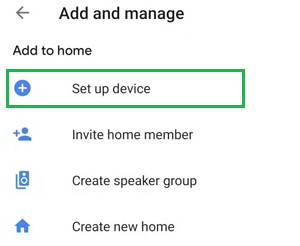
Step 1: Open the Google Home Application & click on the Set Up Device.
👁 Google Assistant for Automation
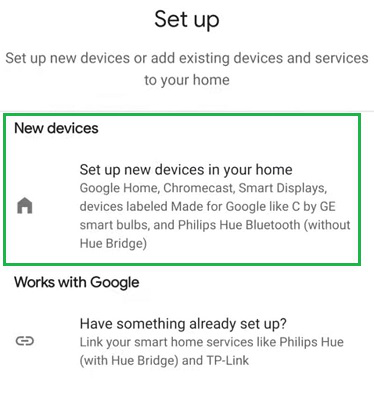
Step 2: Go for the Set Up New Device Option. The Google Assistant will be connected to the application automatically.
👁 Google Assistant for Automation
In this section, we'll learn how to set up your Google smart home devices to make your home life easier. Google smart home devices, like Google Home, can help automate tasks around your house, making things more convenient for you.
Step 1: Go to the Set Up Device option under the Google Home Application.
👁 Google Assistant for Automation
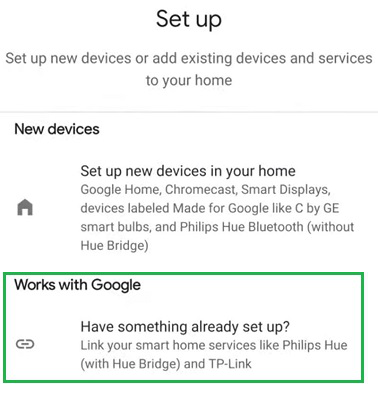
Step 2: Click on the Have Something Already Set Up option. It will search the device, so keep the application close to the device.
👁 Google Assistant for Automation
Step 3: The Smart Device will added. Click on the Done option.
👁 Google Assistant for Automation
By following these steps, you can configure your Google smart home devices to automate tasks around your home, making your life more convenient and enjoyable.
You can use the OK Google option on your mobile. Or open the Google Home Application & click on the Turn On or Turn Off option to operate the system.
👁 Google Assistant for Automation
From the above discussion, it might become clear the step-by-step Configuration of Google Assistant for Home Automation. We will recommend going with the Google Smart Home devices, such as Smart Lights or some Small Smart Devices made by Google. Once you are habituated to the system, you can make your home even more awesome using Google Assistant for Automation.
Harnessing the power of Google Assistant for home automation allows you to create a more efficient and convenient living environment. By following the steps outlined in this guide, you can easily set up and use Google Assistant smart home devices to control lighting, security, climate, and more. The flexibility and ease of use provided by Google Assistant home automation make it an invaluable tool for modern living. Stay ahead in the digital age by integrating Google Assistant into your smart home setup.