|
VOOZH | about |
|
VOOZH | about |
JUnit testing interview questions are commonly asked to check your understanding of Java unit testing concepts and how to write reliable and maintainable test cases. These questions mainly cover both JUnit 4 and JUnit 5 features used in real-world testing.
JUnit is a popular Java testing framework used to write and run unit test cases. It helps developers verify that each method or module works correctly and ensures code quality by catching bugs early in the development process.
Unit testing is important because it helps ensure that each small part of the application (like a method or class) works correctly before integrating it with other parts. It reduces bugs, improves code quality, and makes future changes safer.
JUnit 5 is the modern version of JUnit with better modular architecture and more advanced features compared to JUnit 4.
| Feature | JUnit 4 | JUnit 5 |
|---|---|---|
| Version Type | Older testing framework | Newer and modern framework |
| Main Package | org.junit.* | org.junit.jupiter.* |
| Lifecycle Annotations | @Before, @After | @BeforeEach, @AfterEach |
| Advanced Features | Limited features | Supports nested, dynamic, parameterized tests |
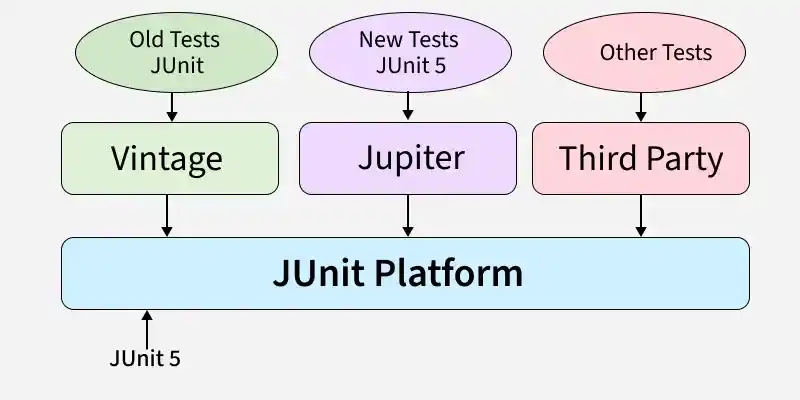
JUnit 5 is designed in a modular way, which makes it more flexible and powerful than older versions. It is mainly divided into three core modules that work together to run and manage test cases.
The @Test annotation is used to mark a method as a test case in JUnit. When the test suite runs, JUnit automatically detects and executes all methods annotated with @Test to verify the expected behavior of the code.
Assertions in JUnit are used to check whether the actual output matches the expected output in a test case. If an assertion fails, JUnit marks the test as failed, helping developers identify issues quickly.
@BeforeEach in JUnit 5 is used to run a method before every test case in a test class. It is mainly used for setting up common test data or initializing objects so that each test runs with a fresh setup.
@AfterEach in JUnit 5 is used to run a method after every test case in a test class. It is mainly used for cleanup tasks like closing resources, resetting values, or releasing memory after each test execution.
@BeforeAll and @AfterAll in JUnit are used to run methods only once for the entire test class. @BeforeAll runs before all test methods, and @AfterAll runs after all test methods, mainly for global setup and cleanup.
A Test Suite in JUnit is a collection of multiple test classes that are executed together as a single group. It is useful when you want to run all related test cases at once, such as running all tests for a module or feature.
BeforeEach and @BeforeAll are both setup annotations in JUnit 5, but they run at different times. @BeforeEach runs before every test method, while @BeforeAll runs only once before all test methods in the class.
| Feature | @BeforeEach | @BeforeAll |
|---|---|---|
| Execution Time | Runs before each test method | Runs once before all test methods |
| Frequency | Multiple times (for every test) | Only one time |
| Use Case | Common setup for each test | One-time setup (DB/server init) |
| Method Type | Can be normal method | Must be static (by default) |
@Disabled in JUnit 5 is used to temporarily skip a test method or an entire test class during execution. It is helpful when a test is under development, failing due to a known issue, or not ready to run.
Example:
@Disabled("Not implemented yet")
@Test
void testFeature() {
}
In JUnit 5, exceptions are tested using the assertThrows() method. It checks whether a specific exception is thrown when executing a piece of code, and the test passes only if the expected exception occurs.
Example:
assertThrows(ArithmeticException.class, () -> {
int result = 10 / 0;
});
A Parameterized Test in JUnit 5 is a type of test that runs the same test method multiple times with different input values. It helps reduce duplicate test code and improves test coverage by testing multiple scenarios in one method.
@ValueSource in JUnit 5 is used to provide a single list of values as input to a parameterized test. It allows the same test method to run multiple times, once for each value given in the annotation.
@ParameterizedTestint, long, double, String, etc.Example:
@ParameterizedTest
@ValueSource(ints = {1, 2, 3})
void testPositiveNumbers(int num) {
assertTrue(num > 0);
}
@CsvSource in JUnit 5 is used in parameterized tests to provide multiple sets of input values in CSV (comma-separated) format. It allows you to pass more than one argument to a test method and run the test multiple times with different data.
Example:
@ParameterizedTest
@CsvSource({"1,2,3", "5,5,10"})
void testAdd(int a, int b, int sum) {
assertEquals(sum, a + b);
}
@RepeatedTest in JUnit 5 is used to run the same test method multiple times. It is helpful when you want to verify consistency, test flaky behavior, or run a test repeatedly under the same conditions.
@RepeatedTest(5)RepetitionInfo if neededExample:
@RepeatedTest(5)
void testMultipleTimes() {
}
@DisplayName in JUnit 5 is used to give a custom readable name to a test class or test method. It makes test reports more meaningful and easy to understand instead of showing method names.
Example:
@DisplayName("Check if sum works correctly")
@Test
void testSum() {
}
@Nested in JUnit 5 is used to create inner test classes inside a test class to organize test cases in a structured way. It is helpful when you want to group related tests together, such as testing different scenarios of the same feature.
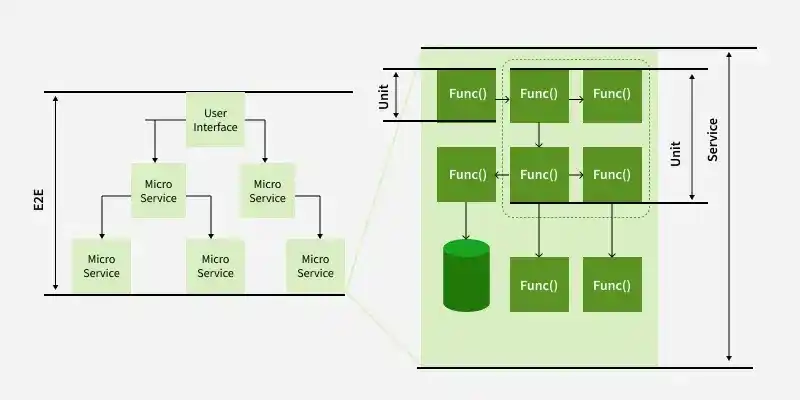
Unit testing and integration testing are both important in software testing, but they focus on different levels. Unit testing checks individual methods or classes, while integration testing verifies how multiple components work together (like service + database).
| Feature | Unit Testing | Integration Testing |
|---|---|---|
| Focus | Tests individual method/class | Tests combined modules/components |
| Dependencies | Uses mocks/stubs, no real external systems | Uses real DB, APIs, services, etc. |
| Speed | Very fast | Slower than unit tests |
| Goal | Validate small logic correctness | Validate end-to-end component interaction |
Mocking in testing means creating a fake object that behaves like a real dependency. It is mainly used in unit testing to isolate the code being tested, without calling real database, API, or external services.
assertAll() in JUnit 5 is used to execute multiple assertions together in a single test. It ensures that all assertions are checked, and even if one fails, the remaining assertions still run, showing all failures at once.
Example:
assertAll(
() -> assertEquals(10, result),
() -> assertTrue(result > 0)
);
Test-Driven Development (TDD) is a software development approach where you write test cases before writing the actual code. The goal is to develop code in small steps by first failing a test, then writing code to pass it, and finally improving the code.
@TestInstance in JUnit 5 is used to control the lifecycle of the test class instance. By default, JUnit creates a new instance for each test method, but using @TestInstance you can make JUnit use a single instance for all tests.