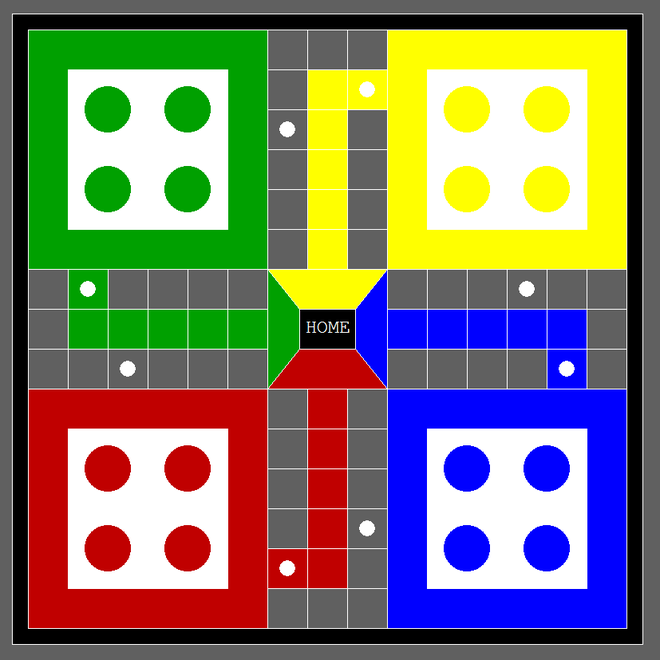
In Turbo C graphics the functions are used to draw different shapes like circles, rectangles, etc, display text(any message) in a different format (different fonts and colors). By using graphics.h we can make programs, animations and also games. These can be useful for beginners.
Function Used:
rectangle(l, t, r, b): A function from graphics.h header file which draws a rectangle from left(l) to right(r) and from top(t) to bottom(b).
line(a1, b1, a2, b2): A function from graphics.h header file which draws a line from (a1, b1) point to (a2, b2) point.
circle( a, b, r): A function from graphics.h header file which draws a circle with (a, b) as the center and r as the radius.
outtextxy(int x, int y, char *string): A function from graphics.h header file by which we can print any statements where, x, y are the coordinates of the point and, the third argument contains the address of the string to be displayed.
settextstyle(int font, int direction, int font_size): A function from graphics.h header file by which we can make a style of the printable text where the font argument specifies the font of the text. The direction can be HORIZ_DIR (Left to right) or VERT_DIR (Bottom to top).
setfillstyle(pattern, color): A function from graphics.h header file by which we can give a pattern of drawing and also a specific color.
floodfill(a, b, c): A function from graphics.h header file by which we can color a specific bounded area with (a, b) as the center and c as the border color.
Approach:
In this program, nine functions are defined:
red_corner()
blue_corner()
green_corner()
yellow_corner()
home()
line_red_blue()
line_green_yellow()
line_red_green()
line_yellow_blue()
The first step is to set the background color dark-gray by using the setfillstyle() and the floodfill() function.
Make two rectangles using the rectangle() function. Between them, one will act as the outer outline and another is the inner outline. Fill the color black in the space between the outer and inner outline.
The red_corner() function is called. Two rectangles are defined using the rectangle() function. Between them, one is the outer and another is an inner rectangle. The space between the outer rectangle is colored with red and the space between the inner rectangle is colored with white. Four circles are created using the circle() function and all the circles will be colored red. All the coloring will be implemented by using the setfillstyle() and the floodfill() functions.
Next step is to call blue_corner(), green_corner(), yellow_corner() functions sequentially.
The same thing has to be done in blue_corner(), green_corner(), yellow_corner() functions. But in the blue_corner() function the color blue is used, in the green_corner() function the color green is used, and in the yellow_corner() function the color yellow is used. The colors are filled by using setfillstyle() and floodfill() functions.
The next step is to call the home() function. In this function, two rectangles are implemented using the rectangle() function. Among them, one is the outer rectangle and another is the inner rectangle. The inner rectangle is colored black. There HOME is printed using the outtextxy(), settextstyle().
Call the line_red_blue() function. This function will draw the lines using the line() function. The space between the red and blue corners is divided into the same distanced line. Here a while loop will be implemented to draw the lines easily. Also, in this while loop, the code to color red will be implemented in the middle of that space. Also, a starting point needs to be created using a red color and a circle using the circle() function which is colored white. A Star Point was created which is also found on the real Ludo board. This is also implemented by the circle() function and color it White. In this function, decoration is done in the Home space by using red color. All the color is implemented by setfillstyle() and floodfill() functions.
The same thing needs to be done in line_green_yellow(), line_red_green(), line_yellow_blue() functions. But in line_yellow_blue() the color blue is used, in line_red_green() the color green is used and in line_green_yellow() the color yellow is used. The colors are filled using setfillstyle() and floodfill() functions.
Below is the C program to implement the above approach: