|
VOOZH | about |
|
VOOZH | about |
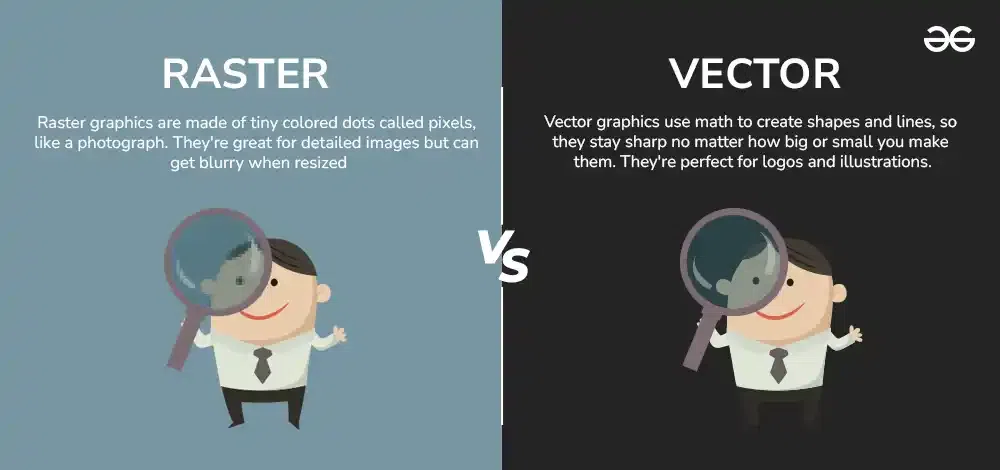
When it comes to digital images, two main types are commonly used: raster and vector graphics. Understanding the difference between these two can help you choose the right format for your project. Raster graphics, made up of tiny pixels, are ideal for detailed and colorful images like photographs.
On the other hand, vector graphics use mathematical paths, making them perfect for designs that need to be scaled without losing quality, like logos and illustrations. Both have their own strengths and weaknesses, and knowing when to use each can make a big difference in your design work.
Before we begin with what vector graphics and raster graphics are, we must understand a few basic terms:
In Computer graphics, a pixel, dot, or picture element is a physical point in a picture. A pixel is simply the smallest addressable element of a picture represented on a screen. A majority of pictures that we see on our computer screen are raster images. The selfie that you click with your mobile phone is another example of a raster image. An image is made up using a collection of pixels referred to as a bitmap.
In computer graphics, a bitmap is a mapping from some domain (for example, a range of integers) to bits, that is, values which are zero or one. It is also called a bit array or bitmap index. The more general term pixmap refers to a map of pixels, where each one may store more than two colors, thus using more than one bit per pixel.
Often bitmap is used for this as well. In some contexts, the term bitmap implies one bit per pixel, while pixmap is used for images with multiple bits per pixel.
Raster images use bit maps to store information. This means a large file needs a large bitmap. The larger the image, the more disk space the image file will take up. As an example, a 640 x 480 image requires information to be stored for 307,200 pixels, while a 3072 x 2048 image (from a 6.3 Megapixel digital camera) needs to store information for a whopping 6,291,456 pixels.
We use algorithms that compress images to help reduce these file sizes. Image formats like jpeg and gif are common compressed image formats. Scaling down these images is easy but enlarging a bitmap makes it pixelated or simply blurred. Hence for images that need to scale to different sizes, we use vector graphics.
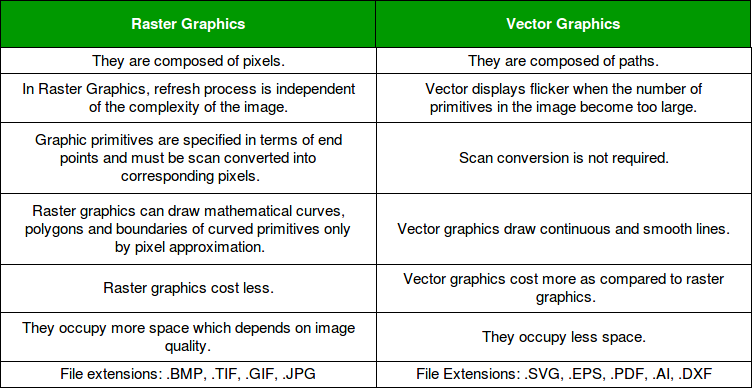
File extensions: .BMP, .TIF, .GIF, .JPG
Making use of sequential commands or mathematical statements or programs which place lines or shapes in a 2-D or 3-D environment is referred to as Vector Graphics. Vector graphics are best for printing since it is composed of a series of mathematical curves. As a result vector graphics print crisply even when they are enlarged.
In physics: A vector is something that has a magnitude and direction. In vector graphics, the file is created and saved as a sequence of vector statements. Rather than having a bit in the file for each bit of line drawing, we use commands which describe a series of points to be connected. As a result, a much smaller file is obtained.
File extensions: SVG, EPS, PDF, AI, DXF
The main difference between vector and raster graphics is that raster graphics are composed of pixels, while vector graphics are composed of paths. A raster graphic, such as a gif or jpeg, is an array of pixels of various colors, which together form an image.
Choosing between raster and vector graphics depends on the needs of your project. Raster graphics are best for rich, detailed images but can lose quality when resized. Vector graphics, however, are perfect for scalable designs and clear lines but may not handle complex images well.
By understanding these differences, you can select the right type of graphic for your designs, ensuring the best results whether you’re working on a detailed photo or a crisp logo. Whether you're a graphic designer, a web developer, or just someone working with images, knowing when to use raster or vector graphics will help you create the best visuals possible.