|
VOOZH | about |
|
VOOZH | about |
Altair is a powerful declarative statistical visualization library for Python, based on Vega and Vega-Lite visualization grammars. It is widely used for creating interactive and visually appealing plots. One of the key features of Altair is its ability to customize visualizations, including setting custom color themes. This article will guide you through the process of setting a custom color theme in Altair as the default, ensuring that your visualizations maintain a consistent aesthetic.
Table of Content
Before diving into customization, it's essential to understand Altair's theming system. Altair supports a variety of built-in themes, such as default, dark, and light.
In Altair, themes define the overall look and feel of your visualizations, including color schemes, fonts, and other stylistic elements. By default, Altair comes with a few predefined themes like 'default' and 'none'.
Firstly, we will have to install altair_viewer, and then proceed with custom theme.
pip install altair_viewerThen, add the following in your notebook:
To create a custom color theme in Altair, you need to define a theme configuration that specifies the desired color scheme and other stylistic elements. Here's a step-by-step guide:
Create a Python function that returns a dictionary representing the theme configuration. This dictionary should include keys for various visual elements, such as colors, fonts, and chart properties.
# Define the custom theme
def my_custom_theme():
 return {
 "config": {
 "view": {"continuousWidth": 400, "continuousHeight": 300},
 "mark": {"color": "steelblue"},
 "axis": {
 "labelFontSize": 12,
 "titleFontSize": 14,
 "labelColor": "gray",
 "titleColor": "black"
 },
 "range": {
 "category": ["#1f77b4", "#ff7f0e", "#2ca02c", "#d62728", "#9467bd"]
 }
 }
 }
Ensure that the theme registration and enabling steps are correctly applied:
alt.themes.register('my_custom_theme', my_custom_theme)
alt.themes.enable('my_custom_theme')
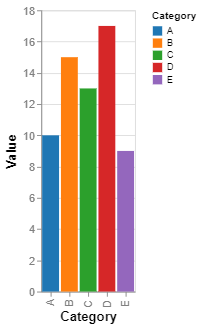
Here's the complete code with the steps included to help you see the output:
Output:
Explanation for the above Example:
my_custom_theme() defines a custom theme for Altair charts. This theme specifies various configuration options such as:steelblue.alt.themes.register('my_custom_theme', my_custom_theme) registers the custom theme with the name 'my_custom_theme'.alt.themes.enable('my_custom_theme') activates the custom theme, meaning all subsequent charts will use this theme unless specified otherwise.Altair allows for advanced customization beyond simple color schemes. Here are a few additional options you might consider:
While setting a custom theme in Altair is straightforward, you might encounter some common issues:
Setting a custom color theme in Altair as default is a powerful way to ensure consistency and branding across your visualizations. By following the steps outlined in this article, you can create visually appealing and cohesive charts that align with your project's aesthetic goals. Whether you're working on a data analysis project, a presentation, or a web application, Altair's theming capabilities offer the flexibility and control you need to create stunning visualizations.