|
VOOZH | about |
|
VOOZH | about |
There must be times when you have come across some social media post whose main aim is to spread hate and controversies or use abusive language on social media platforms. As the post consists of textual information to filter out such Hate Speeches NLP comes in handy. This is one of the main applications of NLP which is known as Sentence Classification tasks.
In this article we’ll walk through a stepwise implementation of building an NLP-based sequence classification model to classify tweets as Hate Speech, Offensive Language or Neutral .
Before we begin let’s import the necessary libraries for data processing, model building and visualization.
We’ll use the Hate Speech Dataset which contains labeled tweets classified into three categories:
The dataset consists of 19,826 rows and 2 columns : tweet (textual content) and class (label). Let’s load the dataset and explore its structure. You can download the dataset from here.
Output:
To check how many such tweets data we have let's print the shape of the data frame.
Output:
(24783, 2)
Although there are only two columns in this dataset let's check the info about their columns.
Output:
The shape of the data frame and the number of non-null values are the same hence we can say that there are no null values in the dataset.
Output:
👁 ImageHere the three labels are as follows:
The dataset is imbalanced so we balance it using a combination of upsampling and downsampling.
Output:
👁 ImageTextual data is highly unstructured and need attention on many aspects like:
Although removing data means loss of information but we need to do this to make the data perfect to feed into a machine learning model.
Output:
The below function is a helper function that will help us to remove the stop words and Lemmatize the important words.
Word cloud is a text visualization tool that help's us to get insights into the most frequent words present in the corpus of the data.
Output:
👁 ImageIn this step we convert text data into numerical sequences and pad them to a fixed length
We will implement a Sequential model like LSTM which will contain the following parts:
The final layer is the output layer which outputs soft probabilities for the three classes.
While compiling a model we provide these three essential parameters:
Output:
Train the model using callbacks like EarlyStopping and ReduceLROnPlateau.
Let's now train the model:
Output:
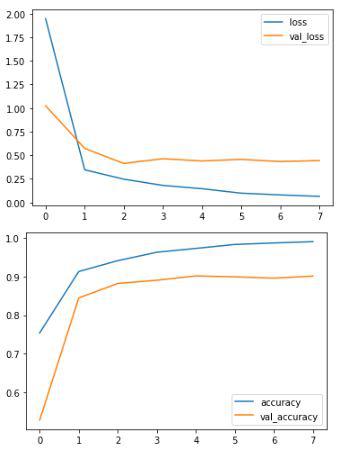
👁 Training progressVisualize the training progress and evaluate the model’s performance.
Output:
👁 Graph of loss and accuracy epoch by epochTest Accuracy
Output:
75/75 ━━━━━━━━━━━━━━━━━━━━ 1s 12ms/step - accuracy: 0.9182 - loss: 0.446
Validation Accuracy: 0.91
The trained model achieves 90% accuracy on the validation set, demonstrating the effectiveness of deep learning techniques like LSTM for hate speech detection. While the model shows some overfitting, regularization techniques can be applied to improve generalization.
Get the Complete Notebook
Notebook: click here.