|
VOOZH | about |
|
VOOZH | about |
Monitoring the training process of a machine learning model is crucial for understanding its performance over time. When working with Keras, one of the most effective ways to track this is by logging the loss output to a file. This not only allows you to keep a record of the training progress but also provides valuable insights for further tuning and optimization. In this article, we'll walk through the process of logging Keras loss output to a file using the CSVLogger callback, a built-in feature in Keras.
Logging the loss output during training has several benefits:
Using CSVLogger callback in Keras we can log epoch results to a CSV file. This is most simple and easy method to keep track of the loss and other metrics during training.
from keras.callbacks import CSVLogger

csv_logger = CSVLogger('training.log', append=True)
Below is a step-by-step guide to logging Keras loss output to a file using a simple Keras model.
Start by importing the required libraries and modules:
import keras
from keras.models import Sequential
from keras.layers import Dense, Input
from keras.callbacks import CSVLogger
import numpy as np
Here, we import Keras modules to build the model, layers for defining the architecture, and CSVLogger for logging. We also use NumPy to generate some sample data for demonstration.
Next, define a simple Keras model using the Sequential API. This model consists of an input layer, two hidden dense layers with ReLU activation, and an output layer with softmax activation.
# Define a simple model
model = Sequential([
 Input(shape=(100,)),
 Dense(64, activation='relu'),
 Dense(64, activation='relu'),
 Dense(10, activation='softmax')
])

model.compile(optimizer='adam', loss='categorical_crossentropy', metrics=['accuracy'])
This model is compiled with the Adam optimizer and categorical cross-entropy as the loss function, which is common for multi-class classification tasks.
The CSVLogger callback is a built-in Keras callback that automatically logs loss, accuracy, and other metrics to a CSV file after each epoch. You can set it up as follows:
# Create CSVLogger callback
csv_logger = CSVLogger('training.log', append=True)
The append=True argument ensures that the logger appends to the file if it already exists, instead of overwriting it.
For the purpose of this demonstration, we’ll create some random sample data. In a real scenario, you would replace this with your actual dataset.
# Create sample data for demonstration (Replace with your actual data)
x_train = np.random.rand(1000, 100)
y_train = np.random.rand(1000, 10)
x_val = np.random.rand(200, 100)
y_val = np.random.rand(200, 10)
Here, x_train and y_train represent the training data and labels, while x_val and y_val represent the validation data and labels.
Now, you can train the model and use the CSVLogger to log the training process:
# Train the model
model.fit(x_train, y_train, epochs=10, validation_data=(x_val, y_val), callbacks=[csv_logger])

print("Training completed. Check 'training.log' for details.")
During training, Keras will log the loss, accuracy, validation loss, and validation accuracy after each epoch into the training.log file.
Output:
Epoch 1/10
32/32 ━━━━━━━━━━━━━━━━━━━━ 1s 9ms/step - accuracy: 0.0963 - loss: 12.9074 - val_accuracy: 0.1000 - val_loss: 20.8755
Epoch 2/10
32/32 ━━━━━━━━━━━━━━━━━━━━ 0s 3ms/step - accuracy: 0.0996 - loss: 23.6421 - val_accuracy: 0.1050 - val_loss: 38.4615
Epoch 3/10
32/32 ━━━━━━━━━━━━━━━━━━━━ 0s 3ms/step - accuracy: 0.1206 - loss: 45.8963 - val_accuracy: 0.0950 - val_loss: 67.9421
Epoch 4/10
32/32 ━━━━━━━━━━━━━━━━━━━━ 0s 3ms/step - accuracy: 0.1003 - loss: 78.6446 - val_accuracy: 0.1150 - val_loss: 120.0951
Epoch 5/10
32/32 ━━━━━━━━━━━━━━━━━━━━ 0s 3ms/step - accuracy: 0.0923 - loss: 136.6691 - val_accuracy: 0.0800 - val_loss: 181.1774
Epoch 6/10
32/32 ━━━━━━━━━━━━━━━━━━━━ 0s 2ms/step - accuracy: 0.0815 - loss: 196.4902 - val_accuracy: 0.1000 - val_loss: 238.5413
Epoch 7/10
32/32 ━━━━━━━━━━━━━━━━━━━━ 0s 3ms/step - accuracy: 0.0923 - loss: 245.0914 - val_accuracy: 0.0900 - val_loss: 270.6060
Epoch 8/10
32/32 ━━━━━━━━━━━━━━━━━━━━ 0s 3ms/step - accuracy: 0.1010 - loss: 285.1187 - val_accuracy: 0.1000 - val_loss: 305.6728
Epoch 9/10
32/32 ━━━━━━━━━━━━━━━━━━━━ 0s 3ms/step - accuracy: 0.1091 - loss: 307.4221 - val_accuracy: 0.1000 - val_loss: 314.3473
Epoch 10/10
32/32 ━━━━━━━━━━━━━━━━━━━━ 0s 3ms/step - accuracy: 0.0955 - loss: 305.7090 - val_accuracy: 0.0750 - val_loss: 260.9680
Training completed. Check 'training.log' for details.
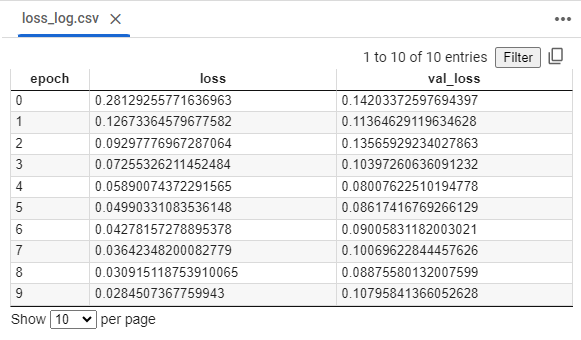
After the training is complete, you can open the training.log file to review the logged data. The file will contain records similar to the following:
Each row corresponds to an epoch, showing the accuracy, loss, validation accuracy, and validation loss.
Logging Keras loss output to a file is a straightforward process using the CSVLogger callback. This method provides a simple yet powerful way to monitor and analyze your model's performance throughout the training process. By logging the loss and other metrics, you can keep a detailed record of your experiments, making it easier to diagnose issues, optimize your model, and document your findings.
Whether you are working on a simple model or a complex deep learning architecture, keeping track of the loss output is essential for successful model development.