Implementing Custom Layers and Activation Functions in TensorFlow
Last Updated : 6 Aug, 2025
TensorFlow is a flexible deep learning framework that supports both predefined and user defined components. While standard layers and activation functions work well for many tasks some projects require more control or experimentation. In such cases custom layers and custom activation functions can be implemented to create tailored architectures, inject domain specific logic or explore novel ideas in research. TensorFlow’s tf.keras API makes this process easy by allowing developers to define new behavior using simple Python classes and functions.
Custom Layers
Custom layers in TensorFlow allow developers to build new types of neural network components when standard layers like Dense or Conv2D are not sufficient.
By subclassing tf.keras.layers.Layer you can define your own forward logic, create trainable weights and integrate specialized computations into your models.
This is particularly useful for experimenting with novel architectures, applying domain specific operations or combining multiple functions within a reusable module.
Custom layers are flexible and easy to integrate into Sequential or functional models and important for advanced deep learning tasks and research.
Activation Functions
Activation functions in TensorFlow are important components of neural networks that introduce non linearity, enabling models to learn complex patterns in data.
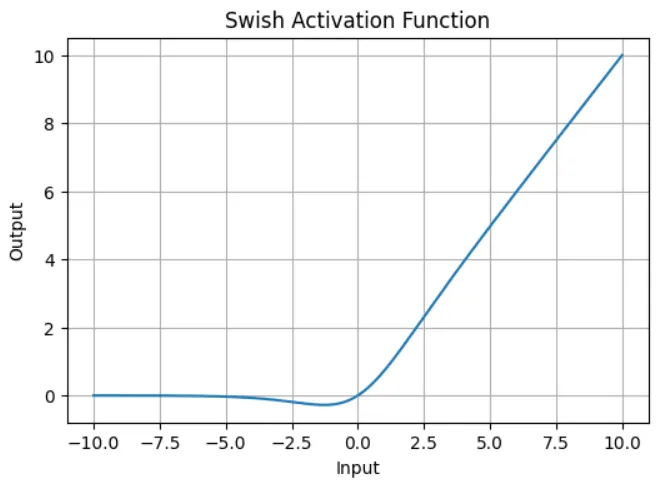
While TensorFlow provides many built in activation functions like ReLU, Sigmoid and Tanh it also supports custom activations for advanced use cases.
A custom activation function can be created using a simple Python function or by subclassing tf.keras.layers.Layer if more control is needed.
These functions are applied to layer outputs and play important role in model performance specially when designing novel architectures or experimenting in research.
Implementation
Step 1: Install Necessary Libraries
This code imports required libraries for building a machine learning model using TensorFlow and scikit-learn. tensorflow is used for creating and training neural networks.
pandas and numpy handle data manipulation and numerical operations and train_test_split is used to split data into training and test sets while StandardScaler normalizes the features to improve model performance.
Step 2: Load Dataset
This code loads the credit card dataset and separates features from the target.
It then applies StandardScaler to normalize the features for better model training.
Finally it splits the data into training and testing sets using an 80/20 split to evaluate the model’s performance on unseen data.
This code builds a neural network model using tf.keras.Sequential with a custom architecture.
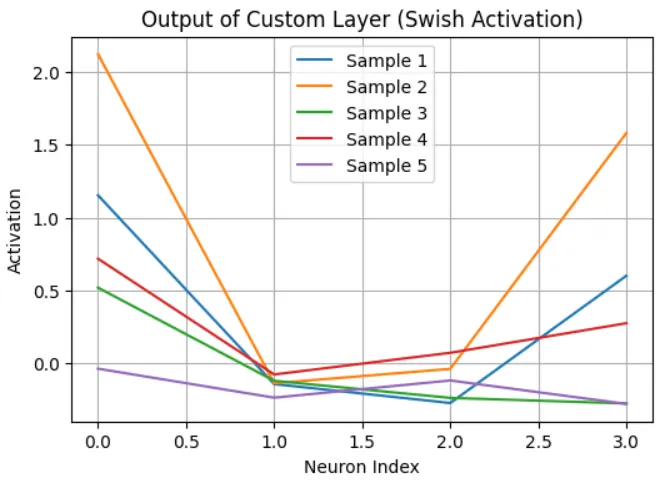
It starts with an input layer matching the feature size, followed by two CustomDense layers with Swish activation, a dropout layer to prevent overfitting and ends with a sigmoid activated output layer for binary classification.
The model is compiled using the Adam optimizer, binary crossentropy loss and accuracy as the evaluation metric.
Step 6: Train the Model
This line trains the compiled neural network model on the training data for 20 epochs using mini batches of size 32.
It also reserves 10% of the training data for validation during training to monitor performance and detect overfitting.
Step 7: Evaluate the Model
This code evaluates the trained model on the test set and prints the final accuracy.
model.evaluate() returns the loss and accuracy on unseen data giving a clear measure of how well the model generalizes beyond the training data.
Advanced Research and Experimentation: Allows researchers to prototype novel architectures and compare their effects on training. Useful for Kaggle competitions where slight performance gains matter.
Domain Specific Modeling: Tailoring models for financial time series, medical imaging or natural language tasks with domain aware transformations. Custom layers can encode physics or biology specific constraints.
AutoML: Supports testing unconventional or dynamic architectures not available in standard layers like learning hidden units with attention based activation or position aware filtering.
Model Optimization: Create layers that reduce memory/compute cost. Custom activation functions like hard sigmoid help optimize mobile deployment.