A pooling layer is used to reduce the spatial dimensions (width and height) of feature maps while keeping the most important information.
Reduces size of feature maps (downsampling) Applies a small filter over each region of the feature map Summarizes values within the region (e.g., max or average) Helps reduce computation and control overfitting Output Size Formula for Pooling Layer For a feature map with dimensions , the dimensions of the output after a pooling layer are:
Where:
: input height : input width : number of channels : filter size : stride length With Padding (if used):
Example Input: 4 × 4 feature map, filter = 2, stride = 2
Output becomes 2 × 2, channels remain same.
Importance of Pooling Layers Pooling layers play a key role in making CNNs efficient and robust by simplifying feature maps while preserving important information.
Reduces dimensions, leading to faster computation and fewer parameters Provides translation invariance, so small shifts do not affect output Helps control overfitting and improves generalization Focuses on important features and supports hierarchical learning Example: A slightly shifted object (such as a cat) is still recognized Types of Pooling Layers 1. Max Pooling Max pooling selects the maximum value from each region of the feature map, capturing the most prominent features.
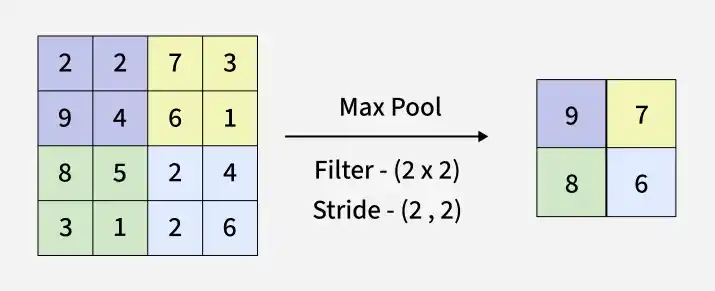
Selects the maximum value from each filter region Retains important features like edges and textures Reduces spatial dimensions of the feature map Commonly used due to strong performance in practice 👁 max_pooling_layer Working of Max Pooling Max Pooling in Keras:
Output:
[[6 9] [5 8]]
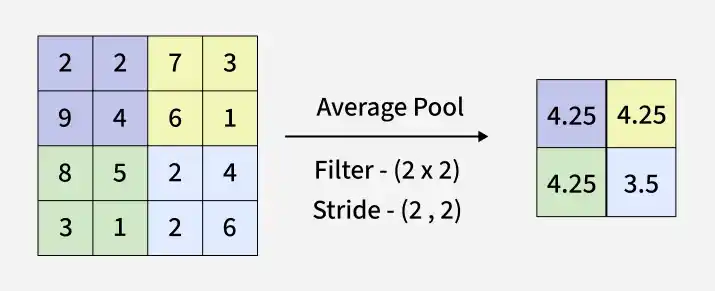
2. Average Pooling Average pooling computes the mean value of elements within each region of the feature map, capturing overall feature information.
Calculates the average value from each filter region Represents overall features rather than the strongest ones Reduces spatial dimensions of the feature map Produces smoother feature maps compared to max pooling 👁 avg_pooling_layer Working of Average Pooling Average Pooling using Keras :
Output:
[[3.75 4.75] [3.5 5.75]]
3. Global Pooling Global pooling reduces each channel of a feature map to a single value, resulting in a output. This is equivalent to applying a filter of size . There are two types of global pooling:
Global Max Pooling : Takes the maximum value across the entire feature map. Global Average Pooling : Computes the average of all values in the feature map. Global Pooling using Keras:
Output:
Global Max Pooling Output: [[9]] Global Average Pooling Output: [[4.4375]]
You can download the source code from here .
Working of Pooling Layers Pooling layers reduce the size of feature maps by summarizing information within small regions.
Define a pooling window (e.g., 2×2) and stride Slide the window across the input feature map Apply operation (max or average) to each region Produce a smaller, downsampled feature map Key Hyperparameters Filter Size (f): Larger = more compression Stride (s): Larger = faster reduction Padding: Ensures edge coverage Advantages Reduces dimensionality, lowering computation and helping prevent overfitting Provides translation invariance, so small shifts do not affect detection Retains important features (max pooling) or captures overall context (average pooling) Limitations Causes information loss due to reduced spatial resolution May lead to over-smoothing of important features Requires careful tuning of filter size and stride