|
VOOZH | about |
|
VOOZH | about |
Full Stack Development is a crucial aspect of modern web applications, involving both frontend and backend technologies to build dynamic, scalable, and high-performance applications. Skilled Full Stack Developers proficient in HTML, CSS, JavaScript, React, Node.js, Express, MongoDB, Spring Boot, Django, and Git are in high demand, with companies offering competitive salaries for their expertise.
In this article, we’ve compiled the Top 200+ Full Stack Developer Interview Questions and Answers – 2025, covering essential topics across frontend, backend, databases, and APIs. Whether you're a beginner or a professional with 2-10 years of experience, these questions will help you confidently ace your Full Stack Developer Interview.
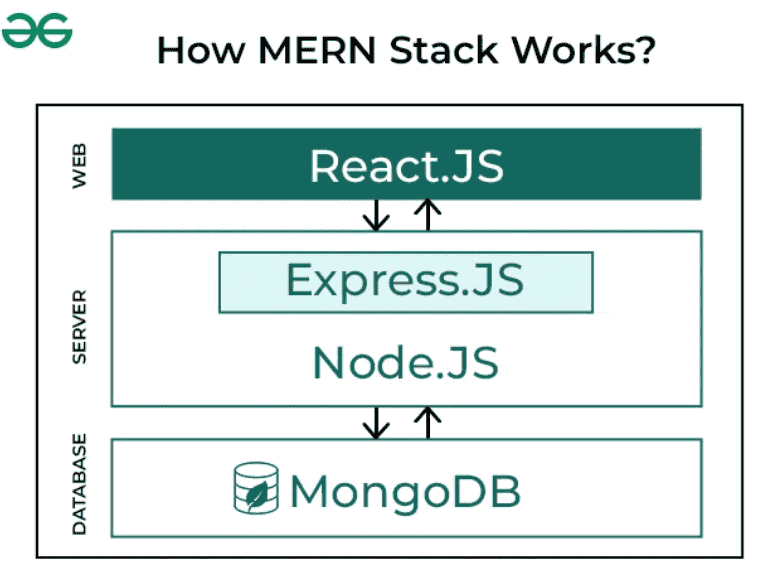
MERN Stack is a JavaScript Stack that is used for easier and faster deployment of full-stack web applications. MERN Stack comprises of 4 technologies namely: MongoDB, Express, React and NodeJS. It is designed to make the development process smoother and easier.
The MERN stack is a popular JavaScript-based web development framework for building modern web applications. It consists of four key technologies working together:
DNS is a hierarchical and distributed naming system that translates domain names into IP addresses. When you type a domain name like www.geeksforgeeks.org into your browser, DNS ensures that the request reaches the correct server by resolving the domain to its corresponding IP address.
Without DNS, we’d have to remember the numerical IP address of every website we want to visit, which is highly impractical. DNS simplifies the process by allowing us to use user-friendly names while still maintaining the performance and scalability required for modern internet operations.
www.geeksforgeeks.org) into your web browser.www.geeksforgeeks.org but knows which Top-Level Domain (TLD) server to query based on the domain’s extension (e.g., .org)..org directs the resolver to the authoritative DNS server for geeksforgeeks.org.geeksforgeeks.org, including the IP address of the website’s server. It sends this IP address back to the resolver.HTTP | HTTPS |
HTTP stands for HyperText Transfer Protocol. In HTTP, the URL begins with “http://”. | HTTPS stands for HyperText Transfer Protocol Secure. In HTTPS, the URL starts with “https://”. |
HTTP uses port number 80 for communication. | HTTPS uses port number 443 for communication. |
Hyper-text exchanged using HTTP goes as plain text i.e. anyone between the browser and server can read it relatively easily if one intercepts this exchange of data and due to which it is Insecure. | HTTPS is considered to be secure but at the cost of processing time because Web Server and Web Browser need to exchange encryption keys using Certificates before actual data can be transferred. |
HTTP does not use encryption, which results in low security in comparison to HTTPS. | HTTPS uses Encryption which results in better security than HTTP. |
HTTP speed is faster than HTTPS. | HTTPS speed is slower than HTTP. |
Before HTML5 | HTML5 |
|---|---|
| It didn’t support audio and video without the use of Flash player support. | It supports audio and video controls with the use of <audio> and <video> tags. |
| It uses cookies to store temporary data. | It aded Local Storage and Session Storage |
| Does not allow JavaScript to run in the browser. | Allows JavaScript to run in the background. This is possible due to JS Web worker API in HTML5. |
| Vector graphics are possible in HTML with the help of various technologies such as VML, Silver-light, Flash, etc. | Vector graphics is additionally an integral part of HTML5 like SVG and canvas. |
| It does not allow drag-and-drop effects. | It allows drag-and-drop effects and support target blank attribute. |
HTML | XHTML |
|---|---|
| HTML stands for Hypertext Markup Language. | XHTML stands for Extensible Hypertext Markup Language. |
| It was developed by Tim Berners-Lee. | It was developed by W3C i.e.lowercase World Wide Web Consortium. |
| It was developed in 1991. | It was released in 2000. |
| It is extended from SGML. | It is extended from XML and HTML. |
| The format is a document file format. | The format is a markup language. |
| All tags and attributes are not necessarily to be in lower or upper case. | In this, every tag and attribute should be in lower case. |
The client-side and server-side refer to two distinct parts of a web application that work together to deliver functionality to users. Understanding their roles is essential for building efficient and responsive applications.
fetch() or axios without a full page reload.CORS refers to cross-origin resource sharing. It's a browser mechanism that allows web pages in one domain to have controlled access to resources in other domains (cross-domain requests). This allows scripts that are run on a browser client to interact with and access resources from other origins. In doing so, it extends and provides greater flexibility to the SOP (Same-Origin Policy). Same-origin policies restrict the ability of a website to access resources outside of its source domain. For example, a JavaScript app that wants to make a call to an API (Application Programming Interface) that runs on another domain will be blocked due to the SOP. A CORS policy was implemented to circumvent restrictions caused by same-origin policies.
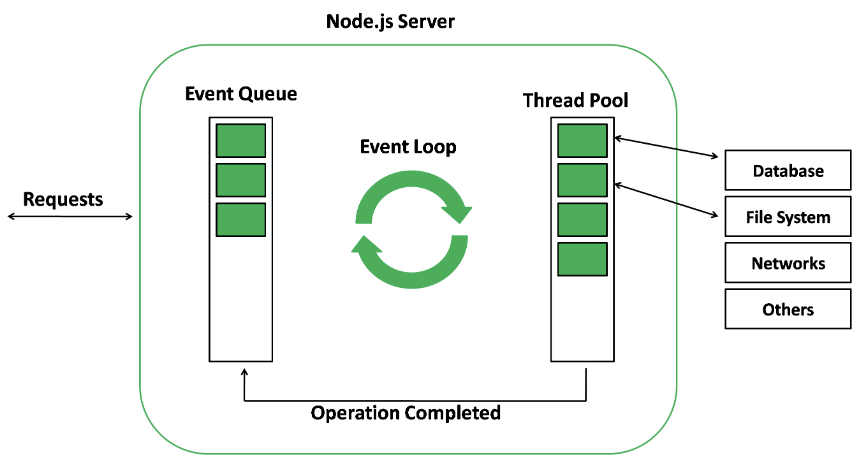
The event loop in Node.js is a mechanism that allows asynchronous tasks to be handled efficiently without blocking the execution of other operations. It:
Therefore, when an async function (or an I/O) needs to be executed, the main thread relays it to another thread, allowing v8 (Javascript engine) to continue processing or running its code. In the event loop, there are different phases, like pending callbacks, closing callbacks, timers, idle or preparing, polling, and checking, with different FIFO (First-In-First-Out) queues.
Callback functions are functions that can be passed to another function as arguments and executed there to complete a routine or action. Those functions depend on one another, so it could get quite messy with so many callback functions nested in so many layers. This is what is referred to as callback hell.
As an alternative to callbacks in JavaScript, promises are used to handle asynchronous operations. In addition to handling multiple asynchronous operations, they provide better error handling than callbacks. Promises can be a better way for a user to read the code effectively and efficiently, especially when that particular code performs multiple asynchronous operations. The Promise object represents the result of an asynchronous operation (or its failure) and the resulting value. The promise is in one of the following states:
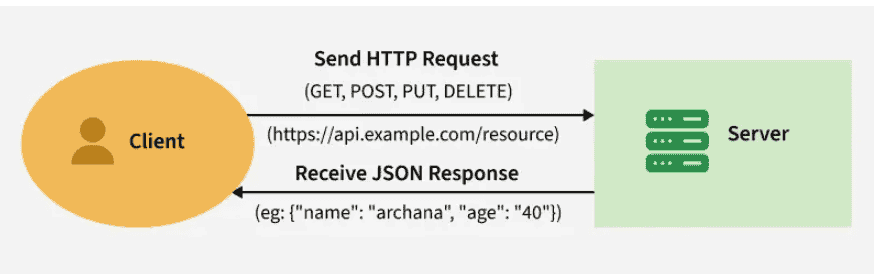
REST API stands for REpresentational State Transfer API. It is a type of API (Application Programming Interface) that allows communication between different systems over the internet. REST APIs work by sending requests and receiving responses, typically in JSON format, between the client and server.
REST APIs use HTTP methods (such as GET, POST, PUT, DELETE) to define actions that can be performed on resources. These methods align with CRUD (Create, Read, Update, Delete) operations, which are used to manipulate resources over the web.
A request is sent from the client to the server via a web URL, using one of the HTTP methods. The server then responds with the requested resource, which could be HTML, XML, Image, or JSON, with JSON being the most commonly used format for modern web services.
GET and POST are two different HTTP request methods.
Features | GET | POST |
|---|---|---|
Purpose | Retrieve (read) data from the serve | Send (create or submit) data to the server |
Request Body | No request body; all data is in the URL query string (after | Can include a request body (JSON, form-data, XML, etc.) |
Idempotency | Idempotent—multiple identical GETs have no side effects (safe reads) | Non-idempotent—submitting twice may create duplicates or side-effects |
Caching | Responses are cacheable by default (unless headers say otherwise) | Not cacheable by default (unless explicitly allowed) |
Use Cases | - Fetching pages, images, data | - Submitting forms (login, registration) |
Features | PUT | PATCH |
|---|---|---|
Purpose | Used to update or replace an entire resource. | Used to apply partial modifications to a resource. |
Data Handling | Requires the client to send the complete resource representation. | Requires only the changes (delta) to be sent, not the entire resource. |
Error Handling | If the resource doesn’t exist, it may create a new one (depending on implementation). | Typically used only for existing resources; may fail if the resource doesn’t exist. |
Performance | It can be less efficient for large resources, as the entire resource is sent. | More efficient for small changes, as only the necessary data is sent. |
Request Body | Contains the full resource representation. | Contains only the fields or data to be updated. |
Use Case | Best for replacing a resource entirely (e.g., updating a user profile). | Best for making small updates (e.g., changing a user's email address). |
Example | PUT /users/1 with full user data updates the entire user resource. | PATCH /users/1 with { "email": "new@example.com" } updates only the email. |
The propagation of events inside the DOM (Document Object Model) is known as 'Event Flow' in JavaScript. The event flow defines the order or sequence in which a particular web page receives an event. Accordingly, event flow (propagation) in JS is dependent on the following aspects:
The following diagram will help you to understand the event propagation life cycle.
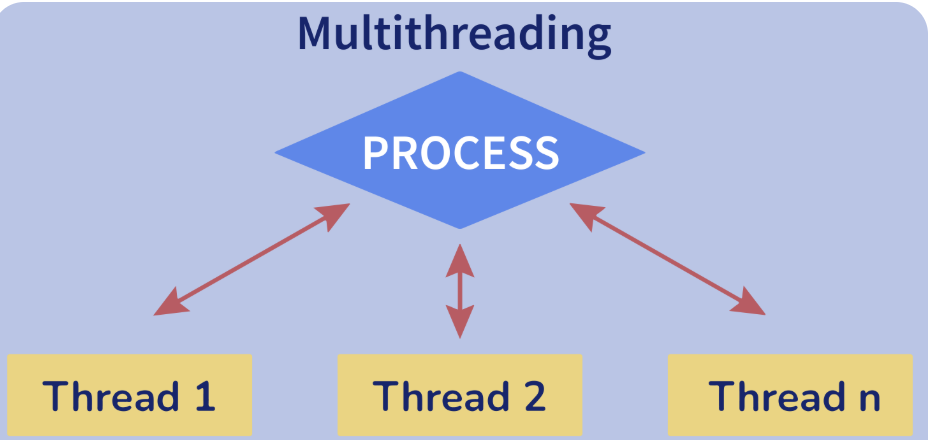
The thread is an independent part or unit of a process (or an application) that is being executed. Whenever multiple threads execute in a process at the same time, we call this "multithreading". You can think of it as a way for an application to multitask.
Advantages:
==: Compares values with each other directly, performing type conversion if required first (example: '5' == 5 → true).===: This operator strictly compares values and types with each other. There is no type conversion performed with this operator. For example, if you try to compare a string and a number, the result will always be false, no matter what: '5' === 5 → false.Relational Database | Non-Relational Database |
It is used to handle data coming in low velocity. | It is used to handle data coming in high velocity. |
It gives only read scalability. | It gives both read and write scalability. |
It manages structured data. | It manages all type of data. |
Data arrives from one or few locations. | Data arrives from many locations. |
It supports complex transactions. | It supports simple transactions. |
It has single point of failure. | No single point of failure. |
It handles data in less volume. | It handles data in high volume. |
support ACID properties compliance | doesn't support ACID properties |
Deployed in vertical fashion. | Deployed in Horizontal fashion. |
There are many ways to handle authentication, from simple auth, all the way to oAuth. The right option depends on your particular business needs.
A classical example is using JWT for authenticating a website with a RESTful API using the following process:
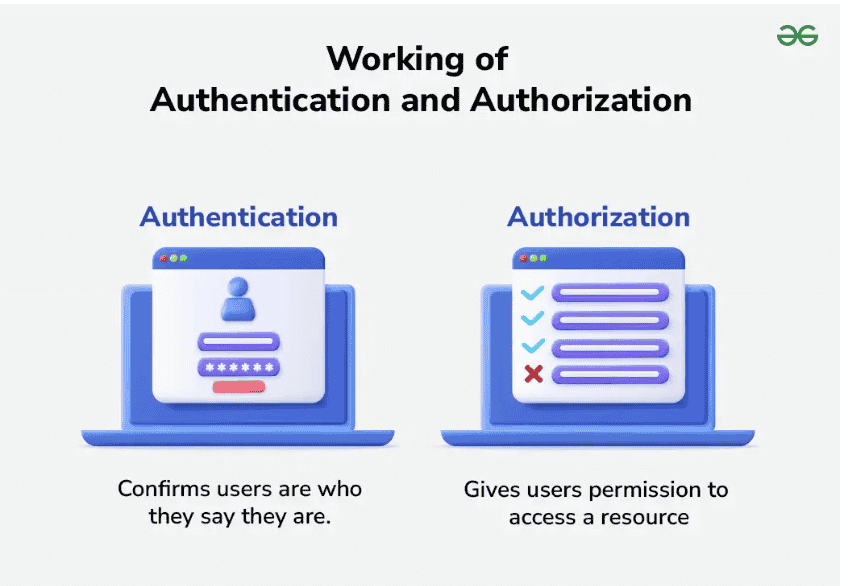
Authentication | Authorization |
In the authentication process, the identity of users are checked for providing the access to the system. | While in authorization process, a the person's or user's authorities are checked for accessing the resources. |
n the authentication process, users or persons are verified. | While in this process, users or persons are validated. |
It is done before the authorization process. | While this process is done after the authentication process. |
It needs usually the user's login details. | While it needs the user's privilege or security levels. |
Authentication determines whether the person is user or not. | While it determines What permission does the user have? |
Generally, transmit information through an ID Token. | Generally, transmit information through an Access Token. |
The user authentication is visible at user end. | The user authorization is not visible at the user end. |
Example: Employees in a company are required to authenticate through the network before accessing their company email. | Example: After an employee successfully authenticates, the system determines what information the employees are allowed to access. |
The package.json file in a Node.js project has multiple uses. It defines the project's metadata, like its name, version, and description. It also lists the dependencies and devDependencies required to run or develop the application, as well as scripts for tasks like building, testing, or running the app (and any custom script you’d like to add).
Finally, it ensures reproducible installations by allowing the npm install command to pull consistent dependencies, ensuring you can easily port your project into other systems.
Callback Hell, or Pyramid of Doom, is a common anti-pattern seen in asynchronous programming code (multiple functions running at the same time). This slang term describes a large number of nested "if" statements or functions. In simple terms, Callback hell is a situation where you have multiple asynchronous functions. Those functions depend on one another, so it could get quite messy with so many callback functions nested in so many layers. The use of callback functions leaves you with code that is difficult to read and maintain, and looks like a pyramid as shown below:
This also makes it more difficult to identify the flow of the application, which is the main obstacle to debugging, which is the reason for the famous name of this problem: Callback Hell.
Normalization | Denormalization |
Normalization involves removing redundant data (multiple copies of data) from a database and storing consistent, non-redundant data. | It involves combining data from multiple tables into a single so that it can be queried quickly. |
It primarily focuses on clearing out unused data and reducing duplicate data and inconsistencies from a database. | On the other hand, denormalization aims to achieve faster query execution by adding data redundancy. |
During normalization, tables are reduced in number due to the reduction of data in the database. | Denormalization, on the other hand, involves integrating data into the same database and therefore the number of tables to store the data increases. |
Data integrity is maintained by normalization. A change to the data in the table will not impact its relationship with the other table. | Data integrity is not maintained by denormalization. |
It optimizes the use of disk space. | It does not optimize disk space. |
Before ES6, variable declarations were only possible using var. With ES6, we got let and const. Both let and const declarations are block-scoped, i.e., they can only be accessed within the " { } " surrounding them. On the other hand, var doesn't have such a restriction. Unlike var, which can be accessed before its declaration, you cannot access the let or const variables until they are initialized with some value. Temporal Dead Zone is the time from the beginning of the execution of a block in which let or const variables are declared until these variables are initialized. If anyone tries to access those variables during that zone, Javascript will always throw a reference error as given below.
Both let and const variables are in the TDZ from the moment their enclosing scope starts to the moment they are declared.
Purpose: Version control tracks changes in code, enables collaboration, and allows reverting to previous versions.
Git Workflow Example:
git clone <repo_url>.git checkout -b feature-branch.git add ..git commit -m "Add feature".git push origin feature-branch.WebSockets: A protocol for full-duplex communication between client and server over a single persistent connection.
Difference:
Example:
MVC is a design pattern for organizing code in three layers:
Flow:
Assertions: Use the Tests tab to write scripts (JavaScript) for automated validation of responses.
Example:
pm.test("Status is 200", () => {pm.response.to.have.status(200);});
A doctype or document-type declaration is an instruction that tells the web browser about the markup language in which the current page is written. The doctype is not an element or tag, it lets the browser know about the version of or standard of HTML or any other markup language that is being used in the document. The DOCTYPE for HTML5 is case-insensitive and can be written as shown below.
<!DOCTYPE html>Syntax
<b> </b> Syntax
<b>This is the content.</b>There are 6 levels of headings defined by HTML. These six heading elements are H1, H2, H3, H4, H5, and H6; with H1 being at the highest level and H6 at the least.
Importance of Heading
One can use the anchor tag to redirect to a particular section on the same page. You need to add “id attribute” to the section that you want to show and use the same id in href attribute with “#” in the anchor tag. So that On click a particular link, you will be redirected to the section that has the same id mentioned in the anchor tag.
Syntax
<a href="#home_section">home</a><section id="home_section"> Information About Page</section>Example
An attribute is used to provide extra or additional information about an element.
Syntax
<strong> Contents... </strong>Syntax
<b> Contents... </b>The main difference between the <bold> tag & <strong> tag is that the strong tag semantically emphasizes the important word or section of words while the bold tag is just offset text conventionally styled in bold. Click Here to know more.
Syntax
<i> Content... </i>Syntax
<em> Content... </em>By default, the visual result is the same but the main difference between these two tags is that the <em> tag semantically emphasizes the important word or section of words while the <i> tag is just offset text conventionally styled in italic to show alternative mood or voice. Click Here to know the difference between them.
The comment tag (<!– Comment –>) is used to insert comments in the HTML code.
Types of HTML Comments: There are two types of comments in HTML which are
Feature | Block Elements | Inline Elements |
|---|---|---|
Display | Takes up the full width available | Takes up only the necessary width |
Line Break | Starts on a new line | Stays in the same line with other elements |
Common Examples | <div>, <p>, <h1> to <h6>, <section> | <span>, <a>, <strong>, <em> |
Usage | Used for structuring content (like paragraphs, sections) | Used for styling or linking small parts of text |
Both the tags (<div> and <span>) are used to represent the part of the web page. The <div> tag is used as the block component, and the <span> tag is used as an inline component.
<div> A Computer Science Portal for Geeks <span> GeeksforGeeks <span></div><div> tag | <span> tag |
|---|---|
The <div> tag is a block level element. | The <span> tag is an inline element. |
It is best to attach it to a section of a web page. | It is best to attach CSS to a small section of a line on a web page. |
It accepts align attribute. | It does not accept aligned attributes. |
This tag should be used to wrap a section, for highlighting that section. | This tag should be used to wrap any specific word that you want to highlight on your webpage. |
Syntax
<element id="id_name">In CSS Stylesheet#id_name { // CSS Property}Syntax
<element class="class_name>In CSS Stylesheet.class { // CSS Property}The <meta> tag in HTML provides information about HTML Document or in simple words, it provides important information about a document. These tags are basically used to add name/value pairs to describe properties of HTML documents, such as expiry date, author name, list of keywords, document author, etc.
Syntax
<meta attribute-name="value">Key Points
Cascading Style Sheets fondly referred to as CSS, is a simply designed language intended to simplify the process of making web pages presentable. CSS allows you to apply styles to web pages. More importantly, CSS enables you to do this independent of the HTML that makes up each web page. CSS is easy to learn and understood, but it provides powerful control over the presentation of an HTML document.
We use CSS because of the following reasons
CSS | CSS3 |
|---|---|
| CSS is capable of positioning texts and objects. CSS is somehow backward compatible with CSS3. | On the other hand, CSS3 is capable of making the web page more attractive and takes less time to create. If you write CSS3 code in CSS, it will be invalid. |
| Responsive designing is not supported in CSS | CSS3 is the latest version, hence it supports responsive design. |
| CSS cannot be split into modules. | Whereas, whereas CSS3 can be breakdown into modules. |
| Using CSS, we cannot build 3D animation and transformation. | But in CSS3 we can perform all kinds of animation and transformations as it supports animation and 3D transformations. |
| CSS is very slow as compared to CSS3 | Whereas, CSS3 is faster than CSS. |
A CSS style rule consists of a selector, property, and its value. The selector points to the HTML element where CSS style is to be applied. The CSS property is separated by semicolons.
Syntax
selector {
 Property: value;
}
Cascading Style Sheet(CSS) is used to set the style in web pages that contain HTML elements. It sets the background color, font size, font family, color, … etc properties of elements on a web page.
There are three types of CSS which are given below:
Comments are the statements in your code that are ignored by the compiler and are not executed. Comments are used to explain the code. They make the program more readable and understandable.
Syntax
/* content */
Comments can be single-line or multi-line.
RGBA contains A (Alpha) which specifies the transparency of elements. The value of alpha lies between 0.0 to 1.0 where 0.0. represents fully transparent and 1.0 represents not transparent.
Syntax
h1 {
 color:rgba(R, G, B, A);
}
HSL: HSL stands for Hue, Saturation, and Lightness respectively. This format uses the cylindrical coordinate system.
Syntax
h1 {
 color:hsl(H, S, L);
}
Example
CSS border properties allow us to set the style, color, and width of the border.
JavaScript data types are categorized into two parts i.e. primitive and non-primitive types.
Comments prevent the execution of statements. Comments are ignored while the compiler executes the code. There are two type of symbols to represent comments in JavaScript:
// Single line comment/*
Multi-line comments
. . .
*/
Output:
57Here, 3 and 2 behave like an integer, and “7” behaves like a string. So 3 plus 2 will be 5. Then the output will be 5+”7″ = 57.
The number isNan function determines whether the passed value is NaN (Not a number) and is of the type “Number”. In JavaScript, the value NaN is considered a type of number. It returns true if the argument is not a number, else it returns false.
JavaScript is faster compared to ASP Script. JavaScript is a client-side scripting language and does not depend on the server to execute. The ASP script is a server-side scripting language always dependable on the server.
The negative infinity is a constant value represents the lowest available value. It means that no other number is lesser than this value. It can be generate using a self-made function or by an arithmetic operation. JavaScript shows the NEGATIVE_INFINITY value as -Infinity.
Yes, it is possible to break the JavaScript code into several lines in a string statement. It can be broken by using the ‘\n’ (backslash n).
For example
console.log("A Online Computer Science Portal\n for Geeks")The code-breaking line is avoid by JavaScript which is not preferable.
let gfg= 10, GFG = 5,
Geeks =
gfg + GFG;
Netscape developed JavaScript and was created by Brenden Eich in the year of 1995.
In contrast, global variables are the variables that define outside of functions. These variables have a global scope, so they can be used by any function without passing them to the function as parameters.
Example:
Inside myFunction - Type of petName: string
Inside myFunction - petName: Kaalingas
Outside myFunction - Type of petName: string
Outside myFunction - petName: Kaalingas
It is difficult to debug and test the code that relies on global variables.
The NULL value represents that no value or no object. It is known as empty value/object.
The delete keyword deletes the whole property and all the values at once like
let gfg={Course: "DSA", Duration:30};
delete gfg.Course;
The prompt box is a dialog box with an optional message prompting the user to input some text. It is often used if the user wants to input a value before entering a page. It returns a string containing the text entered by the user, or null.
Functions in JavaScript are essential objects. Like objects, it can be assign to variables, pass to other functions, and return from functions. And much like objects, they have their own properties. ‘this’ stores the current execution context of the JavaScript program. Thus, when it use inside a function, the value of ‘this’ will change depending on how the function is defined, how it is invoked, and the default execution context.
The timer executes some specific code at a specific time or any small amount of code in repetition to do that you need to use the functions setTimout, setInterval, and clearInterval. If the JavaScript code sets the timer to 2 minutes and when the times are up then the page displays an alert message “times up”. The setTimeout() method calls a function or evaluates an expression after a specified number of milliseconds.
ReactJS is a JavaScript library used to build reusable components for the view layer in MVC architecture. It is highly efficient and uses a virtual DOM to render components. It works on the client side and is written in JSX.
Important Features of React
The Model-View-Controller (MVC) framework is an architectural/design pattern that separates an application into three main logical components Model, View, and Controller. Each architectural component is built to handle specific development aspects of an application. It isolates the business, logic, and presentation layer from each other
The five main building blocks of React are
The Virtual DOM in React is an in-memory representation of the actual DOM. It helps React efficiently update and render the user interface by comparing the current and previous virtual DOM states using a process called diffing.
How Virtual DOM Works
JSX is basically a syntax extension of regular JavaScript and is used to create React elements. These elements are then rendered to the React DOM. All the React components are written in JSX. To embed any JavaScript expression in a piece of code written in JSX we will have to wrap that expression in curly braces {}.
Example of JSX: The name written in curly braces { } signifies JSX
A Component is one of the core building blocks of React. In other words, we can say that every application you will develop in React will be made up of pieces called components. Components make the task of building UIs much easier.
In React, we mainly have two types of components
In general, browsers are not capable of reading JSX and only can read pure JavaScript. The web browsers read JSX with the help of a transpiler. Transpilers are used to convert JSX into JavaScript. The transpiler used is called Babel.
To install React, first, make sure Node is installed on your computer. After installing Node. Open the terminal and type the following command.
npx create-react-app <<Application_Name>>Navigate to the folder.
cd <<Application_Name>>This is the first code of ReactJS Hello World!
Type the following command to run the application
npm startTo create an event in React, attach an event handler like onClick, onChange, etc., to a JSX element. Define the handler function to specify the action when the event is triggered, such as updating state or executing logic.
Lists are very useful when it comes to developing the UI of any website. Lists are mainly used for displaying menus on a website, for example, the navbar menu. To create a list in React use the map method of array as follows.
A “key” is a special string attribute you need to include when creating lists of elements in React. Keys are used in React to identify which items in the list are changed, updated, or deleted. In other words, we can say that keys are used to give an identity to the elements in the lists.
BSON (Binary JSON) is a binary-encoded serialization format used by MongoDB to store documents. BSON extends JSON by adding support for data types such as dates and binary data and it is designed to be efficient in both storage space and scan speed. The binary format allows MongoDB to be more efficient with data retrieval and storage compared to text-based JSON.
Express is a small framework that sits on top of Node.js’s web server functionality to simplify its APIs and add helpful new features. It makes it easier to organize your application’s functionality with middleware and routing; it adds helpful utilities to Node.js’s HTTP objects; it facilitates the rendering of dynamic HTTP objects.
Express is a part of MEAN stack, a full stack JavaScript solution used in building fast, robust, and maintainable production web applications.
Express.js is a lightweight Node.js framework that gives us ability to create server-side web applications faster and smarter. The main reason for choosing Express is its simplicity, minimalism, flexibility, and scalability characteristics. It provides easy setup for middlewares and routing.
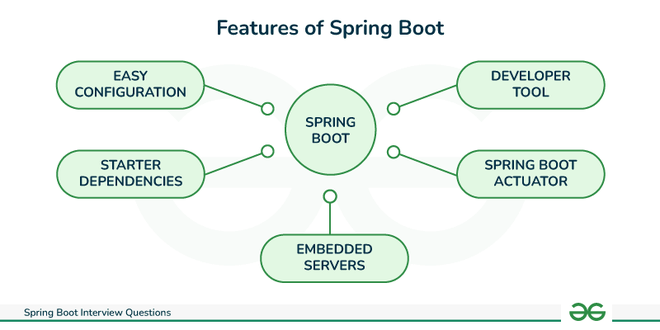
Spring Boot is built on top of the Spring framework to create stand-alone RESTful web applications with very minimal configuration and there is no need of external servers to run the application because it has embedded servers like Tomcat and Jetty etc.
There are many useful features of Spring Boot. Some of them are mentioned below
Django is a Full-stack web development framework that facilitates the creation and maintenance of high-quality Dynamic pages while also encouraging rapid development and a clean, pragmatic style. Django makes it easier to automate repeated operations, resulting in a more efficient development process with fewer lines of code.
| Flask | Django |
| Flask is a WSGI framework | Django is a Full-stack web framework |
| It allows multiple types of databases. | It doesn’t support multiple types of databases. |
| Use SQL Alchemy | Build-in ORM |
| Diversified Working Style | Monolithic Working Style |
| Arbitrary structure | Conventional Project Structure |
| It supports API | It does not have any support for API |
| It does not support Dynamic HTML pages | Django accepts Dynamic Pages. |
| It has support for Visual debug | No support for Visual Debug |
| It doesn’t offer a built-in bootstrapping tool. | Django-admin enables us to start building web applications without any external input, |
| URL dispatcher is a RESTful request. | URL dispatcher is Robust Documentation. |
Git is a (DVCS) that is used to track changes in source code during software development. It permits multiple developers to work on a project together without interrupting each other's changes. Git is especially popular for its speed, and ability to manage both small and large projects capably.
A (or repo) is like a file structure that stores all the files for a project. It continues track changes made to these files over time, helping teams work together evenly. Git can control both local repositories (on your own machine) and remote repositories (usually hosted on platforms like , , or ), allowing teamwork and backup.
The <a> tag (anchor tag) in HTML is used to create a hyperlink on the webpage. This hyperlink is used to link the webpage to other web pages. It’s either used to provide an absolute reference or a relative reference as its “href” value. Click Here to know more in detail.
Syntax
<a href = "link"> Link Name </a>Example
Output
👁 outputThe elements that only have start tags and do not contain any content within it, these elements are called Void Elements. It can only have attributes but does not contain any kind of content.
Example of such elements are <br>, <hr>, <img>, <input>, <link>, <base>, <meta>, <param>, <area>, <embed>, <col>, <track>, <source> etc.
We can accomplish this task by using the display propertyhaving its value as “block”, to change the element from inline to block-level element.
The Container tags are generally divided into three parts, i.e., the opening tag, content(which will display on the browser), and closing tag. In the content part, they can also contain some other tags. These opening and closing tags are used in pairs. For instance, <html>….</html>, <head>…</head>, <title>…</title>, <body>….</body>, etc.
Syntax
<tag_name> …</tag_name>The Empty Tags that do not contain any closing tags are known as empty tags. Empty tags contain only the opening tag but they perform some action in the webpage. For eg: <br>, <link>, <img>, <hr>, <meta>, <source> etc.
Syntax
<tag_name>Please refer to the Is container tag same as the empty tag in HTML? If not, why? article for further detail.
There are 3 ways in which we can add CSS to our HTML file, they are given below:Please refer to the Types of CSS (Cascading Style Sheet) article for more details.
It is possible to include one CSS file in another and it can be done multiple times. Also, import multiple CSS files in the main HTML file or in the main CSS file. It can be done by using the @import keyword. Click here to know more in detail.
Scripts can be placed inside the body, the head section of an HTML page, inside both head and body, or can be added externally. Please refer to the Where to put JavaScript in an HTML Document? article for more detail.
Physical and Logical tags are used in HTML for better visibility and understanding of the text by the user on the web page. However, both tags differ from each other as suggested by their names.
a) Logical Tag: This tag is used in HTML to display the text according to the logical styles. Following are the Logical tags commonly used in HTML.
b) Physical Tag: This tag is used in HTML to provide actual physical formatting to the text. Following are the Physical tags commonly used in HTML. Please refer to the Physical and Logical Tags in HTML article for further details.
The MathML comes in HTML5 the current MathML version is 3 it was introduced in the year 2015. The MathML stands for Mathematics Markup Language. It is used to represent the mathematical equation or expression in web browsers like other HTML elements. The 1st version of MathML was released in the year of 1998 and after that, the 2nd version was released.
Basically, MathML is a complex mathematical formula or equation visual representation made easy. The MathML is supported in the HTML5, all the MathML tag must be used inside the <math> and </math> tags.The MathML is used to describe mathematics as a basis for the machine to machine communication.
Creating an overlay effect simply means putting two div together at the same place but both the div appear when needed i.e while hovering or while clicking on one of the div to make the second one appear. Overlays are very clean and give the webpage a tidy look. It looks sophisticated and is simple to design. Overlays can create using two simple CSS properties:
The z-index property is used to displace elements on the z-axis i.e in or out of the screen. It is used to define the order of elements if they overlap with each other.
Syntax
z-index: auto|number|initial|inherit;The position property in CSS tells about the method of positioning for an element or an HTML entity.
The position property in CSS tells about the method of positioning for an element or an HTML entity. There are five different types of position properties available in CSS:
The positioning of an element can be done using the top, right, bottom, and left properties. These specify the distance of an HTML element from the edge of the viewport. To set the position by these four properties, we have to declare the positioning method.
Let’s talk about each of these position methods in detail:
The CSS overflow controls the big content. It tells whether to clip content or to add scroll bars. The overflow contains the following property:
Overflow-x and Overflow-y: This property specifies how to change the overflow of elements. x deals with horizontal edges and y deals with vertical edges.
Float is a CSS property written in a CSS file or directly in the style of an element. The float property defines the flow of content. Below are the types of floating properties:
| Float type | Usage |
|---|---|
| float: left | Element floats on the left side of the container |
| float: right | Element floats on the right side of the container |
| float: inherit | The element inherits the floating property of its parent (div, table, etc…) |
| float: none | Element is displayed as it is (Default). |
Inline-block uses both properties: block and inline. So, this property aligns the div inline but the difference is it can edit the height and the width of the block. Basically, this will align the div both in the block and inline fashion.
Output
This solution will work for a single line and multiple lines of text, but it still requires a fixed height container:
div {
 height: 200px;
 line-height: 200px;
 text-align: center;
 border: 2px dashed #f69c55;
}
span {
 display: inline-block;
 vertical-align: middle;
 line-height: normal;
}
div{
 GeeksforGeeks
}
Given an image and the task is to set the image to align to center (vertically and horizontally) inside a bigger div. It can be done by using the position property of the element. This example uses the position property to make the image align to the center.
Output
CSS combinators are explaining the relationship between two selectors. CSS selectors are the patterns used to select the elements for style purposes. A CSS selector can be a simple selector or a complex selector consisting of more than one selector connected using combinators.
There are four types of combinators available in CSS which are discussed below:
A Pseudo class in CSS is used to define the special state of an element. It can be combined with a CSS selector to add an effect to existing elements based on their states. For Example, changing the style of an element when the user hovers over it, or when a link is visited. All of these can be done using Pseudo Classes in CSS.
Note that pseudo-class names are not case-sensitive.
Syntax
selector: pseudo-class{
 property: value;
}
There are many Pseudo-classes in CSS but the ones which are most commonly used are as follows:
To change the style/class of an element there are two possible ways. We use document.getElementByID method
document.getElementById("myText").style.fontSize = "16px;document.getElementById("myText").className = "class";readFile( Path, Options, Callback)writeFile( Path, Data, Callback)The variable typing is the type of variable used to store a number and use that same variable to assign a “string”.
Geeks = 42;
Geeks = "GeeksforGeeks";
In JavaScript, parseInt() function is used to convert the string to an integer. This function returns an integer of base which is specified in second argument of parseInt() function. The parseInt() function returns Nan (not a number) when the string doesn’t contain number.
To detect the operating system on the client machine, one can simply use navigator.appVersion or navigator.userAgent property. The Navigator appVersion property is a read-only property and it returns the string that represents the version information of the browser.
There are three types of pop boxes available in JavaScript.
An alert box will display only one button which is the OK button. It is used to inform the user about the agreement has to agree. But a Confirmation box displays two buttons OK and cancel, where the user can decide to agree or not.
There are lots of disadvantages of using the innerHTML in JavaScript as the content will replace everywhere. If you use += like “innerHTML = innerHTML + ‘html'” still the old content is replaced by HTML. It preserves event handlers attached to any DOM elements.
The void(0) is used to call another method without refreshing the page during the calling time parameter “zero” will be passed.
Cookies are small files that are stored on a user’s computer. They are used to hold a modest amount of data specific to a particular client and website and can be accessed either by the web server or by the client’s computer. When cookies were invented, they were basically little documents containing information about you and your preferences. For instance, when you select the language in which you want to view your website, the website would save the information in a document called a cookie on your computer, and the next time when you visit the website, it would be able to read a cookie saved earlier.
To create a cookie by using JavaScript you just need to assign a string value to the document.cookie object.
document.cookie = "key1 = value1; key2 = value2; expires = date";The value of the document.cookieis used to create a cookie. Whenever you want to access the cookie you can use the string. The document.cookie string keep a list of name = value pairs separated by semicolons, where name is the name of a cookie and the value is its string value.
Deleting a cookie is much easier than creating or reading a cookie, you just need to set the expires = “past time” and make sure one thing defines the right cookie path unless few will not allow you to delete the cookie.
// Need escape character
document.write("GeeksforGeeks: A Computer Science Portal "for Geeks" ")
document.write("GeeksforGeeks: A Computer Science Portal \"for Geeks\" ")
When there are multiple components in react and we want to render components according to our preference and some conditions then we use conditional rendering. In conditional rendering, a condition is specified and if the condition is passed then this component is rendered.
Let us look at this sample code to understand conditional rendering.
{isLoggedIn == false ? <DisplayLoggedOut /> : <DisplayLoggedIn />}Here if the boolean isLoggedIn is false then DisplayLoggedOut component will be rendered otherwise DisplayLoggedIn component will be rendered.
React Router is a standard library for routing in React. It enables the navigation among views of various components in a React Application, allows changing the browser URL, and keeps the UI in sync with the URL.
To install react router type the following command.
npm i react-router-domThe main components of a react-router are
A React Component can go through four stages of its life as follows.
Mounting is the phase of the component lifecycle when the initialization of the component is completed and the component is mounted on the DOM and rendered for the first time on the webpage. he mounting phase consists of two such predefined functions as described below
We use the setState() method to change the state object. It ensures that the component has been updated and calls for re-rendering of the component. The state object of a component may contain multiple attributes and React allows using setState() function to update only a subset of those attributes as well as using multiple setState() methods to update each attribute value independently.
Refs are a function provided by React to access the DOM element and the React element that you might have created on your own. They are used in cases where we want to change the value of a child component, without making use of props and all. They have wide functionality as we can use callbacks with them.
The syntax to use ref is
const node = this.myCallRef.current;Hooks are a new addition in React 16.8. They let developers use state and other React features without writing a class. Hooks doesn’t violate any existing React concepts. Instead, Hooks provide a direct API to react concepts such as props, state, context, refs and life-cycle
The most used hook in React is the useState() hook. It allows functional components to manipulate DOM elements before each render. Using this hook we can declare a state variable inside a function but only one state variable can be declared using a single useState() hook. Whenever the useState() hook is used, the value of the state variable is changed and the new variable is stored in a new cell in the stack.
We have to import this hook in React using the following syntax
import {useState} from 'react'The useEffect hook in React eliminates the side effect of using class based components. It is used as an alternative to componentDidUpdate() method. The useEffect hook accepts two arguments where second argument is optional.
useEffect(function, dependency)The dependency decides when the component will be updated again after rendering.
when we are trying to render more than one root element we have to put the entire content inside the ‘div’ tag which is not loved by many developers. So since React 16.2 version, Fragments were introduced, and we use them instead of the extraneous ‘div’ tag. The following syntax is used to create fragment in react.
<React.Fragment>
 <h2>Child-1</h2>
 <p> Child-2</p>
</React.Fragment>
React Developer Tools is a Chrome DevTools extension for the React JavaScript library. A very useful tool, if you are working on React.js applications. This extension adds React debugging tools to the Chrome Developer Tools. It helps you to inspect and edit the React component tree that builds the page, and for each component, one can check the props, the state, hooks, etc.
Aggregation operations in MongoDB are performed using the aggregate method. This method takes an array of pipeline stages, each stage representing a step in the data processing pipeline.
Write Concern in MongoDB refers to the level of acknowledgment requested from MongoDB for write operations. It determines how many nodes must confirm the write operation before it is considered successful. Write concern levels range from "acknowledged" (default) to "unacknowledged," "journaled," and various "replica acknowledged" levels.
The importance of write concern lies in balancing between data durability and performance. Higher write concern ensures data is safely written to disk and replicated, but it may impact performance due to the added latency.
TTL (Time To Live) Indexes in MongoDB are special indexes that automatically remove documents from a collection after a certain period. They are commonly used for data that needs to expire after a specific time, such as session information, logs, or temporary data. To create a TTL index, you can specify the expiration time in seconds
createdAtdb.sessions.createIndex({ "createdAt": 1 }, { expireAfterSeconds: 3600 })This index will remove documents from the sessions collection 1 hour (3600 seconds) after the createdAt field's value.
An API (Application Programming Interface) is a set of rules and protocols that allows different software applications to communicate with each other. It defines how requests and responses should be structured, enabling seamless data exchange between systems. APIs can be RESTful, SOAP, or GraphQL-based and are commonly used in web development to connect front-end applications with back-end services, databases, or third-party platforms.
A web server is responsible for handling and delivering web content to users. It processes incoming HTTP/HTTPS requests, retrieves the requested web pages or data, and sends them back to the client’s browser. Web servers can host static websites (HTML, CSS, JavaScript files) or serve dynamic content generated by back-end languages like PHP, Node.js, or Python. Examples of web servers include Apache, Nginx, and Microsoft IIS.
A CMS (Content Management System) is a software platform that allows users to create, edit, and manage website content without requiring coding knowledge. It provides a user-friendly interface for handling text, images, videos, and other media. CMS platforms like WordPress, Joomla, and Drupal offer themes, plugins, and built-in SEO tools, making it easier to build and maintain websites efficiently.
Deployment in web development is the process of making a website or web application live on a server so users can access it online. It involves uploading files, configuring databases, and setting up hosting environments. Deployment can be done using manual methods (FTP, cPanel) or automated tools like GitHub Actions, CI/CD pipelines, and cloud services (AWS, Vercel, Netlify, Heroku) to ensure smooth updates and scalability.
A Progressive Web App (PWA) is a type of web application that combines the best features of web and mobile apps to deliver a fast, reliable, and engaging user experience. PWAs work offline, load quickly, and provide app-like functionality using technologies like Service Workers, Web App Manifests, and responsive design. They can be installed on a device without needing an app store, making them a popular choice for modern web applications.
Responsive Web Design (RWD) is an approach that ensures websites adapt to different screen sizes and devices for an optimal user experience. It uses flexible layouts, fluid grids, and CSS media queries to adjust elements like text, images, and navigation. This technique allows websites to be mobile-friendly, improving accessibility, SEO, and user engagement across desktops, tablets, and smartphones.
CORS (Cross-Origin Resource Sharing) is a security feature implemented by web browsers to control how web pages in one domain can request and interact with resources hosted on another domain. In the context of Express.js, CORS refers to a middleware that enables Cross-Origin Resource Sharing for your application. This allows the application to control which domains can access your resources by setting HTTP headers.
Express.js, includes a set of built-in middlewares that provide common functionality. These built-in middlewares are included by default when you create an Express application and can be used to handle various tasks. Here are some of the built-in middlewares in Express
In Express JS, you can configure properties using the app.set() method. This method allows you to set various properties and options which affects the behavior of the Express application.
app.set(name, value);
Here, name represents the name of the property you want to configure, and value is the value you want to assign to that property. Express provides a wide range of properties that you can configure based on your application's requirements.
Express.js can support a variety of the databases which includes:
Yes, we can create a non-web application in Spring Boot. Spring Boot is not just for web applications. Using Spring Boot, we can create applications like Microservices, Console applications, and batch applications.
The flow of HTTPS requests through a Spring Boot application is as follows:
👁 springboot---------interview---------questions@RestController annotation is like a shortcut to building RESTful services. It combines two annotations:
It enables us to Define endpoints for different HTTP methods (GET, POST, PUT, DELETE), return data in various formats (JSON, XML, etc.) and map the request parameters to method arguments.
| Features | @Controller | @RestController |
|---|---|---|
Usage | It marks a class as a controller class. | It combines two annotations i.e. @Controller and @ResponseBody. |
Application | Used for Web applications. | Used for RESTful APIs. |
Request handling and Mapping | Used with @RequestMapping annotation to map HTTP requests with methods. | Used to handle requests like GET, PUT, POST, and DELETE. |
Note: Both annotations handle requests, but @RestController prioritizes data responses for building API.
Teams can together work on distinct parts of the system and later combine their changes using pull requests. This way boosts team capability.
A Git bundle is a collective file that wraps all data from Git repository, such as commits, branches, and tags. It acts as a handy approach for relocating a repository offline or sharing upgrades when network connection is not available. To form a git bundle, perform the following command.
git bundle create <bundle_file> <refs> ORM which is also known as the object relation model enables us to interact with our database. It allows us to add, delete, change, and query objects (Object Relational Mapper). Django uses a database abstraction API called ORM to interface Viewed with its database models, to use Django object relation Models, we must first have a project and an app running. Models can be created in app/models.py after an app has been started. The Django ORM may be accessed by running the following command in our project directory.
python manage.py shellThis opens a Python console where we may add objects, retrieve objects, modify existing items, and delete objects.
superuser is the most powerful user with permission to create, read, delete, and update on the admin page which includes model records and another user. Users of Django have access to an Admin Panel. Before using this feature, you must have to migrate your project; otherwise, the superuser database will not be created. To create a superuser, first, reach the same directory, and run the following command
python manage.py createsuperuserThis task can be achieved through <marquee> tag in HTML that helps to create scrolling text or image on a webpage. It scrolls either from horizontally left to right or right to left, or vertically from top to bottom or bottom to top.
Syntax: The marquee element comes in pairs. It means that the tag has an opening and closing elements.
<marquee>
 <--- contents --->
</marquee>
A manifest file is a text file that tells the browser to cache certain files or webpages so that they can be used even in offline mode. HTML5 cache webpages by specifying manifest attribute in <html> tag. All the web pages that contain manifest attributes or are specified in the manifest file will be cached whenever a user visits that page. Manifest files are saved with the .appcache extension. It always starts with the CACHE MANIFEST keyword and contains three sections:
There are several different ways to open a hyperlink in another window or tab such as using JavaScript, jQuery, or HTML. In order to open a hyperlink in another window or tab, use the target attribute and provide it value _blank in the anchor tab. Click Here to know more in detail.
Syntax
<element target="_blank|_self|_parent|_top|framename"\>Attribute Values:
Web workers are multithreaded object which is used to execute Javascripts in the background without affecting the performance of the application or webpage. Web Workers allow for long-running scripts that are not interrupted by scripts that respond to clicks or other user interactions and allow long tasks to be executed without affecting the responsiveness of the web page. Generally, it is used for big CPU-intensive tasks.
Types of Web Workers:
Multipart Form Data: The ENCTYPE attribute of the <form> tag specifies the method of encoding for the form data. It is one of the two ways of encoding the HTML form. It is specifically used when file uploading is required in HTML form. It sends the form data to the server in multiple parts because of the large size of the file.
Syntax
<form action="login.php" method="post"
 enctype="multipart/form-data">
</form>
SVG is a type of image format which is written in XML for vector-based graphics. Every element and every attribute in SVG files can be animated. There are several ways to use SVG images in HTML, which are described below: Please refer to the How to add Scalable Vector Graphics to your web page? article for a more detailed description.
HTML5 introduced 5 most popular media element tags that are supported by the browsers, which are described below: Please refer to the What are the media element tags introduced by HTML5? article for a more detailed description.
An Event is an action or occurrence recognized by the software. It can be triggered by the user or the system. Mostly Events are used on buttons, hyperlinks, hovers, page loading, etc. All this stuff gets into action(processed) with the help of event handlers.
Syntax: Handle event in HTML :
<element onclick="myScript">Various HTML event attributes:Form Event
<element onblur="myScript"><element onchange="myScript"><element onfocus="myScript">Event:
<element onclick="myScript"><element onmouseover="myScript">Please refer to the How to Handle JavaScript Events in HTML? article for a more detailed description.
Cellpadding: Cellpadding specifies the space between the border of a table cell and its contents (i.e) it defines the whitespace between the cell edge and the content of the cell.
Syntax
<table cellpadding="value" >.....</table>
where, value determines the padding
(space between the border of a table and its content)
Cellspacing: Cellspacing specifies the space between cells (i.e) it defines the whitespace between the edges of the adjacent cells.
Syntax
<table cellspacing="value" >.....</table>
where, value determines the padding
(space between adjacent cells)
Difference between cell padding and cell spacing
Cellpadding | Cellspacing |
|---|---|
It specifies the space between the border of a table cell and its contents. | It specifies the space between adjacent cells. |
It is created by using HTML <table> tag but the type attribute is set to cell padding. | It is also created by using HTML <table> tag but the type attribute is set to cell spacing. |
It is mainly meant for a single cell. | Cellspacing can get subjected to more than one cell. |
The default cell padding value is 1 | Whereas, the default cell spacing value is 2 |
Cellpadding is widely used and considered to be an effective mean | Cellspacing is less effective than Cellpadding. |
Cellpadding is an attribute | Cellspacing is also an attribute. |
Pseudo Elements: Pseudo-element in CSS is used to add style to specified parts of an element. Example: Using style before or after an element.
Syntax:
selector::pseudo-element {
 property:value;
}
Use of Pseudo-Element: Below is some examples to describe the use of pseudo-element.
There are two types of Gradients
1. Linear Gradients: It includes the smooth color transitions to going up, down, left, right, and diagonally. A minimum of two colors are required to create a linear gradient. More than two color elements can be possible in linear gradients. The starting point and the direction are needed for the gradient effect.
Syntax:
background-image: linear-gradient(direction, color-stop1, color-stop2, ...);
2. CSS Radial Gradients: A radial gradient differs from a linear gradient. It starts at a single point and emanates outward. By default, the first color starts at the center position of the element and then fades to the end color towards the edge of the element. Fade happens at an equal rate until specified.
Syntax:
background-image: radial-gradient(shape size at position, start-color, ..., l
Yes, we can, a transformation modifies an element by its shape, size, and position. It transforms the elements along the X-axis and Y-axis.
There are six main types of 2D transformations which are listed below:
Yes, it allows changing elements using 3D transformations. In 3D transformation, the elements are rotated along the X-axis, Y-axis, and Z-axis.
There are three main types of transformation which are listed below:
Transitions in CSS allow us to control the way in which transition takes place between the two states of the element.
The transition allows us to determine how the change in color takes place. We can use the transitions to animate the changes and make the changes visually appealing to the user and hence, giving a better user experience and interactivity. In this article, we will show you how to animate the transition between the CSS properties.
There are four CSS properties that you should use, all or in part (at least two, transition-property and transition-duration, is a must), to animate the transition. All these properties must be placed along with other CSS properties of the initial state of the element:
Syntax
transition-property: none | all | property | property1,
property2, ..., propertyN;
Syntax
transition-duration: time;
Here, time can be in seconds(s) or milliseconds(ms), you should use ‘s’ or ‘ms’ after the number (without quotes).
Syntax
transition-timing-function: ease|ease-in|ease-out|ease-in-out|linear|
step-start|step-end;
Syntax
transition-delay: time;
Here, again, time can be in seconds(s) or milliseconds(ms), and you should use ‘s’ or ‘ms’ after the number (without quotes).
Syntax
transition: (property name) | (duration) | (timing function) | (delay);
CSS Animations is a technique to change the appearance and behavior of various elements in web pages. It is used to control the elements by changing their motions or display. It has two parts, one which contains the CSS properties which describe the animation of the elements and the other contains certain keyframes which indicate the animation properties of the element and the specific time intervals at which those have to occur.
The @keyframes rule: Keyframes are the foundations with the help of which CSS Animations works. They define the display of the animation at the respective stages of its whole duration. For example: In the following code, the paragraph changes its color with time. At 0% completion, it is red, at 50% completion it is of orange color and at full completion i.e. at 100%, it is brown.
Example
Output
👁 out1The box-sizing CSS property defines how the user should calculate the total width and height of an element i.e. padding and borders, are to be included or not.
Syntax
box-sizing: content-box|border-box;
Property Values
Media query is used to create a responsive web design. It means that the view of a web page differs from system to system based on screen or media types.
Media queries can be used to check many things:
A media query consist of a media type that can contain one or more expression which can be either true or false. The result of the query is true if the specified media matches the type of device the document is displayed on. If the media query is true then a style sheet is applied.
Syntax
@media not | only mediatype and (expression) {
 // Code content
}
Strict Mode is a new feature in ECMAScript 5 that allows you to place a program or a function in a “strict” operating context. This strict context prevents certain actions from being taken and throws more exceptions. The statement “use strict” instructs the browser to use the Strict mode, which is a reduced and safer feature set of JavaScript.
The DOM Input Checkbox Property is used to set or return the checked status of a checkbox field. This property is used to reflect the HTML Checked attribute.
document.getElementById("GFG").checked;If the CheckBox is checked then it returns True.
The closure is created when a child functions to keep the environment of the parent’s scope even after the parent’s function has already been executed. The Closure is a locally declared variable related to a function. The closure will provide better control over the code when using them.
Both methods are used in a different situation
This can be done by using the target attribute in the hyperlink. Like
<a href="/geeksforgeeks.htm" target="newframe">New Page</a>There are three different types of errors in JavaScript.
There are four possible ways to access HTML elements in JavaScript which are:
Consider a situation an element is present inside another element and both of them handle an event. When an event occurs in bubbling, the innermost element handles the event first, then the outer, and so on.
It is advised to use a callback-based approach to update the state using setState because it solves lots of bugs upfront that may occur in the future.We can use the following syntax to update state using callback
this.setState(st => {
 return(
 st.stateName1 = state1UpdatedValue,
 st.stateName2 = state2UpdatedValue
 )
})
React Material UI is an open-source React component library, offering prebuilt components for creating React applications. Developed by Google in 2014, it’s compatible with JavaScript frameworks like Angular.js and Vue.js. Renowned for its quality designs and easy customization, it’s favored by developers for rapid development.
Flux architecture in Redux is a design pattern used for managing application state in a unidirectional data flow. In this architecture, actions are dispatched to modify the store, which holds the entire application state. The store sends the updated state to the view (UI), and the cycle repeats when new actions are triggered. Redux follows this structure to ensure a predictable and maintainable state management system for large applications.
Journaling in MongoDB ensures data durability and crash recovery by recording changes to the data in a journal file before applying them to the database files. This mechanism allows MongoDB to recover from unexpected shutdowns or crashes by replaying the journal. While journaling provides data safety, it can impact performance due to the additional I/O operations required to write to the journal file.
Full-Text Search in MongoDB is implemented using text indexes. These indexes allow you to perform text search queries on string content within documents.
Example
db.collection.createIndex({ content: "text" });
db.collection.find({ $text: { $search: "mongodb" } });
In this example, a text index is created on the content field, and a text search query is performed to find documents containing the word "mongodb."
In Express.js, you can serve static files using the built-in express.static middleware. This middleware function takes the root directory of your static files as an argument and serves them automatically.
app.use() is used to add middleware functions in an Express application. It can be used to add global middleware functions or to add middleware functions to specific routes.
Express.js provides built-in error-handling mechanism with the help of the next() function. When an error occurs, you can pass it to the next middleware or route handler using the next() function. You can also add an error-handling middleware to your application that will be executed whenever an error occurs.
A traditional server is a server that is built and managed independently. Traditional server may provide a basic foundation for handling HTTP requests and responses. While an Express.js server is built using the Express.js framework. It runs on top of Node.js. Express.js provides a simple and efficient way to create and manage web applications. It offers a wide range of features and tools for handling routing, middleware, and request or response objects.
The next() function is used to pass control from one middleware function to the next function. It is used to execute the next middleware function in the chain. If there are no next middleware function in the chain then it will give control to router or other functions in the app. If you don't call next() in a middleware function, the request-response cycle can be terminated, and subsequent middleware functions won't be executed.
The Util module in node.js provides access to various utility functions. There are various utility modules available in the node.js module library.
We use process.env to handle environment variables in Node.js. We can specify environment configurations as well as keys in the .env file. To access the variable in the application, we use the “process.env.VARIABLE_NAME” syntax. To use it we have to install the dotenv package using the below command:
npm install dotenv
DNS is a node module used to do name resolution facility which is provided by the operating system as well as used to do an actual DNS lookup. Its main advantage is that there is no need for memorizing IP addresses – DNS servers provide a nifty solution for converting domain or subdomain names to IP addresses.
Usually, Node.js allows single-threaded, non-blocking performance but running a single thread in a CPU cannot handle increasing workload hence the child_process module can be used to spawn child processes. The child processes communicate with each other using a built-in messaging system.
The Tracing Objects are used for a set of categories to enable and disable the tracing. When tracing events are created then tracing objects is disabled by calling tracing.enable() method and then categories are added to the set of enabled trace and can be accessed by calling tracing.categories.
Thymeleaf is a Java-based server-side template engine used in Java web applications to render dynamic web pages. It is a popular choice for server-side templating in the Spring ecosystem, including Spring Boot.
To know more about Thymeleaf, refer to this article – Spring Boot – Thymeleaf with Example
Spring Data is a powerful framework that can be used to develop data-oriented applications. It aims to simplify the development of data-centric applications by offering abstractions, utilities, and integration with various data sources.
MVC stands for Model, View, and Controller. Spring MVC is a web MVC framework built on top of the Spring Framework. It provides a comprehensive programming model for building web applications.
An object that is managed by the Spring IoC container is referred to as a spring bean. A Spring bean can be any Java object.
An Inner Bean refers to a bean that is defined within the scope of another bean’s definition. It is a way to declare a bean inside the configuration of another bean, without explicitly giving it a unique identifier. To define an Inner Bean in Spring, we can declare it as a nested <bean> element within the configuration of the enclosing bean.
The Git object model comprises four major types: blobs (which store file data), trees (which store directory structures), commits (which store repository snapshots), and tags (which store references to commits). These objects are the pillar of Git's version control system, permitting for capable tracking and management of changes.
'git rebase' moves commits from one branch to another, making a straight, linear history. Use rebase to enhance and clean up the commit history before merging.
A Git hook is a pattern script that instantly runs at exact points in the Git workflow, such as before or after commits, merges, or pushes. You can use hooks to apply coding rules, run tests, check for security faults, or simplify tasks. For an example, a pre-commit hook can run and tests to verify code quality before changes are committed.
Django has its own inbuilt caching system that allows us to store our dynamic pages. So that we don’t have to request them again when we need them. The advantage of the Django Cache framework is that it allows us to cache data such as templates or the entire site. Django provides four different types of caching options, they are:
NoSql is also known as a non-relational database that stores data in a form of non-tabular, instead it stores data in the form of a storage model that is optimized for specific requirements of the type of data being stored. The types of NoSQL databases include pure documented databases, graph databases, wide column databases, and a key-value store.
No, Django does not officially support no-SQL databases such as CouchDB, Redis, Neo4j, MongoDB, etc.
A Full Stack Developer is a software engineer proficient in both frontend and backend development, working with technologies like HTML, CSS, JavaScript, React, Node.js, Express, MongoDB, Spring Boot, Django, and Git to build complete web applications.
A Full Stack Developer should be skilled in frontend technologies (HTML, CSS, JavaScript, React), backend frameworks (Node.js, Express, Spring Boot, Django), databases (MongoDB, SQL), API development, and version control systems like Git.
A Frontend Developer focuses on the user interface (UI) and client-side logic, while a Full Stack Developer handles both frontend and backend development, including databases, APIs, and server-side logic.
The most in-demand full stack stacks in 2025 include:
- MERN Stack (MongoDB, Express, React, Node.js)
- MEAN Stack (MongoDB, Express, Angular, Node.js)
- Spring Boot + React/Angular
- Django + React/Vue.js
Interviewers typically ask about frontend basics (HTML, CSS, JavaScript, React), backend development (Node.js, Express, Spring Boot, Django), database management (MongoDB, SQL), RESTful APIs, authentication, and deployment best practices.
While some companies hire freshers with strong coding skills, most Full Stack Developer roles require 1-3 years of experience in development, while senior roles demand 5-10 years with expertise in scalable applications.