Myers-Briggs Type Indicator (MBTI) is used to predict personality type based on answers to a MBTI-style survey. The MBTI framework classifies personalities into 16 distinct types based on four dimensions involving how people perceive the world and make decisions. Let's make a machine learning model which will:
Learns from a dataset of social media posts labeled with MBTI types.
The textual data is converted into numerical features using TF-IDF vectorization, capturing the importance of words.
It combines text features with simulated or collected questionnaire answers representing preferences in social behavior, information processing, decision making, work style and values.
A Random Forest classifier is trained on this hybrid data to predict the personality type accurately.
Step-by-Step Implementation
Let's build our prediction model step by step and use it to predict our personality type:
Split: 80% training data, 20% testing to evaluate model generalization.
Step 4: TF-IDF Vectorization of Text Data
Now we:
Converts raw text posts into sparse matrices of TF-IDF features.
Limits to top 3000 frequent words for tractability.
Removes common English stop words to reduce noise.
Step 5: Simulate Questionnaire Data for Training
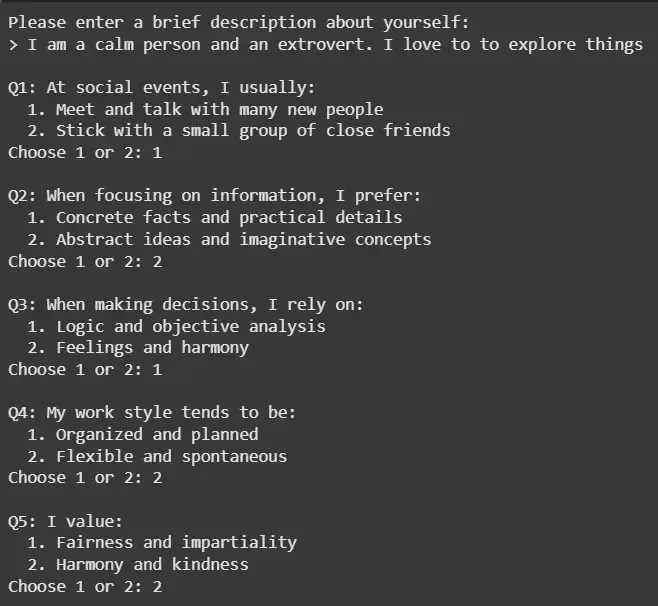
We simulate questions and answers for training the model.
Step 6: Combine Text and Questionnaire Features
Now we,
Horizontally stacks the TF-IDF vectors and questionnaire answer vectors.
Combines text content and survey responses into one feature matrix.
hstack efficiently handles sparse text vectors combined with dense questionnaire data.
Step 7: Train Random Forest Model and Evaluate Performance
RandomForestClassifier: Random Forest classifier is an ensemble tree-based model that combines many decision trees to improve accuracy and reduce overfitting.
n_estimators=100 specifies 100 trees in the forest.
random_state=42 ensures results can be reproduced.
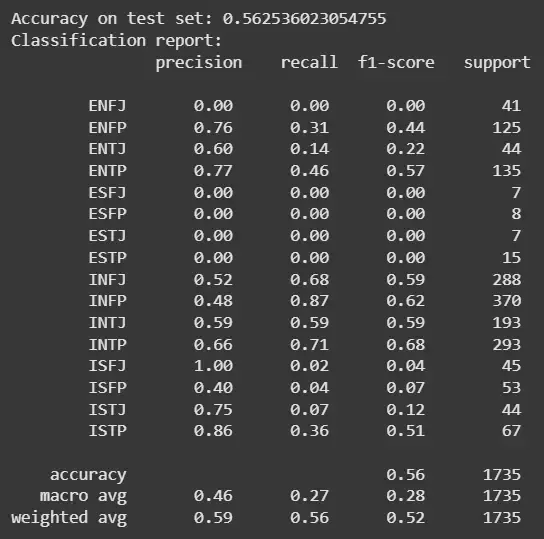
After training on both text features and questionnaire answers, it predicts on the unseen test set.
accuracy_score: Shows overall proportion of correctly predicted instances.
classification_report: Provides detailed metrics per MBTI category for a nuanced evaluation.
Now we save the trained Random Forest model and all encoders/vectorizers to disk. These files are loaded later for interactive prediction after deployment.
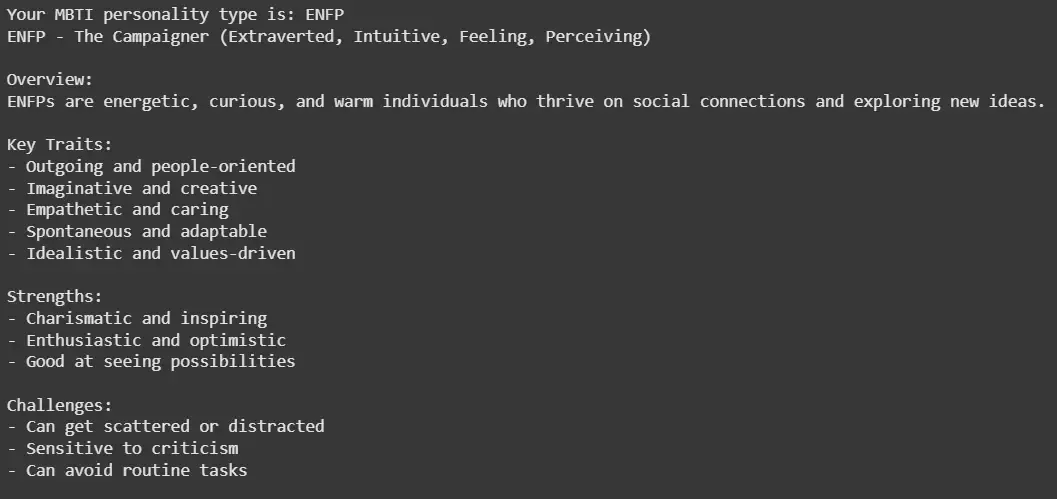
As we saw that our model predicted the personality type of a person based on the answers of the questionnaire.
Step 13: Store the Profile in ChromaDB Vector Database
Our model,
Connects to ChromaDB (local vector DB) to store user profile embeddings.
Metadata contains MBTI type, answers and user text for rich querying.
Uses a unique UUID string as identifier for each stored profile.
Persists the profile for future user comparisons, recommendations or analytics.
Output:
Your profile has been saved to the personality database.
Step 14: Access the Database
We can access the ChromaDB database,
To get all stored metadata and IDs.
Retrieves all saved vectors’ metadata and ids (user texts and MBTI types stored in metadata).
Output:
Stored profile IDs: ['ff6ea2d8-0b78-47ea-b125-0d9baec116a2', '3665925b-1b07-489b-9108-7f4ad3914618'] Stored metadata example: [{'user_text': 'I am a calm person and an extrovert. I love to to explore things', 'mbti_type': 'INFP', 'answers': '[0, 1, 0, 1, 1]'}, {'mbti_type': 'INFP', 'answers': '[1, 0, 1, 0, 1]', 'user_text': 'I am a sad person'}]