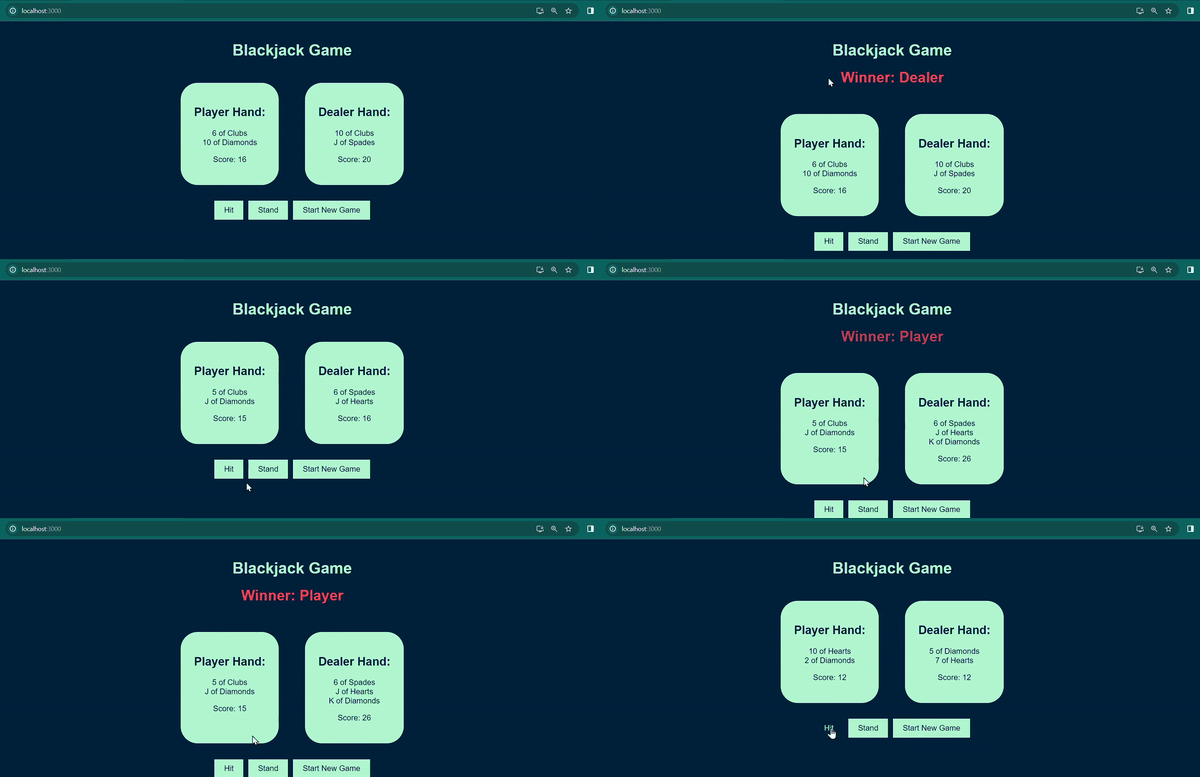
In this tutorial, we'll embark on a journey to create a fully functional Blackjack game using React for the frontend and Node for the backend. This engaging and interactive project will allow you to explore the realms of web development while learning how to implement key features of a classic card game.
Preview of Final Output: Let’s have a look at what our final project will look like:
Approach to create Blackjack Game:
- Backend (Node):
- Set up a NodeJS server using Express.
- Create a MongoDB database to store game data.
- Implement routes for starting a new game, hitting, and standing.
- Define logic to determine winners and calculate scores.
- Frontend (React):
- Develop a responsive UI for the Blackjack game.
- Connect the frontend to the backend using Axios for API calls.
- Implement functionalities for hitting, standing, and starting a new game.
- Display game state, player and dealer hands, and winner messages.
Functionalities of Backend:
- Importing modules such as Express, Mongoose, cors, and body-parser.
- Creating an Express app, setting the server port.
- Middleware is used to Enabling CORS and JSON data parsing.
- Connecting to a local MongoDB database.
- Defining Mongoose schemas and models for Card, Player, and Game.
- Creating a function to generate a shuffled deck.
- Endpoint (/game/start): Starts a new game, initializes player and dealer cards, calculates scores, and saves the game state.
- Endpoints (/game/hit and /game/stand): Handle player hits and stands, update game state, and determine the winner.
- Functions (calculateScore and determineWinner): Calculate hand scores and determine game winner.
- Starting the server and listening on the specified port (either from the environment variable or defaulting to 5000).
Steps To Create The Backend:
Step 1: Create a new NodeJS project.
npm init -y
Step 2: Install necessary packages such as express, mongoose, cors, and body-parser.
npm install express mongoose cors axios
Step 3: Set up a MongoDB database using MongoDB Compass. Define Mongoose schemas for cards, players, and the Game Logic and Routes In server.js:
Project Structure(Backend):
👁 Screenshot-2024-01-28-111302
The updated dependencies in package.json file of backend will look like:
"dependencies": {
 "body-parser": "^1.20.2",
 "cors": "^2.8.5",
 "express": "^4.18.2",
 "mongoose": "^8.1.1"
}
Steps to Run the backend:
Step 1: Navigate to blackjack-server root directory.
cd blackjack-server
Step 2: Run the server using following command.
node server.js
Steps To Create The Frontend:
Step 1: Set up a new React app using create-react-app.
npx create-react-app blackjack-frontend
Step 2: Go to the root directory using the following command.
cd blackjack-frontend
Step 3: Install necessary packages.
npm install axios
Project Structure(Frontend):
👁 Screenshot-2024-01-28-111227
The updated dependencies in package.json file of frontend will look like:
"dependencies": {
 "@testing-library/jest-dom": "^5.17.0",
 "@testing-library/react": "^13.4.0",
 "@testing-library/user-event": "^13.5.0",
 "axios": "^1.6.7",
 "react": "^18.2.0",
 "react-dom": "^18.2.0",
 "react-scripts": "5.0.1",
 "web-vitals": "^2.1.4"
},
Functionalities of Frontend:
- The code imports React, Axios (for HTTP requests), and a CSS file for styling.
- It declares a functional React component named Game, with state variables for managing game state and displaying the winner message.
- The useEffect hook fetches the initial game state from the backend ( <a href="http://localhost:5000/game/start" target="_new" > http://localhost:5000/game/start </a > ) when the component mounts.
- handleHit: Sends an Axios request to the backend to implement player hitting logic.
- handleStand: Sends an Axios request to the backend to implement player standing logic.
- startNewGame: Sends an Axios request to start a new game and clears the winner message.Displays the winner message and starts a new game after a 3-second delay using setTimeout.Uses setTimeout to automatically trigger a new game.Displays a loading message while fetching the game state from the backend.
Steps to Run the frontend:
1. Navigate to blackjack-frontend root directory.
cd blackjack-frontend
2. Run the following command.
npm start
Output:
👁 243-ezgifcom-video-to-gif-converter