|
VOOZH | about |
|
VOOZH | about |
MERN Stack is a popular full-stack JavaScript framework used to build modern and scalable web applications using a single programming language across both frontend and backend.
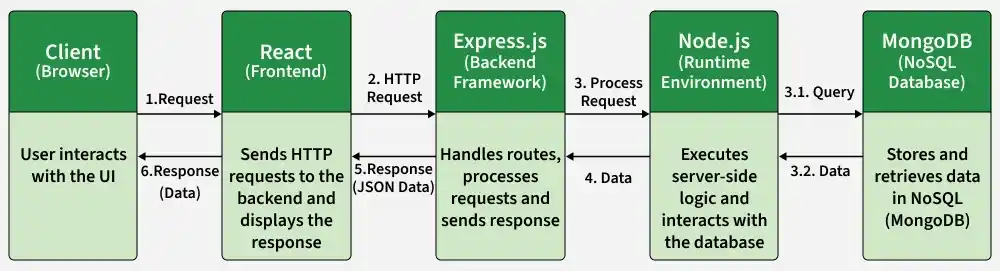
The MERN Stack works by connecting the frontend, backend, and database to create a complete web application. Each technology plays a specific role in handling user interactions, processing data, and storing information.
Step 1: Learn basics of HTML, CSS and JavaScript
Step 2: Learn React which is a frontend library for building User Interfaces
Step 3: Learn NodeJS which is JavaScript runtime environment
Step 4: Learn ExpressJS, a framework built upon NodeJS to simplify the process of creating web application and API building
Step 5: Learn MongoDB, a NoSQL database to store and retrieve data from database.
There are two requirements to start a MERN stack project:
Step 1: Install node on your system depending on your Operating System:
Step 2: Install a Code Editor (Visual Studio Code is recommended).
To setup MERN stack we need to create a folder structure for both frontend and backend. Then we have to define database schema to store and retrieve data from the database.
Follow the below steps to create a basic structure:
Step 1: Create Project Structure
mkdir frontend
mkdir backend
Step 2: Navigate to Frontend
cd frontendStep 3: Create React Application
npx create-react-appStep 4: Navigate to Backend
cd..
cd backend
Step 5: Initialize Backend Project
npm init -yStep 6: Install Dependencies
npm i mongodb express cors dotenvThe basic MERN project structure is now ready.
The MERN Stack consists of four core technologies that work together to develop full-stack web applications, with each component handling a specific part of the application.
NodeJS is an open-source JavaScript runtime environment that allows developers to run JavaScript code on the server side. It also includes npm (Node Package Manager), which provides access to thousands of reusable packages.
Create a NodeJS Project
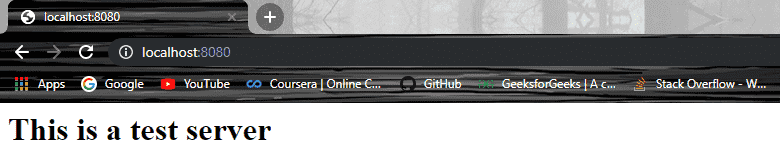
npm initnpm start👁 ImageExpressJS is a lightweight web framework built on NodeJS that simplifies backend development and API creation. It provides powerful features such as routing and middleware support, making web application development faster and more efficient.
Create an Express Project
npm initnpm install express --save👁 Imageindex.jsnpm start👁 ImageMongoDB is a NoSQL, document-oriented database that stores data in flexible JSON-like documents. It allows developers to efficiently store, manage, and retrieve large amounts of data without requiring a fixed schema.
Basic Database Operations in MongoDB
use database_name;db.createCollection("collection_name");db.collection_name.insert({
"id": 1,
"Name": "Klaus",
"Department": "Technical",
"Organization": "Geeks For Geeks"
});
db.collection_name.find({Name : "Klaus"}).forEach(printjson);👁 ImageReactJS is a JavaScript library used for building interactive and dynamic user interfaces. It is widely used for developing single-page applications (SPAs) and mobile applications due to its efficient handling of changing data.
Creating and Running a React App
npm install create-react-app --globalOR
yarn global add create-react-appcreate-react-app app_namenpm startor
yarn startHere are some benefits of using MERN Stack: