|
VOOZH | about |
|
VOOZH | about |
In this article, we will learn how to build an online code compiler using React.js as frontend and Express.js as backend. Users will be able to write C, C++, Python, and Java code with proper syntax highlighting as well as compile and execute it online. The main objective of building an online compiler is to facilitate any user such that programs of any language can be compiled and run without downloading any IDE (Integrated Development Environment) or compiler.
The pre-requisites for this project are:
Before building the whole application, let's divide the application into two parts. The first part is all about building the front-end using React.js and the second part is building the back-end using Express.js. In the front-end, we have three sections, a text editor, an input box, and an output box. In the back-end, we create an API and implement logic to compile the source code provided from the front-end.
Let's start building the Front-end using React first.
Step 1: Create a React application by typing the following command in the terminal:
npx create-react-app code-compilerStep 2: Now, go to the project folder i.e code-compiler by running the following command:
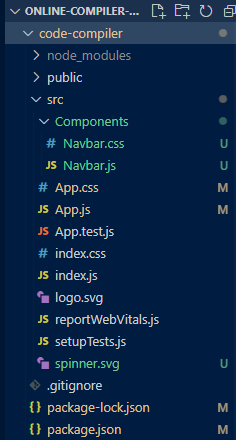
cd code-compilerProject Structure: It will look like this:
Step 3: Let's build the text editor where users will write their code. For this, we will be using the Monaco Editor which is exactly the code editor that Microsoft VS Code IDE uses. So we will be using an npm package called '@monaco-editor/react' for this purpose. Install some npm packages:
npm install @monaco-editor/react axios react-select"dependencies": {
"@monaco-editor/react": "^4.6.0",
"@testing-library/jest-dom": "^5.17.0",
"@testing-library/react": "^13.4.0",
"@testing-library/user-event": "^13.5.0",
"axios": "^1.7.2",
"react": "^18.3.1",
"react-dom": "^18.3.1",
"react-scripts": "5.0.1",
"react-select": "^5.8.0",
"web-vitals": "^2.1.4"
}
For the backend, we will be using Express.js. Here we will create an API endpoint for compiling our code. So let's create a folder named 'server' which will contain all the backend logic.
Step 1: Type the following commands in the terminal:
mkdir servercd serverStep 2: Let's initialize a node.js project:
npm initStep 3: Let's install some dependencies:
npm install express cors axiosDependencies list in package.json file
"dependencies": {
 "axios": "^1.7.2",
 "cors": "^2.8.5",
 "express": "^4.19.2"
}
Step 4: Create a file named 'index.js'. This is the only file that will contain all the backend logic. In this file, we will create a POST route that will take the source code, language, and input if any, from the frontend. After getting those, it will then call the code compilation API (opensource) whose response will be sent back to the frontend where the result will be shown on the output screen.
Now, we have successfully created the POST request route which we will call from the frontend.
Start the back-end server:
node index.jsThe server will listen on localhost port 8000
Start the front-end application:
npm startOutput: Now open your browser and go to http://localhost:3000/, you will see the following output: