|
VOOZH | about |
|
VOOZH | about |
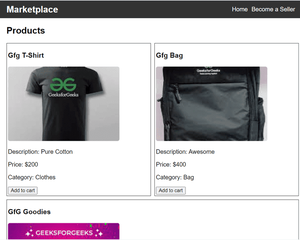
Building a community Marketplace App will help you understand the foundational concepts of full-stack development using the MERN(MongoDB, ExpressJS, React, NodeJS) stack. This tutorial will guide you to set up the backend server for the project and demonstrate the integration of frontend functionality with backend setup. This tutorial will teach you how to leverage mongoDB to create and store product profiles.
Note: You have to install MongoDB and get the URI from that so that you can connect to it and use the database respectively.
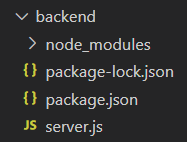
Step 1: Create a new directory named backend.
mkdir backend
cd backend
Step 2: Create a server using the following command in your terminal.
npm init -yStep 3: Install the necessary package in your server using the following command.
npm install express mongoose mongodb cors"dependencies": {
"cors": "^2.8.5",
"express": "^4.18.3",
"mongodb": "^6.3.0",
"mongoose": "^8.2.0",
}
Step 4: Create a file 'server.js' and set up the server.
Start your server using the following command.
node server.js
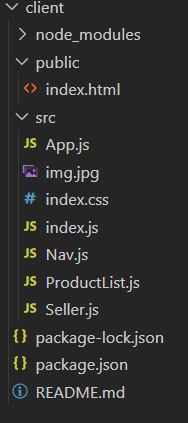
Step 1: Create the frontend repository named client in the main repository.
mkdir client
cd client
Step 2: Create React project using following command.
npx create-react-app .
Step 3: Install necessary dependencies in your application using following command.
npm install axios react-router-dom"dependencies": {
"axios": "^1.6.7",
"react": "^18.2.0",
"react-dom": "^18.2.0",
"react-router-dom": "^6.22.2",
"react-scripts": "5.0.1",
"web-vitals": "^2.1.4"
}
Example: Create the files according to the project structure and write the following code.
Start the project using the given command.
npm startOutput: