|
VOOZH | about |
|
VOOZH | about |
This article is about Restaurant Recommendations using the MERN (MongoDB, Express.js, React.js, Node.js) stack. This project displays a list of restaurants to the users. Users can apply filters like location, cuisines, and ratings based on filters applied by the user, the user gets recommended specific restaurants.
Output Preview:
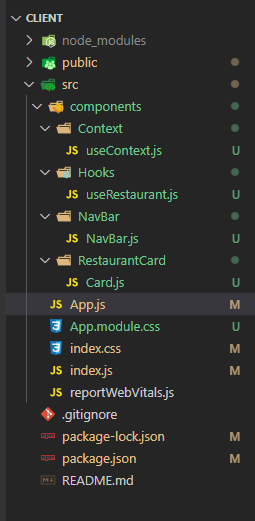
In Frontend, i have used two components Navbar which contains the name of the title and Card component which contains the UI of the restaurant details.I have used custom hook useRestaurantContext which contains the details of the filters selected by the users.
Step 1: Create a reactJS application by using this command
npx create-react-app myappStep 2: Navigate to project directory
cd myappStep 3: Install the necessary packages/libraries in your project using the following commands.
npm i axios react-bootstrapThe updated dependencies in package.json file will look like:
"dependencies": {
 "@testing-library/jest-dom": "^5.17.0",
 "@testing-library/react": "^13.4.0",
 "@testing-library/user-event": "^13.5.0",
 "axios": "^1.5.1",
 "bootstrap": "^5.3.2",
 "react": "^18.2.0",
 "react-bootstrap": "^2.9.0",
 "react-dom": "^18.2.0",
 "react-scripts": "5.0.1",
 "web-vitals": "^2.1.4"
 }
Example: Implementation to design the frontend part of the Restaurant Recommendation.
Step to Run Application: Run the application using the following command from the root directory of the project
npm startOutput: Your project will be shown in the URL http://localhost:3000/
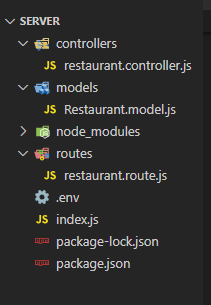
In Backend, i have created one api route /api/restaurants which gets all the restaurants data from the database and if we pass locatin, rating and cuisines data in the request body then it gets the data from the database based on filters.
Step 1: Create seperate directories for frontend and backend
mkdir backendStep 2: Navigate to the backend directory using the command
cd backendStep 3: Initialize Node Package Manager using the command.
npm init -yStep 5: Install express, cors, body-parser, dotenv, mongoose packages using following command.
npm i express cores body-parser mongoose dotenvNote: In backend create a file named .env and add variable
PORT = 4000 and MONGO_URL = specifiy your mongodb url connection.The updated dependencies in package.json file for backend will look like:
"dependencies": {
 "bcrypt":"^5.1.1"
 "cors": "^2.8.5",
 "express": "^4.18.2",
 "mongoose": "^8.0.0",
 "nodemon": "^3.0.1",
 }
Example: Implementation to design the backend part of Restaurant Recommendation.
Step to Run Application: Run the application using the following command from the root directory of the project
npm start
Output: