|
VOOZH | about |
|
VOOZH | about |
Node.js is a JavaScript runtime built on Chrome’s V8 engine that enables server-side development. Its core modules are built-in libraries that provide essential features for building efficient and scalable applications.
To use a core module, you simply use the require() function:
const fs= require('fs');A collection of built-in Node.js modules that provide essential functionalities like file handling, networking, and system operations without requiring installation
The fs (File System) module in Node.js is a built-in module used to interact with the file system. It supports both synchronous and asynchronous operations for handling files and directories efficiently.
Node is used to execute the fs.js script. When the script runs, it uses the fs module to read the Lucas.txt file and prints the message:
Output:
Note: When running a file using Node.js, it does not automatically watch for changes. If you make any changes to the file, you need to manually stop and restart the application for the updates to take effect.
fs module in Node.js provides methods for interacting with the file system are as follows:
fs.appendfile: fs.appendFile() adds data to a file. It takes the file name, data, and a callback with err and throws an error if it fails, otherwise prints a success message.
filename: fs.js
Output:
fs.appendfileSync: It is synchronous method from Node.js built-in module. It is used to append data to file. If the specified file will not be created fileappendSync will automatically create it.
filename: fsappendSync.js
Output:
readFile/ writeFile | readFileSync/writeFileSync |
|---|---|
Asynchronous (non-blocking) | Synchronous (blocking) |
Better for high-performance and large-scale applications | Slower, blocks the event loop until the operation completes |
Takes a callback function | Returns result directly or throws error |
Preferred in server environments to avoid blocking | Useful for small scripts or startup code |
Error passed to callback | Use try...catch block for error handling |
fs.readFile('file.txt', 'utf8', (err, data) => {...}) | const data = fs.readFileSync('file.txt', 'utf8') |
fs.writeFile('file.txt', data, err => {...}) | fs.writeFileSync('file.txt', data) |
The http and https modules in Node.js are built-in modules used to create HTTP and HTTPS servers and handle web requests securely. They allow developers to build web servers, RESTful APIs, and interact with web services.
filename: http.js
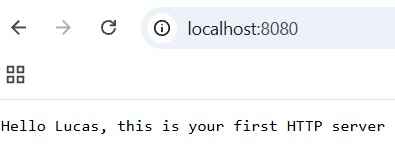
This result of running the Node.js server using node, which will start your server on provided port no.
Finally, the message "Lucas, your server is running on port 8080" appears, indicating that the server started successfully and is now live.
Output:
filename: https.js
Note: Whatever the port number and IP Address are given to the server.listen it will execute that only web page whenever requested. And this web page will be HTTPS.
Node.js follows an event-driven architecture, and the events module plays a central role in it. It provides the EventEmitter class to create and handle custom events asynchronously.
filename: EventEmitter.js
Output:
The path module simplifies working with file and directory paths. It offers functions like join, resolve, and basename to manipulate and construct paths in a platform-independent way.
filename : path.js
Output:
The util module contains utility functions that extend JavaScript's built-in capabilities. It's particularly useful for debugging and working with objects. You'll find functions like promisify, inspect, and format here.
filename:util.js
It uses Node.js’s built-in util module, specifically the util.format() method, to format a string. The %s is a placeholder for a string value, which gets replaced by "Lucas" in this case. The result is a formatted string: "Hello Lucas".
Output:
The os module provides information about the operating system on which Node.js is running. You can access details like CPU architecture, memory, and network interfaces. It's essential for writing platform-specific code.
filename: os.js
This Node.js code uses the built-in os module to get information about the operating system. It prints the platform (like 'linux' or 'win32'), the system architecture (like 'x64'), and the amount of free system memory (in bytes).
Output:
For handling cryptographic operations like encryption, decryption, and creating hashes, the crypto module is indispensable. It includes functions for secure data handling and authentication.
filename: crypto.js
Output:
To use a core module, you need to require it in your Node.js script:
filename: coremodule.js
Once required, you can access the module’s functions and classes and start using them in your application.
An example of reading a file using the fs module: