|
VOOZH | about |
|
VOOZH | about |
NodeJS is widely used for building scalable and high-performance applications, particularly for server-side development. It is commonly employed for web servers, APIs, real-time applications, and microservices.
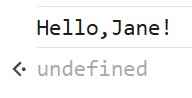
This section demonstrates how to execute JavaScript directly in Node.js using the console (REPL) without creating any files or project setup.
Node.js lets you run JavaScript directly in the console using the REPL. Simply type node in the terminal to execute JavaScript interactively.
$ node
> let name = "Jane";
> console.log("Hello, " + name + "!");
Output:
Initialize a Node.js application using npm init and enhance its functionality by installing required modules.
Step 1: Initialize a Node.js Project
mkdir my-node-app
cd my-node-app
npm init -y
Step 2: Install Required Modules
We will install fs (for handling file operations) and path (for working with file paths).
npm install fs pathStep 3: Create an index.js File
Create a simple HTTP server that reads and serves a file.
Step 4: Create a message.txt File
Create a message.txt file in the same directory and add some content:
Step 5: Run the Application
node index.jsA web-based Node application consists of the following three important components:
Step 1: Import required modules
Load Node modules using the required directive. Load the http module and store the returned HTTP instance into a variable.
Syntax:
var http = require("http");Step 2: Creating a server in Node
Create a server to listen to the client's requests. Create a server instance using the createServer() method. Bind the server to port 8080 using the listen method associated with the server instance.
Syntax:
http.createServer().listen(8080);Step 3: Read request and return response in Node
Read the client request made using the browser or console and return the response. A function with request and response parameters is used to read client requests and return responses.
Syntax:
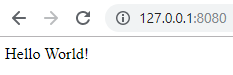
http.createServer(function (request, response) {...}).listen(8080);step 4: Create an index.js File
Step 5: To run the program type the following command in terminal
node index.js Output:
👁 first node application created
👁 node application hello world output