|
VOOZH | about |
|
VOOZH | about |
CSV files are the "comma separated values", these values are separated by commas, this file can be viewed as an Excel file. In Python, Pandas is the most important library coming to data science. We need to deal with huge datasets while analyzing the data, which usually can be in CSV file format. Let's see the different ways to import csv files in Pandas.
There are various ways to import CSV files in Pandas, here we are discussing some generally used methods for importing CSV files in pandas.
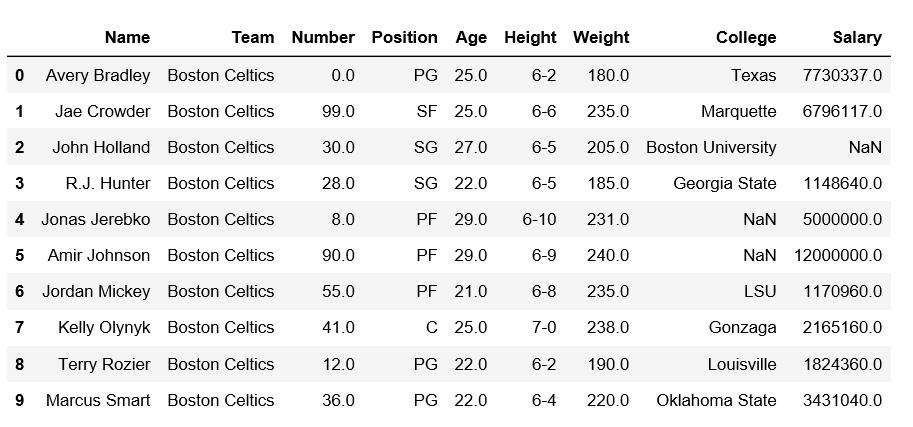
csvIn this method the below code uses the panda's library to read an NBA-related CSV file from a given URL, creating a DataFrame named `df`. It then prints the first 10 rows of the DataFrame to provide a brief overview of the dataset.
Output:
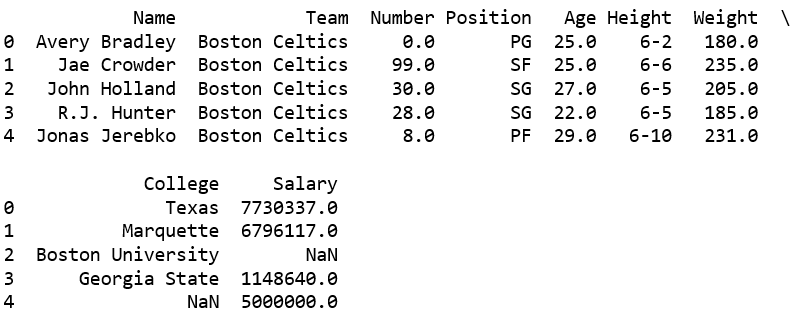
👁 ImageIn this example the below code uses the pandas library to read a CSV file ("C:\Gfg\datasets\nba.csv") into a DataFrame and then prints the first five rows of the DataFrame.
Output:
👁 Imagecsv module.One can directly import the csv files using csv module. In this code example the below code reads a CSV file ("nba.csv") into a Pandas DataFrame using Python's `csv` and `pandas` modules. It then prints the values in the first column of the DataFrame. A correction is needed in the DataFrame creation line for accurate functionality.
Output:
👁 ImageWay to import a CSV file in Python is by using the numpy library. The numpy library provides the genfromtxt() function, which can be used to read data from a CSV file and create a NumPy array.
Example : Replace 'path/to/your/file.csv' with the actual path to your CSV file. The delimiter=',' parameter indicates that the values in the CSV file are separated by commas. This method is useful when you want to work with numerical data and leverage the capabilities of the NumPy library.
Output :
[[1. 2. 3.]
 [4. 5. 6.]
 [7. 8. 9.]]
This is a hypothetical example assuming the CSV file contains a 3x3 matrix of numerical values separated by commas.