|
VOOZH | about |
|
VOOZH | about |
In a world where age is a factor for many legal, social, and personal purposes, it is very convenient to have a quick and available method of calculating it. Age calculator applications do just that. These small simple calculators provide an easy and accurate way to determine a person’s age from when they were born. No need to sit down and calculate or thumb calendars: this article looks into the functionality, advantages, and potential uses of age calculator application.
Table of Content
Before the start of any step, there is the ideation process in which the developer thinks and generates some creative problem statements and their solutions. Here in this post, we are covering age calculator application creation.
You can also visitTop 50 project ideas for Software Development page to know about some more creative software development ideas for your future projects.
A Project Development is a multiphase process in which each and every process are equally important. Here in this post we are also going to develop our Age Calculator Application in multiple phases, such as:
Let us look into the steps one by one.
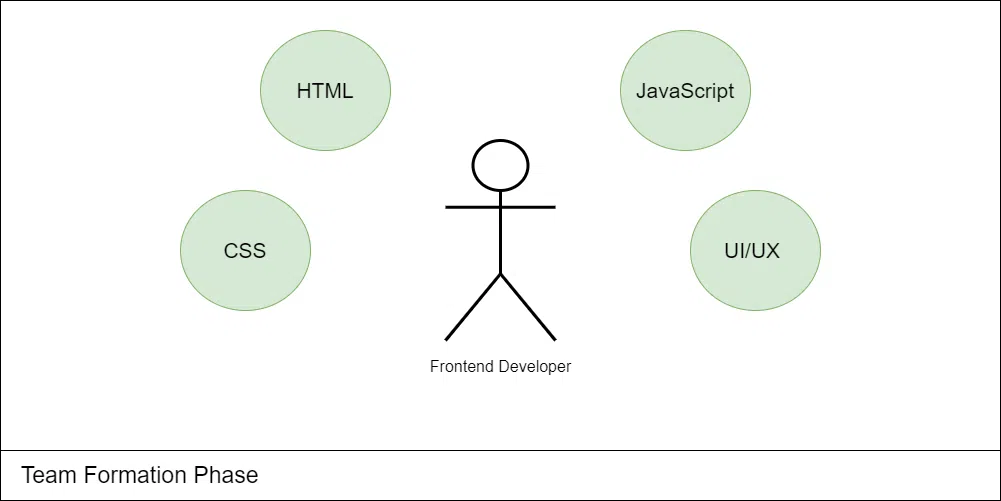
In Team Formation Phase we will form a dynamic team having high energy and enthusiasm for the project.
In Age Calculator Application creation We need Frontend Developer majorly i.e. HTML , CSS, Javascript and react.js. If you want to improve your website appearance you can also take the help of any UI/UX Developer also.
If a person knows about frontend development he/she can develop the Age Calculator Application all by himself/herself.
A project synopsis serves as a concise overview or summary of a proposed project, offering a brief but comprehensive insight into its objectives, scope, methodology, and expected outcomes.
Let’s create a Synopsys Report for Age Calculator Application:
An age calculator application is an essential tool that simplifies the process of determining age accurately. Its significance lies in its ability to provide precise and reliable results, eliminating the potential for human error. This versatile application finds utility across diverse domains, from personal record-keeping to organizational data management and research analysis. It streamlines processes by automating complex age calculations, saving valuable time and resources. Moreover, accurate age data plays a crucial role in informing data-driven decisions across various sectors. With its user-friendly interface and widespread availability, an age calculator application offers accessibility and convenience, empowering individuals and organizations to leverage the power of age data effectively.
In the digital age, an age calculator app solves a common yet tricky problem: determining someone's age accurately. Whether for personal curiosity, event planning, or professional data analysis, this tool takes the guesswork out of age calculations. With just a few taps, you can input a date of birth and instantly know someone's precise age. No more awkward "How old are you?" moments or risky assumptions. An age calculator app is a discreet, reliable, and versatile solution, empowering you with age data at your fingertips, streamlining processes, and unlocking insights for personal and professional endeavors.
An age calculator application will provide a user-friendly digital solution to accurately calculate an individual's age based on their date of birth. With a clean and intuitive interface, users can effortlessly input the required date and instantly obtain the precise age, eliminating the need for complex calculations or guesswork. This application will serve as a reliable and convenient tool for personal record-keeping, event planning, demographic analysis, and various other scenarios where accurate age information is essential. Whether for personal or professional purposes, an age calculator application offers a streamlined and accessible approach to leveraging the power of age data effectively.
The primary objective of an age calculator application is to offer a user-friendly and reliable solution for accurately determining an individual's age based on their date of birth. By providing a clean interface to input the required date, it instantly calculates and displays the precise age, streamlining the process. Whether for personal use, event planning, demographic research, or any scenario requiring accurate age data, this application aims to empower users with a seamless and accessible approach to leveraging age information, facilitating informed decision-making and enabling data-driven insights across various domains.
Front end of the website will be created using react.js which is a powerful JavaScript library for building dynamic and interactive user interfaces (UIs) and used tailwind.css which is a Utility first CSS framework for building rapid custom UI.
Technologies used in this project are:
While the core functionality of accurately calculating age based on date of birth is invaluable, the future scope of this application extends far beyond its current utility. Enhancements could include integrations with calendar apps for automated birthday/milestone reminders, data visualization tools for analyzing age demographics, and even predictive capabilities estimating future ages for long-term planning. Additionally, the application could evolve into a comprehensive age-related toolkit, incorporating legal age requirements for various activities, age-specific health and wellness recommendations, and personalized life event timelines. With continuous innovation and user feedback, this age calculator has the potential to become an indispensable companion app, empowering users with age-centric insights and solutions throughout their lifetimes.
Below are some of the key points in a Software Requirement Specification Document:
- Purpose
- Scope
- Introduction
- Overall Description
- Product Perspective
- System Interface
- Product Function
- Operating Environment
- Functional Requirements
- Software Requirements
- Hardware Requirements
- Database Requirements
- Non-Functional Requirement
- Usability Requirements
- Security Requirements
- Availability Requirements
- Error Requirements
- Design
- Control Flow Diagram
- Use Case Diagram
- System Features
Note: To know more about What is a SRS Document or How to write a good SRS for your Project follow these articles.
Let’s Start building a Software Requirement Specification for Age Calculator Application:
The main objective of this document is to illustrate the requirements of the Age Calculator Application . The document gives the detailed description of the both functional and non-functional requirements proposed by the client.
The age calculator application serves the purpose of providing an accurate and user-friendly solution for determining an individual's age based on their date of birth. By offering a clean interface and streamlined calculations, it empowers users with precise age information for various scenarios, including personal record-keeping, event planning, demographic analysis, and compliance with age-related requirements. The primary aim is to simplify age calculations, eliminate errors, and enable data-driven insights through seamless access to accurate age data.
The age calculator application holds a promising scope for growth beyond its core functionality. Potential enhancements include integrations with calendar apps for automated birthday/milestone reminders and data visualization tools for analyzing age demographics. The application could evolve into a comprehensive age-centric toolkit, incorporating legal age requirements, health recommendations, and personalized life event timelines.
Predictive capabilities estimating future ages could aid long-term planning. As technology progresses and user needs change, the application can adapt, serving as a versatile tool for individuals, families, and professionals across domains. Continuous innovation and user feedback will drive its evolution into a holistic age management solution and trusted companion throughout users' lifetimes, empowering them with age-related insights and solutions.
This project will provide the age of a person, days remain in his next birthday, nest bierhday date, his age on moon, his age on mars, total number of months he lived, total number of days he lived.
The user interface for the task will have a website that will show the age related details of the user. This site will utilize HTML, CSS and Javascript, React.js and Tailwind.CSS in its frontend.
Age Calculator Application is an web page which you can run using your favourite browser. In the website all details are static and can only be updated by the author. It requires knowledge of html , CSS, JS, React.js and Tailwind.css to update any entry in this project.
This software package is developed using html , CSS, javascript and React.js for frontend, Using Vs Code as a text editor and Google Chrome for the execution of our code.
Required Specifications for our Device:
Availability requirements for a Age Calculator Application are crucial to ensure that the website service is consistently accessible and operational.
Here are key availability requirements:
If there comes any errors in any part of the project it should be able to alert the author about it. Errors in the links and website working should be treated in less down time.
The design phase in Age Calculator Application is a crucial stage where the conceptual ideas and requirements are transformed into a detailed and visually appealing blueprint. This phase involves creating the Data flow Diagrams, ER model design, and the overall architecture of the Age Calculator Application.
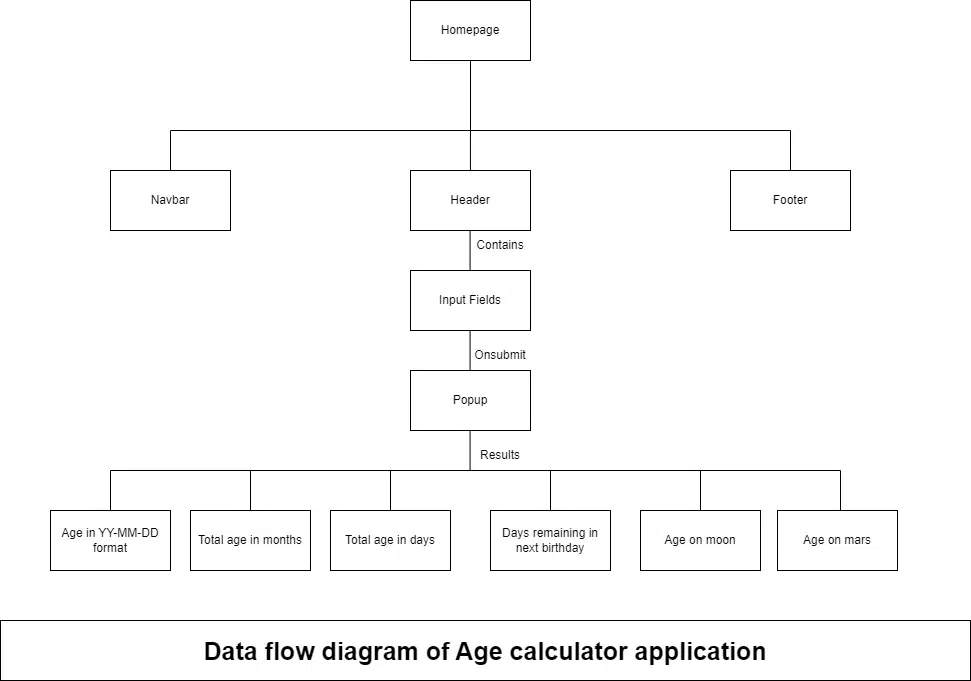
Data Flow Diagram (DFD) serves as a visual representation of the flow of information within the system. This diagram illustrates how data, flows in the project. because this is our frontend project majorly , we will be only using html and css part of the project so we are only going to discuss about the project structure in this stage.
Let’s Draw a Dataflow Diagram for our project:
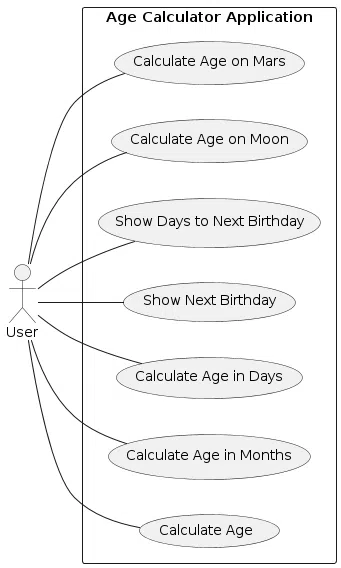
A use case diagram is a visual representation of the functional requirements of a system, illustrating how users interact with the system and the system’s responses. For a Age Calculator Application, the use case diagram will include actors such as “User,” or “Administrator” and system will tell about the various details like age, age in months, age in days etc.
Here’s a simplified use case diagram for a Age Calculator Application:
At this stage, the fundamental development of the product starts. For this, we use a specific programming code as per the design. Conventional programming tools like compilers, interpreters, debuggers, etc. are also put into use at this stage.
In this stage we are going to create the environment to build our project, We will install all required software and extensions for ease in the coding part.
Required Softwares:
In our project we are using HTML, CSS, JavaScript, React.js and Tailwind to build the project so in this stage we are going to code our project. Before going further lets talk about the environment we need for the project.
Source Code: https://github.com/geeksforgeeksorg/Age-Calculator
Here are the steps to run the code in you computer:
We must have NodeJS installed on our PC. So, the very first step will be to install NodeJS. Once we have set up NodeJS on our PC, the next thing we need to do is set up our project. Here are some article you can refer.
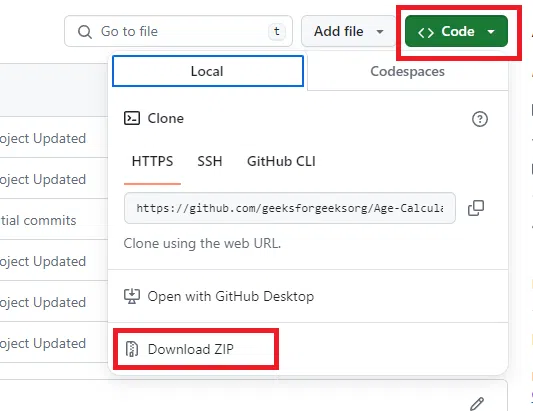
In this step we download the project from github go to project source code link then click on code then click on Download ZIP. After downloading the zip file extract the it at your desired path.
Or you can also clone the repository by the command:
git clone https://github.com/geeksforgeeksorg/Age-Calculator
Now you have the source code downloaded. Next open you CMD and navigate to your your project's directory and paste this command which is for download the required packages for the project.
npm install @testing-library/jest-dom @testing-library/react @testing-library/user-event moment react react-dom react-scripts tailwindcss
Now you have all the dependencies required to run the project. Use the following command to run your project.
npm start
Now your project is up and running. You will be able to see the project on https://locahhost:3000.
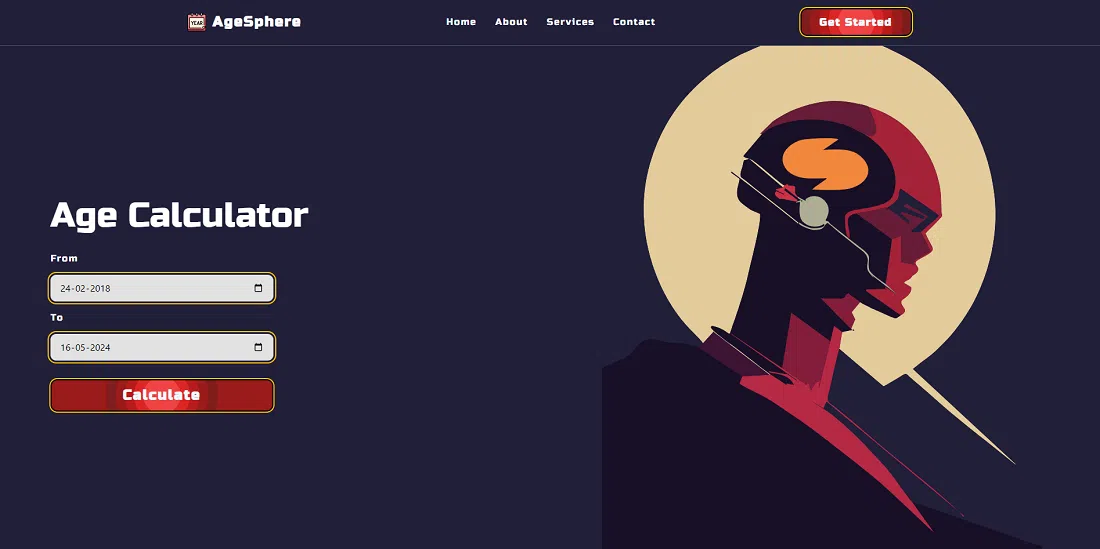
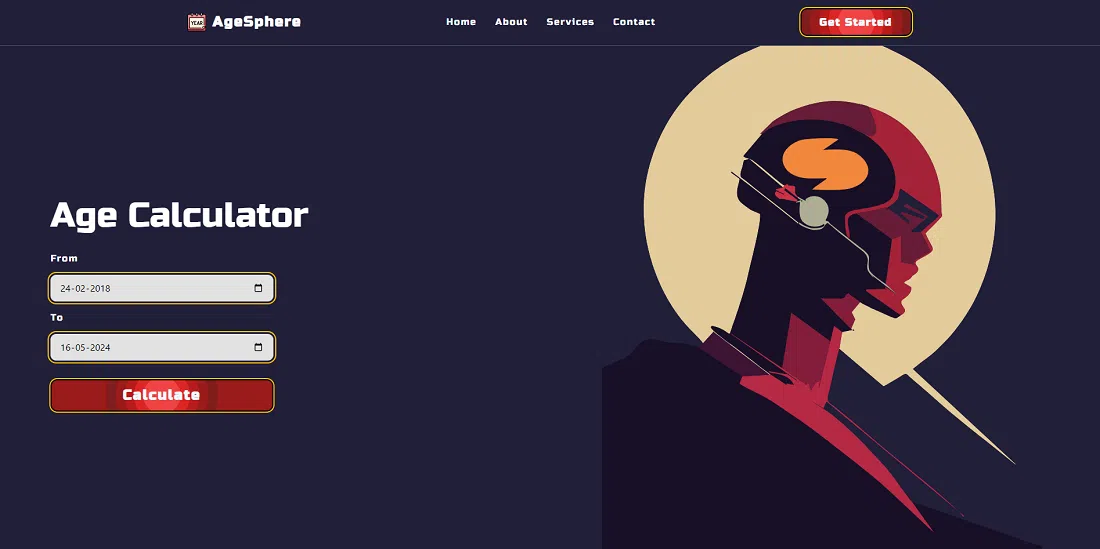
Here are some of the screen shots of the project.
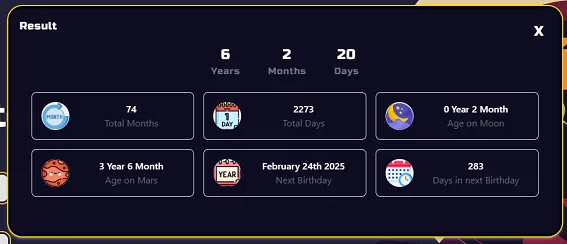
Result Pupup:
After entering the from and to the user will able to see the result in popup which looks like this:
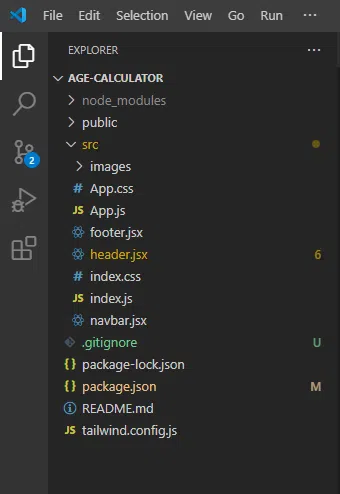
Here is how the folder and file structure is looks like:
To host your website we can use various tools or third party web apps . here we are going to discuss about most reliable source to do it i.e. GitHub.
Steps to host your website:
For Detailed Documentation follow How to Host a Website on GitHub For Free?
Testing is a crucial phase in the development of aAge Calculator Application to ensure that it meets its intended requirements, functions correctly, and is free of bugs.
Below are some key steps and considerations for the testing phase of a Age Calculator Application:
In this phase of software development, Developer will have to present their work in front of authorities and they will judge your work and give suggestions on the improvement areas.
The ideal length of the ppt should be min 10 slides and maximum 15 slides , you will not have too much time to explain your project so prepare your presentation carefully using important key points.
Some of the key points (slides) which your presentation should have are given below: