VOOZH about

URL: https://www.geeksforgeeks.org/software-testing/how-to-retrieve-test-method-description-in-testng-before-and-after-execution/

⇱ How to retrieve test method description in TestNG before and after execution? - GeeksforGeeks


  • Courses
  • Tutorials
  • Interview Prep

How to retrieve test method description in TestNG before and after execution?

Last Updated : 23 Jul, 2025

Using TestNG listeners specifically IInvokedMethodListener we can capture all kinds of nice info related to the test method just before and after it actually invokes. This is quite handy when you are building logs and log parsers to debug and give contextual info in a report. In this way, you have much control over the execution flow and can monitor and interact during runtime.

Approach to retrieve test method description in TestNG before and after execution

To get the description of a test method before and after execution in TestNG, one can follow these steps. This approach involves developing a listener that will connect to the execution of test methods and provide the required information.

Step 1: Create a Custom Listener Class

With TestNG, you can create listener classes that enable you to apply custom behavior during the lifetime of a test. For this case, we will use the IInvokedMethodListener interface to obtain information about test method invocation, both before and after its execution.

The IInvokedMethodListener interface contains two methods:

  • beforeInvocation(): This method is invoked right before the test method is called. You can use this to capture and display the method description.
  • afterInvocation(): This method is invoked right after the test method finishes execution. You can retrieve the method description after execution in this step.

To begin, create a class that implements the IInvokedMethodListener interface. This class will hold the logic for capturing and displaying the description of test methods.

Step 2: Capture Test Method Description

  • In the custom listener class, you will implement the two methods (beforeInvocation() and afterInvocation()), where you will extract the test method description using the ITestNGMethod object provided by the listener methods.
  • TestNG allows you to specify a description for a test method using the @Test(description = "...") annotation. The description can be accessed through the getDescription() method of the ITestNGMethod object.
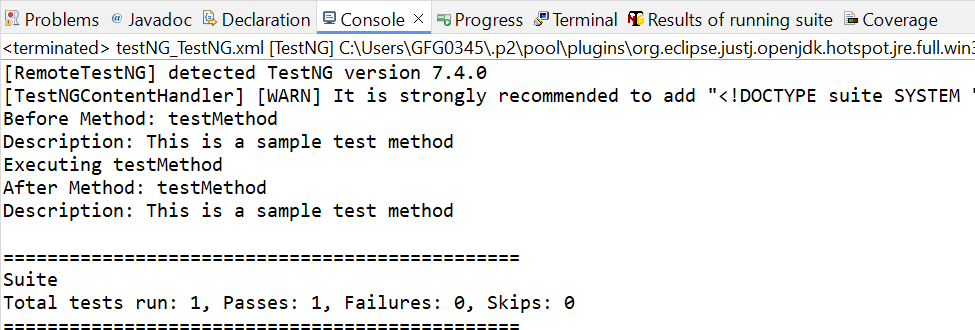
  • Before the test method runs, the beforeInvocation() method will print the method name and its description (if provided). Similarly, after the test method has finished executing, the afterInvocation() method will print the method name and its description.

Step 3: Attach the Listener to Your Test Class

To activate the listener, you need to attach it to your test class. There are two common ways to do this:

  • Using the @Listeners Annotation: In this approach, you annotate your test class with @Listeners and provide the fully qualified name of the listener class. This tells TestNG to use the custom listener while running tests in this class.
  • Using testng.xml Configuration: You can configure listeners globally in your testng.xml configuration file. This is useful if you want the listener to apply to multiple classes or test suites.

Step 4: Add Descriptions to Test Methods

In your test class, you can annotate test methods with the @Test annotation, providing a description for each method. This description will be displayed before and after the test method runs.

Step 5: Run the Tests

Once the listener is attached and the test methods are annotated with descriptions, you can run the test suite as usual. TestNG will automatically invoke the custom listener and output the descriptions of each test method before and after execution.

Example Code

CustomListener.java


TestClass.java


testng.xml


Output:

👁 Output
Output

Conclusion

Using the TestNG listeners, particularly IInvokedMethodListener, you easily get information about a test method before and after its invocation. Logging, debugging, and further invocation for report addition may use this. You also have better control over the flow of execution using the powerful listener interface in TestNG and can track and interact with the methods while they are being executed.

Comment
Article Tags:

Explore