|
VOOZH | about |
|
VOOZH | about |
Spring Boot Integration with PostgreSQL as a Maven Project involves developing a Spring Boot application that connects to a PostgreSQL database while using Maven to manage project dependencies and build configuration. This integration enables efficient backend development and reliable data storage.
Follow the below steps to integrate Spring Boot with PostgreSQL using a Maven project:
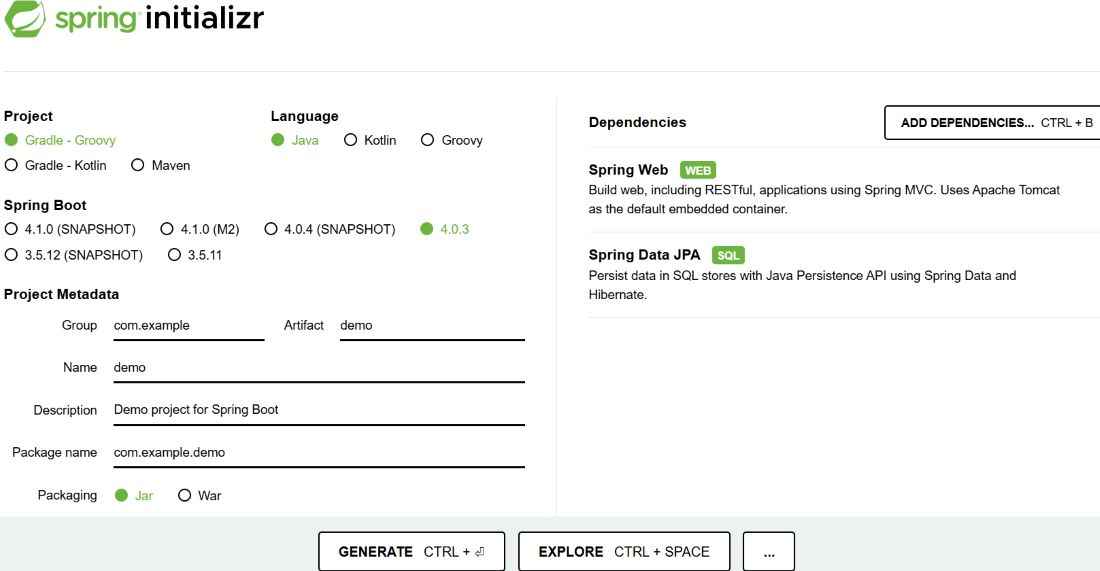
Generate a project using Spring Initializr and fill in the details as per the requirements.
For this application:
Click Generate to download the starter project.
Project Structure:
Add the PostgreSQL dependency to connect the application with PostgreSQL database.
pom.xml
Add PostgreSQL configuration in application.properties.
spring.datasource.url=jdbc:postgresql://localhost:5432/testdb
spring.datasource.username=postgres
spring.datasource.password=your_password
spring.jpa.hibernate.ddl-auto=update
spring.jpa.show-sql=true
spring.jpa.properties.hibernate.dialect=org.hibernate.dialect.PostgreSQLDialect
Let us write the entity class now:
geek_author.java
Create AuthorRepository.java to handle database operations using Spring Data JPA.
AuthorRepository.java
Create AuthorController.java and define API endpoints.
AuthorController.java
Create AuthorApplication class.
AuthorApplication.java
http://localhost:8080Console Output:
Test the api's using Postman .
POST API
URL: http://localhost:8080/authors
JSON
{
"name": "John",
"email": "john@example.com"
}
Response (JSON)
{
"id": 1,
"name": "John",
"email": "john@example.com"
}
GET API (Fetch All)
http://localhost:8080/authors
Response
[
{
"id": 1,
"name": "John",
"email": "john@example.com"
}
]