|
VOOZH | about |
|
VOOZH | about |
Spring MVC Custom Validation is used to enforce user-defined rules on form inputs when built-in validation annotations are not sufficient. It allows developers to create custom constraints and validation logic for specific business requirements. This ensures that only valid and meaningful data is processed in the application.
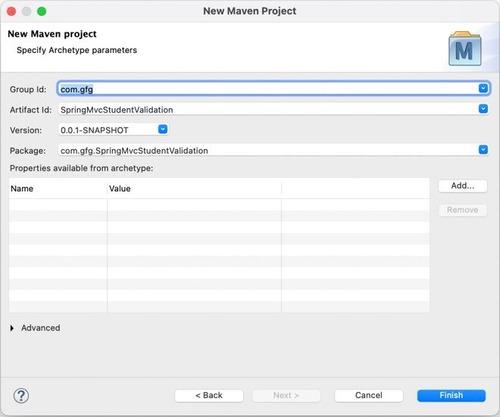
Follow these steps to create a custom validator to validate the address of a student in a student portal.
Provide all the metadata:
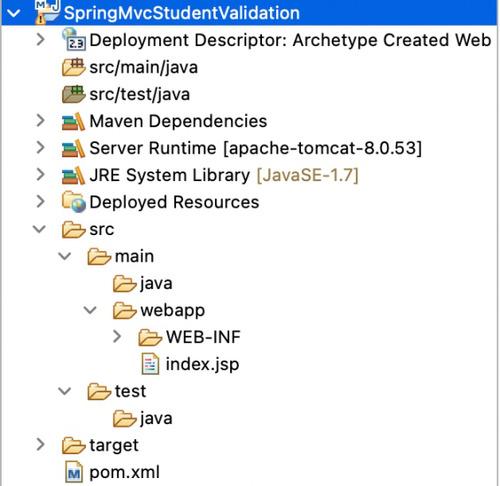
A maven web project would be created with a pom.xml configuration file. The project structure would look something like this:
The pom.xml file is used to manage all project dependencies. In this step, we add Spring MVC, Servlet API, JSP (JSTL), and Hibernate Validator dependencies. These libraries are essential for building a web application and enabling validation features in Spring MVC.
pom.xml:
The web.xml file is the deployment descriptor of the application. It defines and registers the DispatcherServlet, which acts as the front controller in Spring MVC. All incoming requests are routed through this servlet to the appropriate controller.
This XML file contains Spring MVC configuration such as component scanning, view resolver, and annotation support. It helps Spring detect controller classes automatically and resolves JSP pages from a specific folder location. It acts as the core configuration file for the MVC layer.
The Student class represents the data structure of the form. It contains fields like first name, last name, roll number, and address. Validation annotations such as @NotNull, @Size, and custom @Address are applied to ensure that user input follows defined business rules before processing.
The controller is responsible for handling HTTP requests and managing the application flow. It receives user input from the form, performs validation using @Valid, and checks errors using BindingResult. If validation fails, the same form is returned; otherwise, the user is redirected to the success page.
A custom annotation is created to define user-specific validation rules that are not available by default in Spring. This annotation is linked with a validator class using @Constraint. It allows developers to define reusable validation logic for specific business requirements.
The validator class contains the actual logic for custom validation. It implements ConstraintValidator interface and overrides the isValid method. In this example, it checks whether the address contains the word “India”, ensuring business-specific validation rules are applied.
This JSP page is used to display the user input form. Spring form tags are used to bind form fields directly with the model object. It also displays validation error messages dynamically next to each field if the input is invalid.
This page is displayed after successful validation of user input. It shows the submitted student details and confirms that all validation rules have been passed. It acts as the final confirmation page of the application flow.
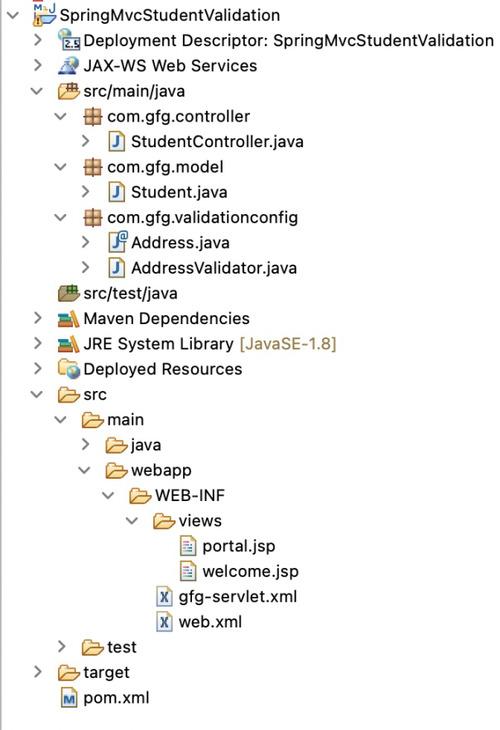
Now, that our Spring MVC project has been completed with all the configuration files and classes. The Structure of your project should look like this:
Open the browser and access:
http://localhost:8080/SpringMvcStudentValidation/welcome
Output:
The image below shows the Student Portal form with fields for entering the first name, last name, roll number, and address
The below image demonstrates the validation errors as per the custom validation.
The below image demonstrates that the form has been filled correctly.
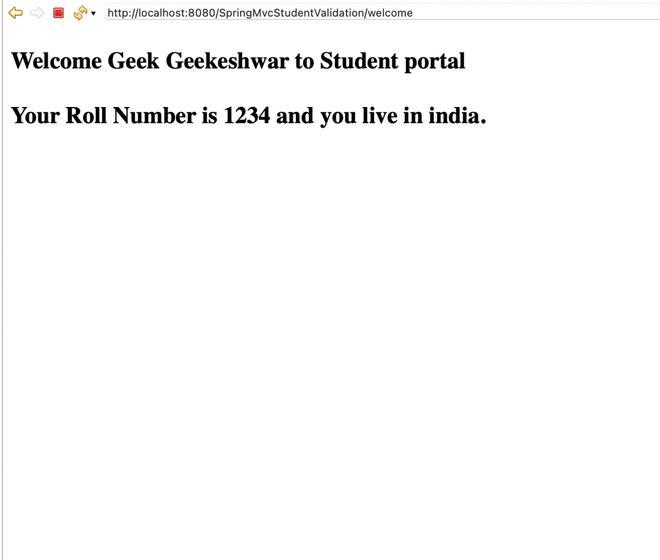
👁 OutputAfter successful form submission and validation, the Welcome page is displayed with a confirmation message, showing the student’s first name, last name, roll number, and address containing “India”.
Explanation: This example shows how Spring MVC processes a student form using built-in and custom validation. The user enters data in the Student Portal form, which is bound to the model object. On submission, Spring validates the input and displays errors if any validation fails. If all data is valid, the controller redirects to the Welcome page showing the submitted details.