|
VOOZH | about |
|
VOOZH | about |
ResultSetExtractor is an interface used to extract data from a ResultSet object returned by executing an SQL query. It is especially useful when mapping an entire ResultSet (multiple rows or nested data) into a single object or collection.
Method Syntax:
query() method syntax:
Execute the following SQL statements to create and populate the Student table.
CREATE TABLE Student (
id INT PRIMARY KEY AUTO_INCREMENT,
name VARCHAR(45) NOT NULL,
department VARCHAR(45) NOT NULL
);
INSERT INTO Student (name, department)
VALUES ('geek', 'computer science');
Include the following dependencies in your pom.xml file.
pom.xml:
Define the model class representing the student entity.
Student.java:
Create a StudentDao interface for database access operations.
Create the implementation class that uses ResultSetExtractor to map query results.
StudentDaoImpl.java:
Add the configuration to application.yml.
application.yml:
spring:
datasource:
url: jdbc:mysql://localhost:3306/school_db
username: root
password: pass
driver-class-name: com.mysql.cj.jdbc.Driver
Create a main class to bootstrap the Spring Boot application.
ResultSetExtractorApplication.java:
Write a simple integration test to verify data fetching.
StudentDaoTest.java:
Run the project using:
mvn spring-boot:run
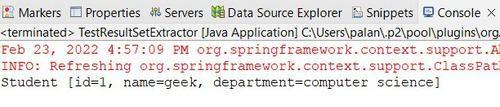
When executed, the console will print the student records retrieved from the database.