|
VOOZH | about |
|
VOOZH | about |
A monthly sales report represents the state of sales activities in a company per month. It helps the sales team to align their efforts effectively. Whether we are a sales leader or manager, metrics play a crucial role in ensuring our company's success. If our data is stored in a database, SQL provides powerful tools to calculate and analyze monthly sales.
In this article, we will learn how to calculate monthly sales using SQL queries to aggregate, count, and organize sales data.
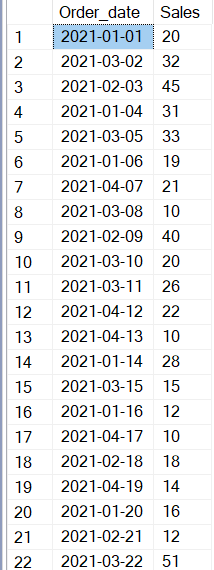
We will use the following sample table named Products, which contains two columns: Order_date and Sales. This table stores the order date and corresponding sales amounts.
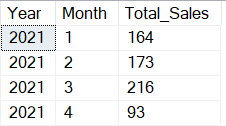
To calculate the monthly sales, we will use the YEAR() and MONTH() functions to extract the year and month from the Order_date column. Then, we group the data by year and month, applying theSUM() function to compute the total sales for each month.
Query:
SELECT YEAR(Order_date) AS Year,
MONTH(Order_date) AS Month,
SUM(Sales) AS Total_Sales
FROM Products
GROUP BY YEAR(Order_date), MONTH(Order_date) ;
Output
Explanation:
In this query, we use the YEAR() and MONTH() functions to extract the year and month from the Order_date column. We then apply SUM() to calculate the total sales for each month, and group the results by year and month.
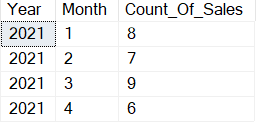
If we want to find the total count of sales for each month (instead of the total sales amount), replace the SUM() function with theCOUNT() function.
Query:
SELECT YEAR(Order_date) AS Year,
 MONTH(Order_date) AS Month,
 COUNT(Sales) AS Count_Of_Sales
FROM Products
GROUP BY YEAR(Order_date), MONTH(Order_date);
Output
COUNT() function counts the number of entries in the Sales column for each month.For a more readable output, we can use the DATENAME() function to display the Month name instead of the numeric month. The DATENAME() function returns a specific part of the date. Here, we used it to return the MONTH part of the Order_date string.
Query:
SELECT YEAR(Order_date) AS Year, DATENAME(MONTH, Order_date)
 AS Month, COUNT(Sales) AS Count_Of_Sales FROM Products
 GROUP BY YEAR(Order_date), DATENAME(MONTH, Order_date);
Output
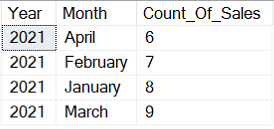
DATENAME() function returns the name of the month (e.g., "January") instead of the month number.YEAR() and DATENAME(MONTH, Order_date) ensures that the output remains accurate while being more readable.To order the results by the Count_Of_Sales in descending order, we can use the ORDER BY clause. This query will show the months with the highest sales count first, allowing us to identify the most successful months.
Query:
SELECT YEAR(Order_date) AS Year, DATENAME(MONTH, Order_date)
AS Month, COUNT(Sales) AS Count_Of_Sales FROM Products GROUP
BY YEAR(Order_date), DATENAME(MONTH, Order_date) ORDER
BY Count_Of_Sales DESC;
Output
| Year | Month | Count_Of_Sales |
|---|---|---|
| 2021 | March | 9 |
| 2021 | January | 8 |
| 2021 | February | 7 |
| 2021 | April | 6 |
Explanation
ORDER BY clause sorts the output in descending order of the Count_Of_Sales column.Calculating and organizing monthly sales in SQL can be done efficiently using the GROUP BY, SUM(), COUNT(), and ORDER BY functions. These techniques allow us to analyze sales data by month, compare sales across months, and create meaningful reports that can drive business decisions. We can also filter data by year or use different aggregate functions to suit our needs. Additionally, using functions like DATENAME() can make reports more user-friendly and readable.