|
VOOZH | about |
|
VOOZH | about |
A stored procedure is a pre-written SQL query that can be called multiple times and will run as the same. Like we can create a Stored procedure for Insert, select, update in SQL database. We can also pass parameters to the Stored procedures.
So, we will create a database first:
Step 1: Creating Database
Query:
CREATE DATABASE GFG;Step 2: Using Database
Query:
USE GFG;Step 3: Create a table
Query:
CREATE TABLE gfgTutorial(
id integer,
Name varchar(20)
);
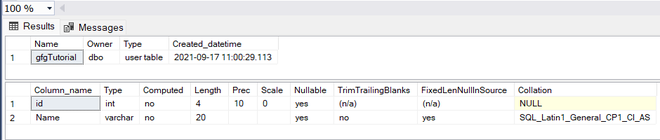
Step 4: Describe the table
Query:
sp_help 'dbo.gfgTutorial';Output:
Step 5: Insert some data into the table
Query:
INSERT INTO [dbo].[gfgTutorial]
 ([id]
 ,[Name])
 VALUES
 (1, 'Devesh')
GO

INSERT INTO [dbo].[gfgTutorial]
 ([id]
 ,[Name])
 VALUES
 (2, 'Geeks')
GO

INSERT INTO [dbo].[gfgTutorial]
 ([id]
 ,[Name])
 VALUES
 (3, 'For')
GO

INSERT INTO [dbo].[gfgTutorial]
 ([id]
 ,[Name])
 VALUES
 (4, 'Geeks')
GO

INSERT INTO [dbo].[gfgTutorial]E
 ([id]
 ,[Name])
 VALUES
 (5, 'GFG')
GO
Step 6: Create a Stored procedure for Select all the rows from a table
Query:
CREATE PROCEDURE select_all_data
AS
BEGIN
 SELECT * FROM gfgTutorial;
END;
GO
Output:
Execute Stored procedure select_all_data
Query:
EXEC select_all_data;
Output:
Now we have seen how to create a basic stored procedure now let's see how to create the parameterized stored procedure
Step 1: Create a parameterized stored procedure to insert data in the table
Query:
CREATE PROCEDURE insertData
 @id INT,
 @Name VARCHAR(30)
AS
BEGIN
 INSERT INTO gfgTutorial (id, Name)
 VALUES (@id, @Name);
END;
GO
Step 2: Execute stored procedure
Query:
EXEC insertData @id = 6, @Name = 'Inserted Name';SELECT * FROM gfgTutorial;