|
VOOZH | about |
|
VOOZH | about |
A nested query (or subquery) is a SQL query written inside another query to solve complex data problems. The inner query executes first and passes its result to the main query.
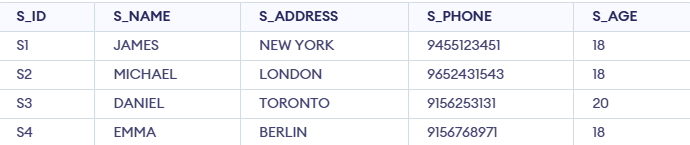
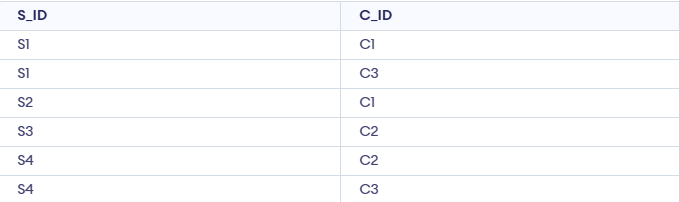
We will use the following sample tables to demonstrate nested queries:
The STUDENT table stores information about students, including their unique ID, name, address, phone number and age.
The COURSE table stores course details, including a unique course ID and course name.
This table maps students to the courses they have enrolled in, with columns for student ID (S_ID) and course ID (C_ID):
There are two primary types of nested queries in SQL:
In an independent nested query, the execution of the inner query is independent of the outer query. The inner query runs first and its result is used directly by the outer query. Operators like IN, NOT IN, ANY and ALL are commonly used with independent nested query.
In this example, we will find the S_IDs of students who are enrolled in the courses ‘DSA’ or ‘DBMS’. We can break the query into two parts:
Step 1: Find the C_IDs of the courses:
This query retrieves the IDs of the courses named 'DSA' or 'DBMS' from the COURSE table.
SELECT C_ID FROM COURSE WHERE C_NAME IN ('DSA', 'DBMS');Output:
Step 2: Use the result of Step 1 to find the corresponding S_IDs:
The inner query finds the course IDs and the outer query retrieves the student IDs associated with those courses from the STUDENT_COURSE table.
SELECT S_ID FROM STUDENT_COURSE
WHERE C_ID IN (
 SELECT C_ID FROM COURSE WHERE C_NAME IN ('DSA', 'DBMS')
);
Output
Explanation: The inner query finds the course IDs of DSA and DBMS. The outer query then retrieves the student IDs enrolled in those courses.
In correlated nested queries, the inner query depends on the outer query for its execution. For each row processed by the outer query, the inner query is executed. This means the inner query references columns from the outer query. The EXISTS keyword is often used with correlated queries.
Example 2: Using EXISTS
In this Example, we will find the names of students who are enrolled in the course with C_ID = 'C1':
SELECT S_NAME FROM STUDENT S
WHERE EXISTS (
 SELECT 1 FROM STUDENT_COURSE SC
 WHERE S.S_ID = SC.S_ID AND SC.C_ID = 'C1'
);
Output
Explanation: For each student, the inner query checks if they are enrolled in C1. If yes, that student’s name is returned.
SQL provides several operators that can be used with nested queries to filter, compare and perform conditional checks.
The IN operator is used to check whether a column value matches any value in a list of values returned by a subquery. This operator simplifies queries by avoiding the need for multiple OR conditions.
Example: Retrieve student names who enrolled in ‘DSA’ or ‘DBMS’:
SELECT S_NAME FROM STUDENT
WHERE S_ID IN (
 SELECT S_ID FROM STUDENT_COURSE
 WHERE C_ID IN (
 SELECT C_ID FROM COURSE WHERE C_NAME IN ('DSA', 'DBMS')
 )
);
Output
Explanation:
The NOT IN operator excludes rows based on a set of values from a subquery. It is particularly useful for filtering out unwanted results. This operator helps identify records that do not match the conditions defined in the subquery.
Example: Retrieve student IDs not enrolled in ‘DSA’ or ‘DBMS’:
SELECT S_ID FROM STUDENT
WHERE S_ID NOT IN (
 SELECT S_ID FROM STUDENT_COURSE
 WHERE C_ID IN (
 SELECT C_ID FROM COURSE WHERE C_NAME IN ('DSA', 'DBMS')
 )
);
Output:
Explanation:
The ANY operator compares a value with any value returned by a subquery. If at least one comparison is true, the condition is satisfied. It is commonly used with comparison operators such as =, >, <, >=, <=, and <>. The ANY operator returns true if the condition holds for one or more values in the subquery result.
Example: Retrieve student names whose age is greater than at least one student from
SELECT S_NAME
FROM Student_Details s
WHERE EXISTS (
 SELECT 1
 FROM Student_Details d
 WHERE d.S_ADDRESS = 'LONDON'
 AND s.S_AGE > d.S_AGE
);
Output
Explanation:
It compares a value with all values returned by the subquery. The condition is satisfied only if it is true for every value.
Example: Retrieve student names whose age is greater than all students from London
SELECT S_NAME
FROM Student_Details
WHERE S_AGE > (
 SELECT MAX(S_AGE)
 FROM Student_Details
 WHERE S_ADDRESS = 'London'
);
Output:
Explanation: