|
VOOZH | about |
|
VOOZH | about |
Relationships in SQL define how tables in a relational database are connected and interact through foreign keys, ensuring data integrity and enabling efficient data retrieval by allowing data to be linked across multiple tables.
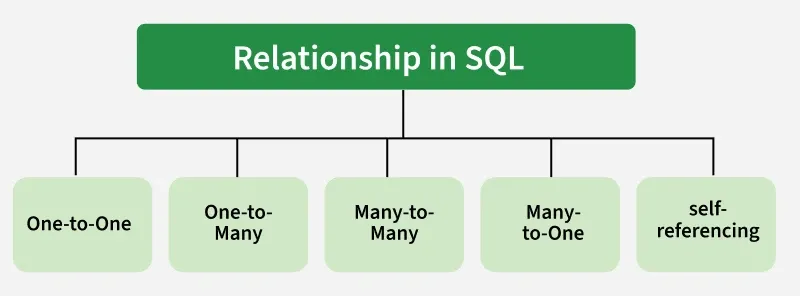
There are different types of relationships: one-to-one, one-to-many, many-to-many, and self-referencing.
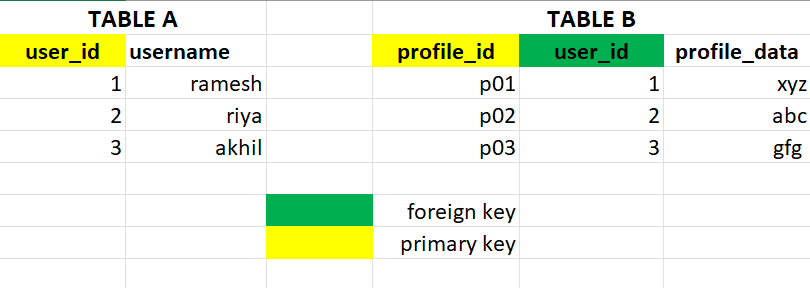
Each record in Table A is associated with one and only one record in Table B, and vice versa.
CREATE TABLE users (
 user_id INT PRIMARY KEY,
 username VARCHAR(50));
CREATE TABLE user_profiles (
 profile_id INT PRIMARY KEY,
 user_id INT UNIQUE,
 profile_data VARCHAR(255),
 FOREIGN KEY (user_id) REFERENCES users(user_id));
Output:
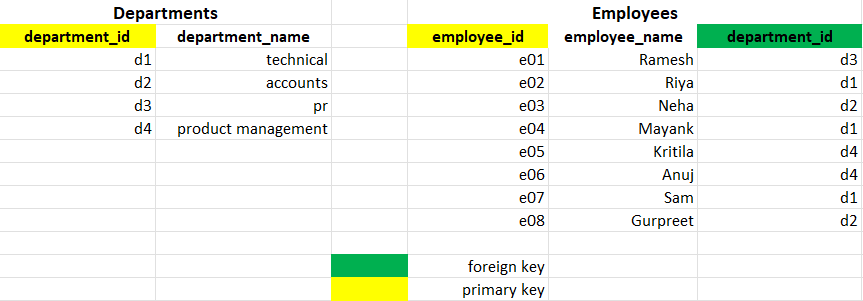
Each record in Table A can be associated with multiple records in Table B, but each record in Table B is associated with only one record in Table A.
CREATE TABLE departments (
 department_id INT PRIMARY KEY,
 department_name VARCHAR(50));
CREATE TABLE employees (
 employee_id INT PRIMARY KEY,
 employee_name VARCHAR(50),
 department_id INT,
 FOREIGN KEY (department_id) REFERENCES departments(department_id));
Output:
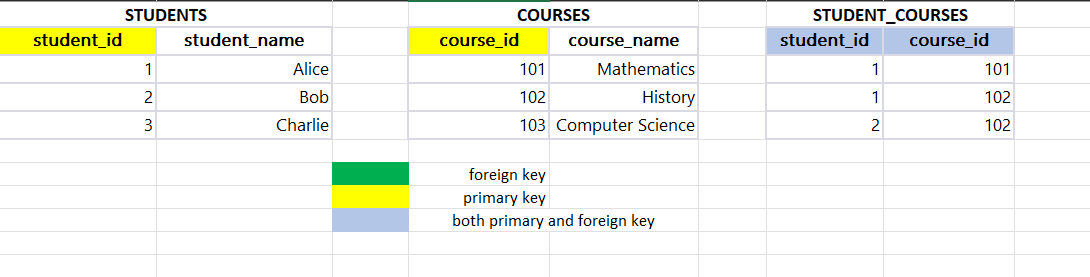
Each record in Table A can be associated with multiple records in Table B, and vice versa.
CREATE TABLE students (
 student_id INT PRIMARY KEY,
 student_name VARCHAR(50));
CREATE TABLE courses (
 course_id INT PRIMARY KEY,
 course_name VARCHAR(50));
CREATE TABLE student_courses (
 student_id INT,
 course_id INT,
 PRIMARY KEY (student_id, course_id),
 FOREIGN KEY (student_id) REFERENCES students(student_id),
 FOREIGN KEY (course_id) REFERENCES courses(course_id));
Output:
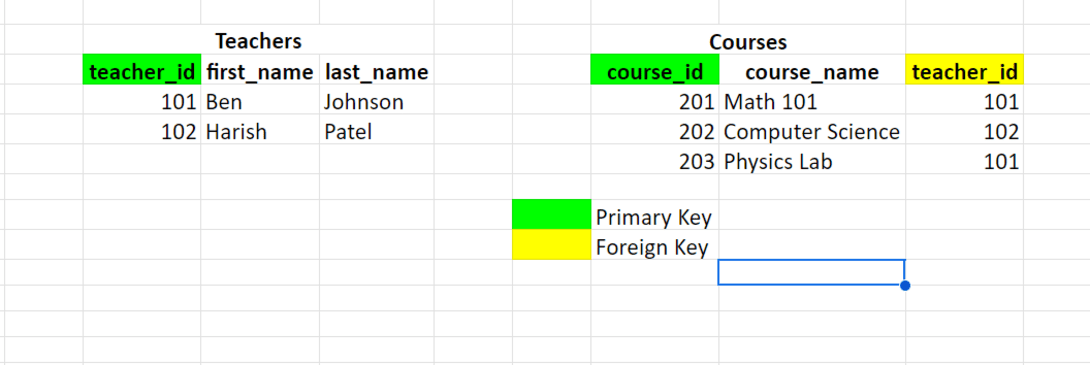
Multiple records in table B can be associated with one record in table A.
CREATE TABLE Teachers (
 teacher_id INT PRIMARY KEY,
 first_name VARCHAR(255),
 last_name VARCHAR(255)
);
CREATE TABLE Courses (
 course_id INT PRIMARY KEY,
 course_name VARCHAR(255),
 teacher_id INT,
 FOREIGN KEY (teacher_id) REFERENCES Teachers(teacher_id)
);
Output:
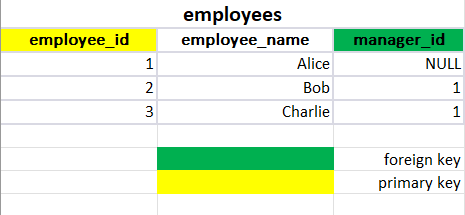
A table has a foreign key that references its primary key.
CREATE TABLE employees (
 employee_id INT PRIMARY KEY,
 employee_name VARCHAR(50),
 manager_id INT,
 FOREIGN KEY (manager_id) REFERENCES employees(employee_id));
Output: