|
VOOZH | about |
|
VOOZH | about |
SQL clauses are the core components of SQL queries that define how data is retrieved, filtered, grouped, and organized from a database. These clauses work alongside SELECT, UPDATE, DELETE, and INSERT queries to refine results and ensure efficient data handling.
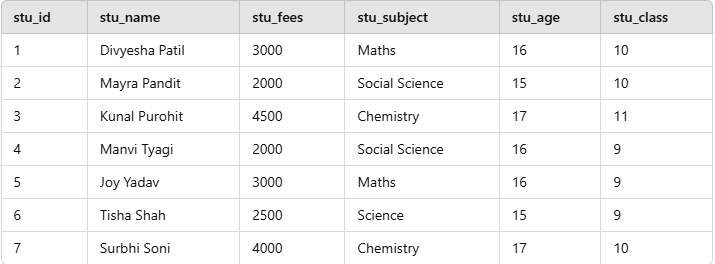
Consider the below Students table, which is used as a reference for all the examples that are mentioned below. The Students table contains information about students, including their ID, name, fees, subject, age, and class. This table helps in performing various SQL operations such as filtering, grouping, and sorting records.
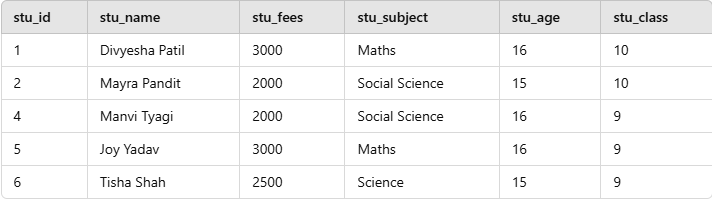
The WHERE clause is used to filter records that meet a specific condition. In this example, we retrieve students whose fees are less than 3500.
Query:
SELECT * FROM Students
WHERE stu_fees < 3500;
Output:
Explanation:
stu_fees is less than 3500. The GROUP BY clause is used to group records with the same values in a column and perform aggregate functions such as SUM(), COUNT(), etc. This example calculates the total student fees per class.
Query:
SELECT stu_class, SUM(stu_fees) AS total_fees
FROM Students
GROUP BY stu_class;
Output:
| stu_class | total_fees |
|---|---|
| 10 | 9000 |
| 11 | 4500 |
| 9 | 7500 |
Explanation:
stu_class.SUM(stu_fees) function.The ORDER BY clause is used to sort query results in ascending or descending order. This example sorts students by their fees in ascending order.
Query:
SELECT * FROM Students
ORDER BY stu_fees ASC;
Output:
| stu_id | stu_name | stu_fees | stu_subject | stu_age | stu_class |
|---|---|---|---|---|---|
| 2 | Mayra Pandit | 2000 | Social Science | 15 | 10 |
| 4 | Manvi Tyagi | 2000 | Social Science | 16 | 9 |
| 6 | Tisha Shah | 2500 | Science | 15 | 9 |
| 1 | Divyesha Patil | 3000 | Maths | 16 | 10 |
| 5 | Joy Yadav | 3000 | Maths | 16 | 9 |
| 7 | Surbhi Soni | 4000 | Chemistry | 17 | 10 |
| 3 | Kunal Purohit | 4500 | Chemistry | 17 | 11 |
Explanation:
The HAVING clause filters groups created by the GROUP BY clause, working on aggregate values (like sums or counts). It is essentially the WHERE clause for groups, applied after the aggregation is performed.
Query:
SELECT stu_subject, COUNT(*) AS num_students
FROM Students
GROUP BY stu_subject
HAVING COUNT(*) > 1;
Output:
| stu_subject | num_students |
|---|---|
| Maths | 2 |
| Social Science | 2 |
| Chemistry | 2 |
Used to limit the number of rows returned.
Query:
SELECT stu_name, stu_fees
FROM Students
ORDER BY stu_fees DESC
LIMIT 3;
Output:
| stu_name | stu_fees |
|---|---|
| Kunal Purohit | 4500 |
| Surbhi Soni | 4000 |
| Divyesha Patil | 3000 |
The FROM clause is mandatory in a SELECT statement to specify the table you are retrieving data from.
Query:
SELECT stu_name, stu_class, stu_age
FROM Students_Table;
Output:
stu_name | stu_class | stu_age |
|---|---|---|
Divyesha Patil | 10 | 16 |
Mayra Pandit | 10 | 15 |
Kunal Purohit | 11 | 17 |
Manvi Tyagi | 9 | 16 |
Joy Yadav | 9 | 16 |
Tisha Shah | 9 | 15 |
Surbhi Soni | 10 | 17 |
The LIKE operator is used within a WHERE clause to search for a specified pattern in a column. It is typically used with wildcards such as:
SELECT stu_name, stu_subject FROM
Students_Table WHERE stu_name LIKE '%Patil';
Output:
stu_name | stu_subject |
|---|---|
Divyesha Patil | Maths |
The AND logical operator combines multiple conditions in a WHERE clause, and a record is only included if all conditions are true.
Query:
SELECT stu_name, stu_class, stu_age FROM
Students_Table WHERE stu_class = 9 AND stu_age = 16;
Output:
stu_name | stu_class | stu_age |
|---|---|---|
Manvi Tyagi | 9 | 16 |
Joy Yadav | 9 | 16 |
| Clause | Description |
|---|---|
| WHERE | The WHERE clause is used to filter records based on specific conditions. It is typically used in SELECT, UPDATE, and DELETE queries to restrict the data that is affected by these statements. For example, retrieving all employees with a salary above 50,000. |
| ORDER BY | The ORDER BY clause is used to sort the query results in either ascending or descending order. It is commonly used with numeric, date, and text fields to organize data meaningfully, such as sorting employees by their joining date. |
| GROUP BY | The GROUP BY clause groups records with the same values in specified columns and is used with aggregate functions like COUNT(), SUM(), AVG(), etc. For example, calculating total sales per region. |
| HAVING | The HAVING clause is similar to WHERE but is used to filter grouped records. It is used with GROUP BY to apply conditions on aggregated results, such as filtering groups where the total revenue exceeds a certain amount. |
| LIMIT | The LIMIT clause restricts the number of rows returned in a query result. This is especially useful in large databases where retrieving all records could be inefficient. For example, fetching the top 5 highest-paid employees. |
| TOP | The TOP clause, similar to LIMIT, is used in SQL Server to limit the number of rows returned. It helps in retrieving a specific subset of records efficiently. |
| LIKE | The LIKE clause filters results using pattern matching with wildcards (% for multiple characters and _ for a single character). It is useful for searching partial matches in text fields, such as finding all customers whose names start with 'J'. |
| FROM | The FROM clause specifies the database table from which records will be retrieved. It is a fundamental part of SQL queries as it defines the source of data for SELECT, DELETE, and UPDATE statements. |
| AND | The AND clause is used to combine multiple conditions in a query, ensuring that all conditions must be met. It is useful in complex filtering scenarios, such as retrieving employees who work in a specific department and have a salary above 60,000. |
| OR | The OR clause is used to combine multiple conditions where at least one must be true. It is useful when searching for multiple criteria, such as retrieving customers from either New York or Los Angeles. |