|
VOOZH | about |
|
VOOZH | about |
Cloning or copying a table in SQL is used to create a duplicate of an existing table for various purposes.
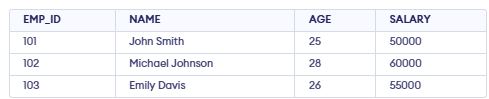
Example: First, we will create a demo SQL database and table, on which we will use the Cloning command.
👁 Screenshot-2026-01-19-152855Query:
CREATE TABLE EMPLOYEE_COPY AS
SELECT * FROM EMPLOYEE;
Output:
👁 Screenshot-2026-01-19-153006There are three different methods to create a clone table in SQL:
The following STUDENT table is used to demonstrate table cloning, with sample records added for illustration.
👁 Screenshot-2026-01-19-153308In this method, the clone table creates a copy of the original table’s structure and data, but constraints like primary keys, unique keys, and auto-increment properties are not preserved.
Syntax
CREATE TABLE clone_table SELECT * FROM original_table;Example: Let us see the example to understand how simple cloning syntax works.
Query:
CREATE TABLE STUDENT_COPY AS SELECT * FROM STUDENT;
SELECT * FROM STUDENT_COPY;
Output:
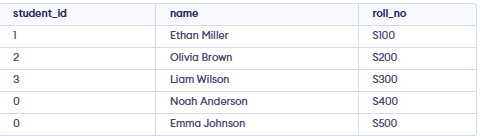
👁 Screenshot-2026-01-19-153401Simple SQL cloning may not preserve unique constraints and auto-increment settings, which can affect data integrity. Reapply them manually after cloning if needed.
Query:
INSERT INTO STUDENT_COPY VALUES
(0, 'Noah Anderson', 'S400'),
(0, 'Emma Johnson', 'S500');
Output:
👁 Screenshot-2026-01-19-155803Shallow cloning creates a new table with the same structure as the original table but without copying any data. It preserves constraints such as primary keys, unique keys, indexes, and auto-increment settings.
Syntax:
CREATE TABLE clone_table LIKE original_table;Query:
CREATE TABLE STUDENT_SHALLOW_CLONE LIKE STUDENT;
SELECT * FROM STUDENT_SHALLOW_CLONE;
Output:
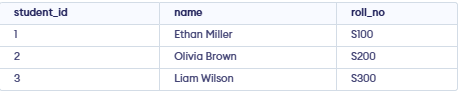
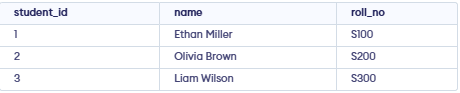
👁 Screenshot-2026-01-19-160048Insert Data into Shallow Clone:
INSERT INTO STUDENT_SHALLOW_CLONE (name, roll_no)
VALUES ('Ethan Miller', 'S100');

INSERT INTO STUDENT_SHALLOW_CLONE (name, roll_no)
VALUES ('Olivia Brown', 'S200');

INSERT INTO STUDENT_SHALLOW_CLONE (name, roll_no)
VALUES ('Liam Wilson', 'S300');
Output:
👁 Screenshot-2026-01-19-160048Deep cloning creates a copy of a table along with all its data, preserving both the structure and records of the original table.
Syntax:
CREATE TABLE clone_table LIKE original_table;
INSERT INTO clone_table SELECT * FROM original_table;
Query:
CREATE TABLE STUDENT_DEEP_CLONE LIKE STUDENT;
INSERT INTO STUDENT_DEEP_CLONE SELECT * FROM STUDENT;
SELECT * FROM STUDENT_DEEP_CLONE;
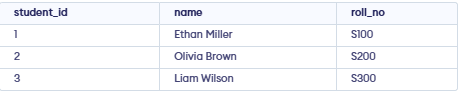
Output:
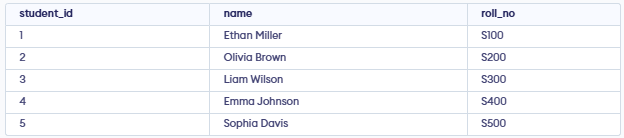
👁 Screenshot-2026-01-19-160048The output of the "STUDENT_DEEP_CLONE" is exactly the same as the "STUDENT" table. We can add new entries to the deep clone table to confirm the preservation of constraints:
INSERT INTO STUDENT_DEEP_CLONE (name, roll_no)
VALUES ('Emma Johnson', 'S400');

INSERT INTO STUDENT_DEEP_CLONE (name, roll_no)
VALUES ('Sophia Davis', 'S500');

SELECT * FROM STUDENT_DEEP_CLONE;
Output:
👁 Screenshot-2026-01-19-161217To better understand table cloning methods, see our detailed comparison of Shallow Cloning and Deep Cloning in SQL.