|
VOOZH | about |
|
VOOZH | about |
The SQL DROP DATABASE statement permanently deletes a database and all its objects such as tables, views, indexes and stored procedures from the DBMS. This action is irreversible, so it is important to back up the database beforehand. The command is typically used when a database is no longer needed or during system reorganization. Only users with administrative privileges can execute it.
Syntax
DROP DATABASE IF EXISTS Database_Name;To demonstrate the functionality of the SQL DROP DATABASE command, Let's look at some examples of the DROP DATABASE statement in SQL
First, let's create a database on which we will run the query. This will allow us to perform operations and test the SQL DROP DATABASE command.
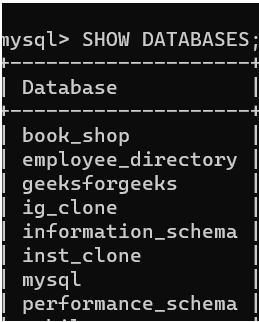
CREATE DATABASE GeeksForGeeks;To confirm that the GeeksForGeeks database was successfully created, use the following command to list all databases:
Query:
SHOW DATABASES;Output
Now that the database is confirmed to exist, let’s use the DROP DATABASE command, to delete the database 'GeeksforGeeks'.
Query:
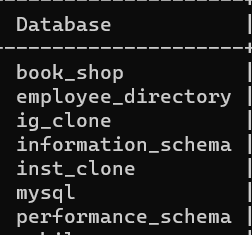
DROP DATABASE GeeksForGeeks;After the database has been deleted/dropped successfully we will now verify that whether the database exist in the system or not. So, we will once again use the SHOW DATABASES command and verify that the GeeksForGeeks database has been deleted or not.
Query:
SHOW DATABASES;To avoid any error while running the DROP DATABASE command use the IF EXISTS clause, which will delete the database only if it exists in the system.
Example:
DROP DATABASE IF EXISTS GeeksForGeeks;This command will check if the database exists before attempting to drop it, making it safer to run in scripts or on production systems.