|
VOOZH | about |
|
VOOZH | about |
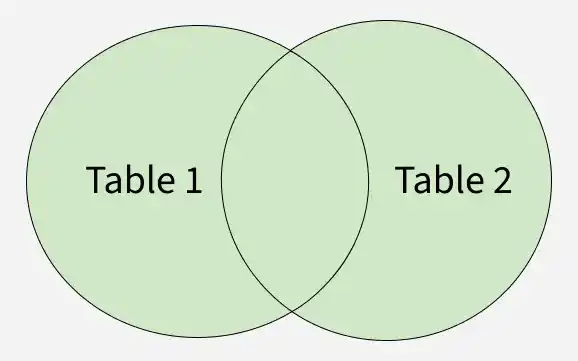
The FULL JOIN (or FULL OUTER JOIN) in SQL returns all rows from both tables, combining matched rows and filling unmatched rows with NULL values. It is basically the combination of LEFT JOIN and RIGHT JOIN.
Syntax:
SELECT columns
FROM table1
FULL JOIN table2
ON table1.column = table2.column;
Parameters:
This query retrieves all records from both table1 and table2, returning NULL where there are no matches.
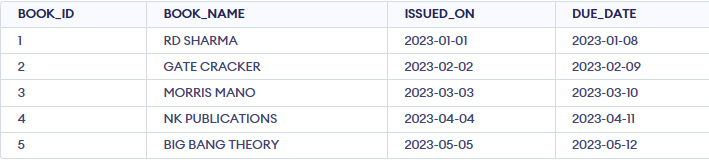
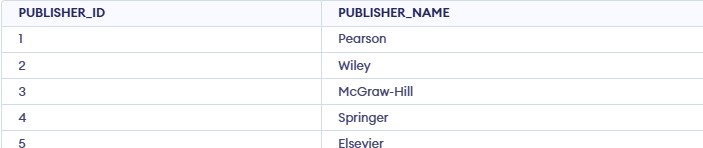
Let's look at some examples of the FULL JOIN in SQL and understand it's working. First, let's create a demo database and two tables on which we will perform the JOIN.
In this example, we perform a FULL JOIN across the Books, Authors and Publishers tables to combine all related records into a single result set.
Query:
SELECT
 b.BOOK_ID,
 b.BOOK_NAME,
 a.AUTHOR_NAME,
 p.PUBLISHER_NAME
FROM Books b
FULL JOIN Authors a
 ON b.AUTHOR_ID = a.AUTHOR_ID
FULL JOIN Publishers p
 ON b.PUBLISHER_ID = p.PUBLISHER_ID;
Output:
Now, we want to filter the results from the above join based on a specific condition. We will select only books that have "Sharma" in the book name.
Query:
SELECT
 b.BOOK_ID,
 b.BOOK_NAME,
 a.AUTHOR_NAME,
 p.PUBLISHER_NAME
FROM Books b
FULL JOIN Authors a ON b.BOOK_ID = a.AUTHOR_ID
FULL JOIN Publishers p ON b.BOOK_ID = p.PUBLISHER_ID
WHERE b.BOOK_NAME LIKE '%Sharma%';
Output: