|
VOOZH | about |
|
VOOZH | about |
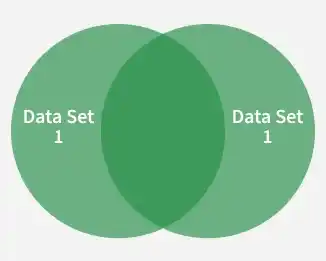
The INTERSECT operator in SQL is used to return only the records that appear in both of two SELECT query results. It acts like the intersection of two sets, showing only the common rows shared between them.
Example: First, we will create a demo SQL database and table, on which we will use the INTERSECT Clause command.
Query:
SELECT Name FROM Emp1
INTERSECT
SELECT Name FROM Emp2;
Output:
Syntax:
SELECT column1 , column2 ....
FROM table1
WHERE condition
INTERSECT
SELECT column1 , column2 ....
FROM table2
WHERE condition
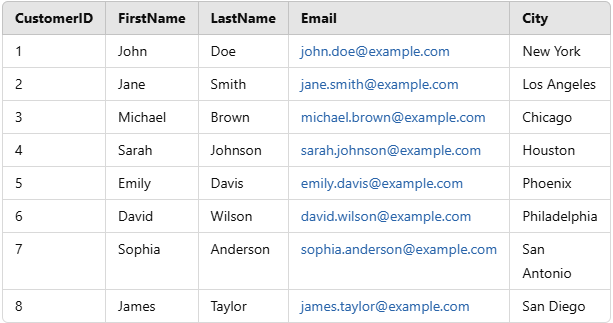
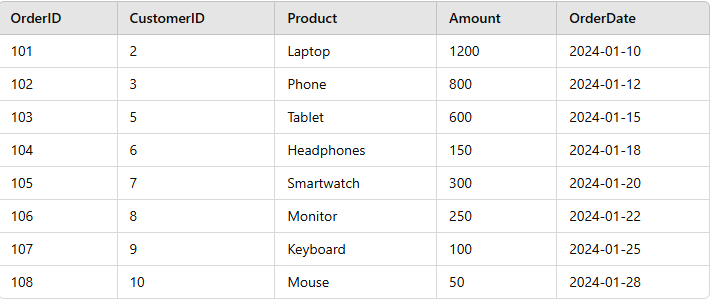
Let’s consider two tables: the Customers table, which holds customer details, and the Orders table, which contains information about customer purchases. By applying the INTERSECT operator, we can retrieve customers who exist in both tables, meaning those who have made purchases.
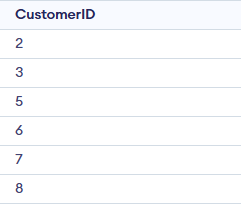
In this example, we retrieve customers who exist in both the Customers and Orders tables. The INTERSECT operator ensures that only those customers who have placed an order appear in the result.
Query:
SELECT CustomerID
FROM Customers
INTERSECT
SELECT CustomerID
FROM Orders;
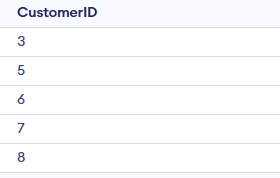
Output:
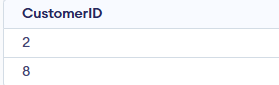
In this example, we apply the INTERSECT operator along with the BETWEEN condition to filter records based on a specified range. The query retrieves customers whose CustomerID falls between 3 and 8 and who have placed an order. The result contains only the common CustomerID values that meet both conditions.
Query:
SELECT CustomerID
FROM Customers
WHERE CustomerID BETWEEN 3 AND 8
INTERSECT
SELECT CustomerID
FROM Orders;
Output:
In this example, we use the INTERSECT operator along with the LIKE operator to find common customers whose FirstName starts with the letter 'J' in both the Customers and Orders tables.
Query:
SELECT CustomerID
FROM Customers
WHERE FirstName LIKE 'J%'
INTERSECT
SELECT CustomerID
FROM Orders;
Output:
Note:
- Both SELECT queries must return the same number of compatible columns.
- Can be slower on large datasets; indexing helps.
- Treats NULL values as equal.
- In databases without INTERSECT, use INNER JOIN as an alternative.