|
VOOZH | about |
|
VOOZH | about |
The SQL LIMIT clause is used to control the number of records returned by a query. It helps you retrieve only a specific portion of data instead of the entire result set, which is especially useful when working with large databases.
Example: First, we will create a demo SQL database and table, on which we will use the LIMIT Clause command.
Query:
SELECT *
FROM Employees
LIMIT 2;
Output:
Syntax:
SELECT column1, column2, ...
FROM table_name
WHERE condition
ORDER BY column
LIMIT [offset,] row_count;
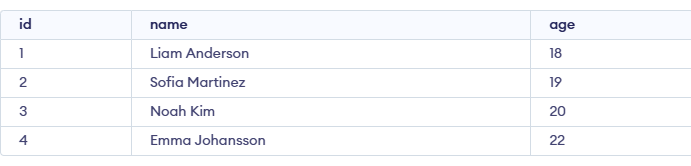
Let's look at some examples of the LIMIT clause in SQL to understand it's working. Imagine we have a Student table with a list of students and we just want to retrieve the first 3 students from the table. Here's how you can do that using LIMIT:
Student Table:
Query:
SELECT * FROM student
LIMIT 3;
Output:
In this example, we will use the LIMIT clause with ORDER BY clause to retrieve the top 3 students sorted by their age. The LIMIT operator can be used in situations like these, where we need to find the top 3 students in a class and do not want to use any conditional statements.
Query:
SELECT * FROM Student
ORDER BY age DESC
LIMIT 3;
Output:
The OFFSET clause skips a specified number of rows before displaying the result. It is used with the ORDER BY clause.
Syntax:
SELECT * FROM table_name ORDER BY column_name LIMIT X OFFSET Y; OR
SELECT * FROM table_name ORDER BY column_name LIMIT Y,X; Imagine we have a list of students, but we want to skip the first 2 rows and fetch the next 2 students based on their age.
Query:
SELECT *
FROM Student
ORDER BY age
LIMIT 2 OFFSET 2;
Output:
Now we will look for LIMIT use in finding highest or lowest value we need to retrieve the rows with the nth highest or lowest value. In that situation, we can use the subsequent LIMIT clause to obtain the desired outcome.
Syntax:
SELECT column_list
FROM table_name
ORDER BY expression [ASC | DESC]
LIMIT n-1, 1;
Let’s say we want to find the third-highest age from your Student table. We can do this using LIMIT along with ORDER BY.
Query:
SELECT age FROM Student
ORDER BY DESC age
LIMIT 2, 1;
Output:
Explanation:
LIMIT 2) and retrieves the next one (LIMIT 2,1).The WHERE clause can also be used with LIMIT. It produces the rows that matched the condition after checking the specified condition in the table.
For example, let's say we want to find the youngest student with an ID less than 4.
Query:
SELECT age
FROM Student
WHERE id<4
ORDER BY age
LIMIT 2, 1;
Output:
There are several limitations of SQL LIMIT. The following situations do not allow the LIMIT clause to be used: