|
VOOZH | about |
|
VOOZH | about |
The MIN() function in SQL returns the smallest value from a specified column or expression. It is widely used in data analysis to identify minimum numeric, date, or string values while automatically ignoring NULL values.
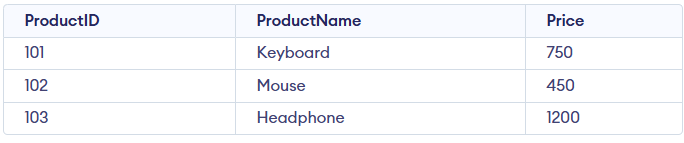
Example: First, we create a demo SQL database and table, on which we use the MIN() functions.
Query:
SELECT MIN(Price) AS LowestPrice
FROM Products;
Syntax:
SELECT MIN(column_name)
FROM table_name;
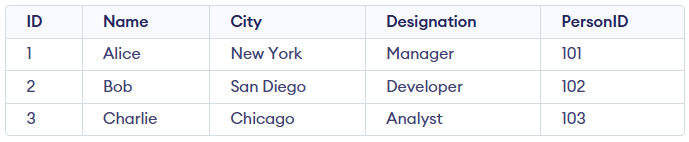
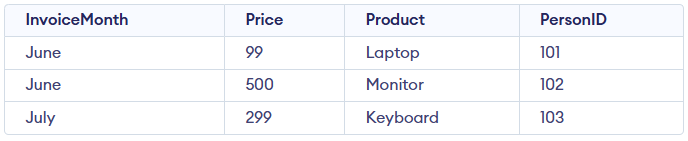
In this section, we will demonstrate the MIN() function using two sample tables Employee and Sales; consider these tables for the examples below:
To determine the smallest invoice price processed in a specific month. This query is particularly useful when analyzing monthly trends or identifying the least expensive transaction in a given period.
Query:
SELECT MIN(price) AS [Lowest Invoice]
FROM Sales
WHERE InvoiceMonth = 'July';
Output:
The IN clause allows for filtering data across multiple specified values, making it convenient to analyze trends or minimum values across a range of categories or time periods.
Query:
SELECT MIN(price) AS [Lowest Invoice]
FROM Sales
WHERE InvoiceMonth IN ('June', 'July');
Output:
The GROUP BY clause groups rows by columns, and with MIN() it returns the smallest value in each group, useful for finding the lowest amounts across categories, periods, or regions.
The GROUP BY clause is useful when we need to aggregate data into meaningful groups, such as months, categories, or regions, and perform calculations like finding the minimum value within each group.
Query:
SELECT InvoiceMonth, MIN(price) AS [Lowest Invoice]
FROM Sales
GROUP BY InvoiceMonth;
Output:
This query demonstrates how filtering and grouping work together: WHERE narrows the data, and GROUP BY analyzes the filtered groups.
Query:
SELECT InvoiceMonth, MIN(price) AS [Lowest Invoice]
FROM Sales
WHERE InvoiceMonth IN ('June', 'July')
GROUP BY InvoiceMonth;
Output:
The ORDER BY clause is used to sort query results in ascending or descending order. When paired with the MIN() function, it helps prioritize groups based on their smallest values, making the output more organized and easier to interpret.
To sort groups by their minimum invoice price in ascending order, the query uses the combination of GROUP BY and ORDER BY clauses:
Query:
SELECT InvoiceMonth, MIN(price) AS [Lowest Invoice]
FROM Sales
GROUP BY InvoiceMonth
ORDER BY MIN(price);
Output:
The HAVING clause is used to filter grouped data based on aggregate conditions. Unlike WHERE, which filters rows before grouping, HAVING applies conditions after the groups are formed. This method is effective for pinpointing groups that meet specific aggregate conditions.
This query filters groups where the smallest invoice price exceeds $150.
Query:
SELECT InvoiceMonth, MIN(price) AS [Lowest Invoice]
FROM Sales
GROUP BY InvoiceMonth
HAVING MIN(price) > 150;
Output:
This query filters groups where the smallest invoice price is below $150.
Query:
SELECT InvoiceMonth, MIN(price) AS [Lowest Invoice]
FROM Sales
GROUP BY InvoiceMonth
HAVING MIN(price) < 150;
Output:
The MIN() function can be combined with other aggregate functions such as MAX(), AVG(), and SUM() to generate a more comprehensive view of your data. This approach helps in summarizing key metrics in a single query.
This query calculates the lowest, highest, average, and total invoice amounts for each month.
Query:
SELECT InvoiceMonth,
 MIN(price) AS [Lowest Invoice],
 MAX(price) AS [Highest Invoice],
 AVG(price) AS [Average Invoice],
 SUM(price) AS [Total Invoice]
FROM Sales
GROUP BY InvoiceMonth;
Output:
Subqueries can be used with the MIN() function to fetch detailed information about the record that has the smallest value in a column. This technique is useful for isolating specific rows based on aggregate results.
This query retrieves the complete record associated with the lowest invoice price.
Query:
SELECT *
FROM Sales
WHERE price = (SELECT MIN(price) FROM Sales);
Output:
The MIN() function can be directly used within the WHERE clause to filter rows based on the smallest value in a column. This approach allows precise targeting of records that match specific criteria.
This query retrieves detailed information about the invoice associated with the lowest price.
Query:
SELECT e.Name, e.City, e.Designation, s.InvoiceMonth, s.Price, s.Product
FROM Sales AS s
JOIN Employee AS e
ON e.ID = s.PersonID
WHERE s.Price = (SELECT MIN(price) FROM Sales);
Output: