|
VOOZH | about |
|
VOOZH | about |
Relational databases play an important role in managing data, especially during complex operations like updates and deletions. To maintain data integrity, it is essential to back up tables before making changes. SQL backup tables ensure the safety of the original dataset, allow for data recovery, and facilitate safe experimentation.
Backup tables are essential during complex data changes or migrations because they let us safely restore the original data if something goes wrong. Here are the key reasons why creating them is essential:
We will be using the following table "Student Information" which consists of data of Geeks who enrolled in our DSA course as shown below:
| ID | Age | Student Name | Sex |
|---|---|---|---|
| 1 | 22 | Harry | Male |
| 2 | 23 | Vishal | Male |
| 3 | 20 | Snehal | Female |
| 4 | 25 | Ram | Male |
| 5 | 24 | Hina | Female |
We can create a backup of a table by creating a duplicate or copy of original database. This is particularly useful for preserving the original table before performing updates, deletions, or other modifications. Below is a detailed explanation of the syntax and terms used for this operation.
Syntax
CREATE TABLE Table_Name AS SELECT * FROM Source_Table_Name;
Key Terms
Creating backup tables in SQL can involve duplicating all data, copying specific columns, or even creating an empty table with the same structure. Let's look at some examples on how to copy/duplicate table in SQL to create a backup table in different scenarios:
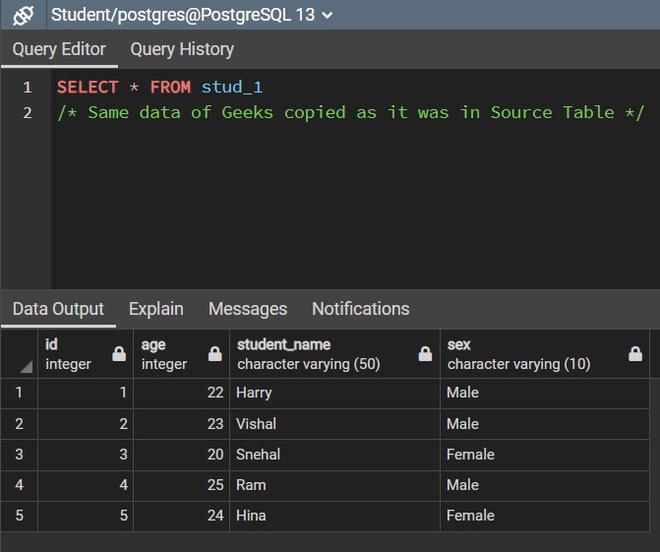
In this example, we will create a backup table "stud_1" of "student_information" table by creating a copy of "student_information" table that duplicates all columns and their data..
Query:
CREATE TABLE stud_1 AS SELECT * FROM student_information;
SELECT * FROM stud_1;
Output
In this example, we create a backup table, "stud_2", by copying only selected columns from the "student_information" table using a SELECT statement.
Query:
CREATE TABLE stud_2 AS
SELECT id,student_name FROM student_information;
SELECT * FROM stud_2;
Output
Till now we have seen how to create a clone of the source table. In the above backup table, the data is also copied along with the table. However, we can also create a backup table without copying the data.
So, to create a table without any data being copied we can use the WHERE clause which needs to return a FALSE value. For example, we can use WHERE 2<2 or WHERE 1=2.
In this example, we will create a backup table "geeks_student" of "student_information" table by creating a copy of "student_information" table and copying its all columns without data.
Query:
CREATE TABLE geeks_student AS SELECT * FROM student_information
WHERE 1!=1;
SELECT * FROM geeks_student;
Output
In this example, we will create a backup table "geek_student" of "student_information" table by creating a copy of "student_information" table and copying specific columns without data.
Query:
CREATE TABLE specific_empty_backup AS
SELECT ID, Student_Name FROM student_information WHERE 1=2;
SELECT * FROM specific_empty_backup;
Output
CREATE TABLE AS SELECTWhile convenient, CREATE TABLE AS SELECT has key limitations:
To copy the structure of a table along with its constraints, the CREATE TABLE AS SELECT statement is not sufficient. Instead, we need to define the table structure manually and then copy the data.
CREATE TABLE student_backup AS SELECT * FROM student_information;ALTER TABLE student_backup ADD PRIMARY KEY (ID);CREATE TABLE student_backup (
ID INT PRIMARY KEY,
Age INT,
Student_Name VARCHAR(50),
Sex VARCHAR(10)
);
INSERT INTO student_backup SELECT * FROM student_information;Creating backup tables in SQL is an essential practice for ensuring data integrity, facilitating disaster recovery, and safely experimentation without compromising the original data. While the CREATE TABLE AS SELECT statement is a quick and convenient method, it has limitations such as the exclusion of constraints, indexes, and triggers. For a more complete backup, manual intervention is required to replicate the full structure of the original table.