|
VOOZH | about |
|
VOOZH | about |
Counting rows in a database table is a fundamental operation in SQL that helps developers and analysts understand the size and structure of their datasets. Whether we're building reports, analyzing trends, or debugging data inconsistencies, the COUNT() function in SQL is an essential tool to streamline these tasks.
In this article, we will explore various ways to use the COUNT() function to count rows in SQL tables, with practical examples and clear explanations. By the end of this article, we'll be equipped with the knowledge to efficiently count rows in your database and make informed decisions.
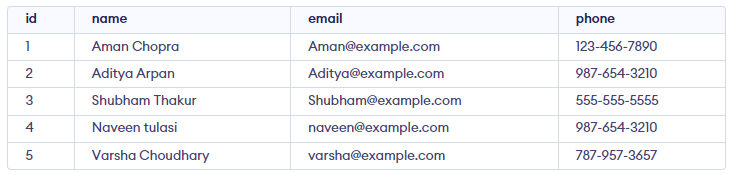
In this example, we will create a demo database and table and then write an SQL query to get the total number of rows in that table. For this demonstration, we will create a students table and populate it with sample data.
CREATE TABLE students (
 id INT PRIMARY KEY,
 name VARCHAR(255),
 email VARCHAR(255),
 phone VARCHAR(20)
);


INSERT INTO students (id, name, email, phone)
VALUES
 (1, 'Aman Chopra', 'Aman@example.com', '123-456-7890'),
 (2, 'Aditya Arpan', 'Aditya@example.com', '987-654-3210'),
 (3, 'Shubham Thakur', 'Shubham@example.com', '555-555-5555'),
 (4, 'Naveen tulasi', 'naveen@example.com', '987-654-3210'),
 (5, 'Varsha Choudhary', 'varsha@example.com', '787-957-3657');

Select * FROM students;
Output
Let's look at the query to count the number of rows in a table in SQL using COUNT() function. This query returns the total number of rows, including any with NULL values. We can even change the display name for displaying count:
Query:
SELECT COUNT(id) FROM students;Output
Aliases allow us to rename the column or result for better clarity in our output. The alias total_students provides a user-friendly label for the count result.
Query:
SELECT COUNT(id) AS id_count FROM students;Output
We can use the HAVING clause in the SQL query to specify a condition for the COUNT function and also we can modify the code to only show the results for num_rows where the count is greater than 1. For example, to find phone numbers associated with more than one student:
Query:
SELECT phone, COUNT(*) AS num_rows
FROM students
GROUP BY phone
HAVING num_rows > 1;
Output
Explanation:
GROUP BY clause groups rows by the phone column.HAVING clause filters results to show only groups where the count is greater than 1.The ORDER BY clause is used to sort the results of a SQL query by one or more columns. When used in conjunction with the COUNT() function, the ORDER BY clause can be used to sort the results by the count of a particular column.
For example, let's say we have a student's table with columns id, name, email, and phone. We want to count the number of students in each phone and then sort the results in descending order by the count of students in each phone. We can use the following SQL query:
Query:
SELECT phone, COUNT(*) AS num_students
FROM students
GROUP BY phone
ORDER BY num_students ASC;
Output
The COUNT() function is a flexible and powerful feature in SQL that simplifies row counting and aggregation tasks. Whether we're analyzing trends, identifying duplicates, or summarizing data, this function provides actionable insights into our dataset. By combining COUNT() with clauses like HAVING and ORDER BY, we can perform advanced operations to refine our queries and extract valuable information. Mastering these techniques will enhance our ability to manage and analyze data effectively.