|
VOOZH | about |
|
VOOZH | about |
SQL UPDATE with JOIN allows updating records in one table using related data from another table through a join condition. It is useful for syncing data, correcting values, or modifying columns based on matching rows across tables.
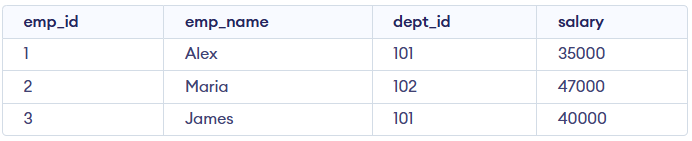
Example: First, we create a demo SQL database and tables, on which we will use the UPDATE with JOIN command.
Query:
UPDATE Employee e
JOIN Department d
ON e.dept_id = d.dept_id
SET e.salary = e.salary + d.bonus;
Output:
Syntax
UPDATE target_table
SET target_table.column_name = source_table.column_name,
 target_table.column_name2 = source_table.column_name2
FROM target_table
INNER JOIN source_table
ON target_table.column_name = source_table.column_name
WHERE condition;
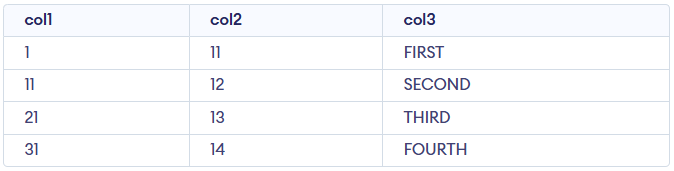
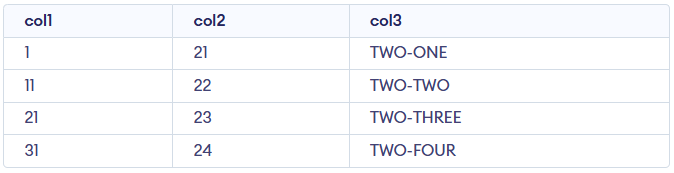
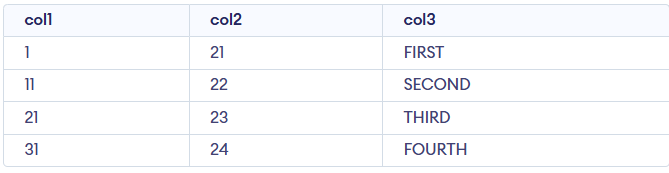
Let us assume we have two tables Geeks1 and Geeks2, each containing data about different attributes. In this example, we will update Geeks1 by joining it with Geeks2 based on a common column col1.
Query:
UPDATE Geeks1
SET col2 = Geeks2.col2,
col3 = Geeks2.col3
FROM Geeks1
INNER JOIN Geeks2
ON Geeks1.col1 = Geeks2.col1
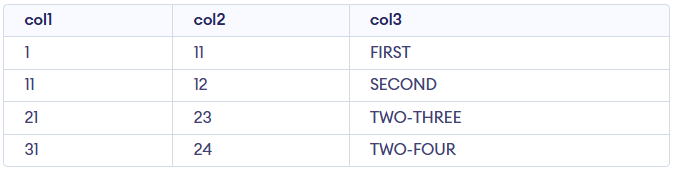
WHERE Geeks1.col1 IN (21, 31);
Output
Sometimes you may need to update records in the target table even if there is no match in the source table. In such cases, we can use LEFT JOIN.
Syntax:
UPDATE target_table
SET target_table.column_name = source_table.column_name
FROM target_table
LEFT JOIN source_table
ON target_table.column_name = source_table.column_name;
Query:
Let’s say we want to update the Geeks1 table but only change col2 where a match exists; otherwise, set it to a default value.
UPDATE Geeks1
SET col2 = ISNULL(Geeks2.col2, 0)
FROM Geeks1
LEFT JOIN Geeks2
ON Geeks1.col1 = Geeks2.col1;
Output:
Geeks2.Geeks2 have col2 set to 0 (default value).