|
VOOZH | about |
|
VOOZH | about |
SQL wildcard characters are special symbols used to represent one or more unknown characters in a string. They help in searching and filtering text data based on patterns instead of exact matches. Wildcards are mainly used with the LIKE and NOT LIKE operators to perform flexible searches.
Syntax:
SELECT column1,column2 FROM table_name
WHERE column LIKE wildcard_operator;
There are several wildcard characters in SQL, each serving a different purpose in pattern matching. Let’s break down the most common wildcard characters and their usage:
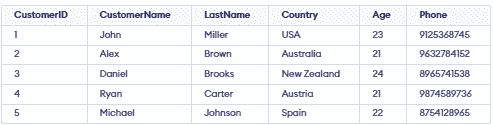
We will use a Customers table to show how wildcard characters work in SQL searches.
👁 Screenshot-2026-01-29-180226The % wildcard is used to substitute for zero or more characters. It’s very flexible and is commonly used for matching partial strings.
Example 1: Records Starting with a Specific Letter
To fetch records where CustomerName starts with 'A'.
Query:
SELECT *
FROM Customers
WHERE CustomerName LIKE 'A%';
Output:
👁 Screenshot-2026-01-17-144641Example 2: Records Ending with a Specific Letter
To fetch records from the Customers table with NAME ending with the letter 'I'.
Query:
SELECT *
FROM Customers
WHERE CustomerName LIKE '%l';
Output
👁 Screenshot-2026-01-17-154128Example 3: Records Containing a Specific Letter at Any Position
To fetch records from the Customers table where CustomerName contains the letter 'A' at any position.
Query
SELECT * FROM Customers WHERE CustomerName LIKE '%A%';Output:
👁 Screenshot-2026-01-17-154801Example 4: Records Containing a Specific Substring at Any Position
To fetch records from the Customers table where the Country contains the substring 'ra' at any position.
Query:
SELECT DISTINCT * FROM Customers WHERE Country LIKE '%ra%';Output:
👁 Screenshot-2026-01-17-154905The _ wildcard is used to substitute for exactly one character. This is useful when we know part of the string but need to match one specific unknown character.
Example 1: Records with a Specific Prefix and Exactly Three Characters
This query fetches records where CustomerName starts with "Dan" and is followed by exactly three characters.
Query:
SELECT * FROM Customers WHERE CustomerName LIKE 'Dan___';Output:
👁 Screenshot-2026-01-17-155105This query fetches customers whose Country name has exactly 7 characters.
Query:
SELECT * FROM Customers WHERE Country LIKE '_______';Output:
👁 Screenshot-2026-01-17-155215The [ ] wildcard is used to match a single character from a specified set or range of characters. It is useful for searching values that contain characters from a defined group.
Example 1: Matching One Character from a Set
This query fetches customers whose LastName starts with A, B or C.
Query
SELECT * FROM Customers WHERE LastName REGEXP '^[A-C]';Output:
👁 Screenshot-2026-01-29-180544Example 2: Matching Characters Outside a Range
To fetch records from the Customers table with LastName not containing letters 'y' or 'z'.
Query
SELECT * FROM Customers WHERE LastName NOT LIKE '%[y-z]%';Output:
👁 Screenshot-2026-01-29-180723We can combine % and _ to create more accurate search patterns.% matches many characters and _ matches one, helping filter data more precisely.
Example: Matching Specific Digits in a Phone Number
This query fetches records where the phone number starts with 8, has any two characters next and 5 as the fourth character.
Query
SELECT * FROM Customers WHERE PHONE LIKE '8__5%';Output:
👁 Screenshot-2026-01-29-180843