|
VOOZH | about |
|
VOOZH | about |
A subquery is a query that is used inside another SQL query. It can be used to return a single value or a set of values that will be used by the outer query. Subqueries in the WHERE clause are particularly useful when we need to filter records based on conditions that involve other tables or more complex criteria. Basic syntax for using a subquery within the WHERE clause of an UPDATE statement is given below:
UPDATE TableName
SET column_name = new_value
WHERE column_name IN (SELECT column_name FROM another_table or same_table WHERE condition);
Here,
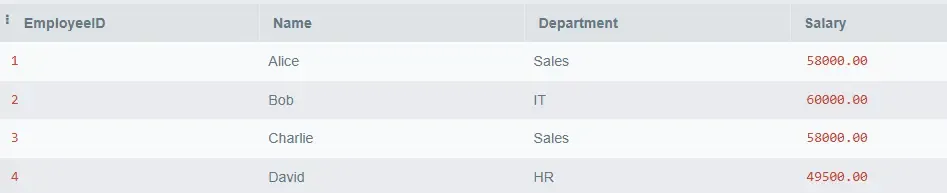
To understand How to perform subqueries in the WHERE Clause of UPDATE statement in SQL, We will consider two table called Employees, Departments on which we will perform various operations and queries. as shown below:
1. Employees Table
2. Department Table
Suppose we want to update the salary of employees in the Sales department to match the average salary defined in the Departments table for that department.
Query:
UPDATE Employees
SET Salary = (SELECT AvgSalary FROM Departments WHERE Department = 'Sales')
WHERE Department = 'Sales';
Output
Explanation:
Suppose we want to increase the salary of employees by 10% in their respective departments for those who earn less than the average salary of their department. We can write the following query using a subquery in the WHERE clause:
Query:
UPDATE Employees
SET Salary = Salary * 1.10
WHERE Salary < (SELECT AVG(Salary) FROM Employees WHERE Department = Employees.Department);
Output
Explanation:
Suppose we want to update the Salary of employees who have a salary lower than the average salary of their respective departments. This will involve a correlated subquery because the inner query will reference the DepartmentID from the outer query.
Query:
UPDATE Employees
SET Salary = Salary * 1.15
WHERE Salary < (SELECT AVG(Salary)
 FROM Employees
 WHERE Employees.DepartmentID = Employees.DepartmentID);
Output
| EmployeeID | Name | DepartmentID | Department | Salary |
|---|---|---|---|---|
| 1 | Alice | 1 | Sales | 57500.00 |
| 2 | Bob | 2 | IT | 60000.00 |
| 3 | Charlie | 1 | Sales | 55000.00 |
| 4 | David | 3 | HR | 45000.00 |
Explanation:
(SELECT AVG(Salary) FROM Employees WHERE Employees.DepartmentID = Employees.DepartmentID) computes the average salary for each employee's department.=, IN, BETWEEN, and others to compare the result of the subquery with columns in the outer query.Overall, Using subqueries in the WHERE clause of an UPDATE statement is a powerful technique to conditionally update records in SQL. Whether you are updating based on values from another table or from within the same table, subqueries allow for more complex and flexible data manipulation. By understanding how to utilize subqueries effectively, you can write more efficient and readable SQL queries.