|
VOOZH | about |
|
VOOZH | about |
TCL (Transaction Control Language) is a subset of SQL used to manage transactions in a database. It controls how changes are committed or rolled back to maintain data integrity and consistency.
Starts a new transaction. All SQL commands after this are treated as part of the same transaction until COMMIT or ROLLBACK is used.
Syntax:
BEGIN TRANSACTION transaction_name ;Example of SQL Transaction with a Bank Transfer Scenario
Let’s look at an example of a bank transfer between two accounts. This example demonstrates the usage of multiple queries in a single transaction.
BEGIN TRANSACTION;

 -- Deduct $150 from Account A
UPDATE Accounts SET Balance = Balance - 150
WHERE AccountID = 'A';

 -- Add $150 to Account B
UPDATE Accounts
SET Balance = Balance + 150
WHERE AccountID = 'B';

 -- Commit the transaction if both operations succeed
COMMIT;
ROLLBACK;The COMMIT command is used to save all changes made during the current transaction to the database. Once a transaction is committed, the changes are permanent.
Syntax:
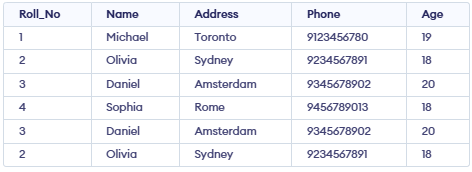
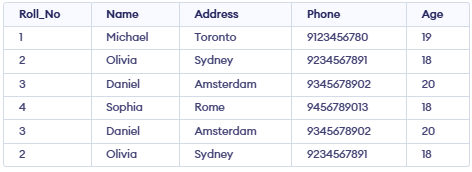
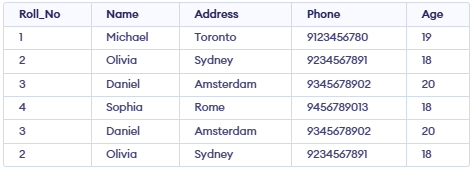
COMMIT;Example: The Student table contains basic details like ID, Name, and Age, and will be used to demonstrate transaction commands such as SAVEPOINT, ROLLBACK, and RELEASE.
👁 Screenshot-2026-01-16-111510Following is an example which would delete those records from the table which have age = 20 and then COMMIT the changes in the database.
Query:
DELETE FROM Student WHERE AGE = 20;COMMIT;Output:
👁 Screenshot-2026-01-16-111821The ROLLBACK command undoes all changes in the current transaction, useful if something goes wrong or you want to cancel the changes. The database will revert to the state it was in before the BEGIN TRANSACTION was executed.
Syntax:
ROLLBACK;Query:
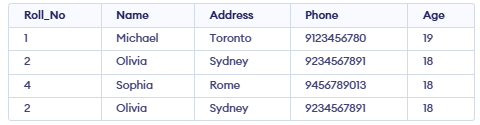
DELETE FROM Student WHERE AGE = 20;ROLLBACK;Output:
👁 Screenshot-2026-01-16-111510ROLLBACK restores the table to its original state before the delete.A SAVEPOINT is like a marker inside a transaction. It lets you go back to a specific point without canceling the whole transaction.
Syntax:
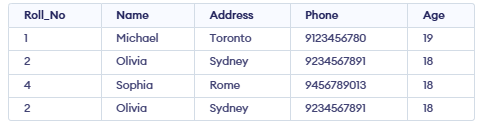
SAVEPOINT SAVEPOINT_NAME;SAVEPOINT SP1;DELETE FROM Student WHERE AGE = 20;SAVEPOINT SP2;Output:
👁 Screenshot-2026-01-16-111821The ROLLBACK TO SAVEPOINT command allows us to roll back the transaction to a specific savepoint, effectively undoing changes made after that point.
Syntax:
ROLLBACK TO SAVEPOINT SAVEPOINT_NAME;Query:
ROLLBACK TO SP1;Output:
👁 Screenshot-2026-01-16-111510RELEASE SAVEPOINT removes a savepoint so you can’t rollback to it. It helps manage transactions and their changes. It is used to initiate a database transaction and used to specify characteristics of the transaction that follows.
Syntax:
RELEASE SAVEPOINT SAVEPOINT_NAME;Query:
RELEASE SAVEPOINT SP2; -- Release the second savepoint.Output:
Savepoint releasedFor Example: In banking system transactions ensure money transfers are safe by making sure either all steps succeed or all fail, keeping data consistent.