|
VOOZH | about |
|
VOOZH | about |
The UPPER() function is a commonly used SQL string function that converts all lowercase letters in a string to uppercase. It helps maintain consistent text formatting and is useful when performing case-insensitive string comparisons.
Query:
SELECT UPPER('geeksforgeeks') AS Upper_case;Output:
Syntax:
UPPER(input_text);

OR

UPPER(column_name);
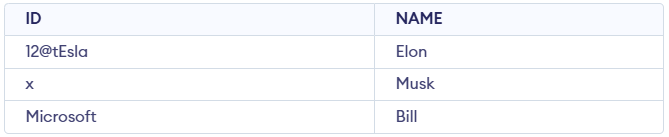
Let's look at the examples of UPPER() function in SQL. Check the SQL UPPER function with examples to understand it better. First, let's create a demo database and table on which we use the UPPER function.
In this example, the character x is displayed as-is in the first column and then converted to uppercase using the UPPER() function in the second column.
Query:
SELECT "x" as "BEFORE UPPER() Function" , UPPER("x") as "AFTER UPPER() Function";Output:
In this example, the word "Microsoft" is displayed as it is in the first column and in the second column it is converted to uppercase using the UPPER() function.
Query:
SELECT "Microsoft" as "BEFORE UPPER() Function" , UPPER("Microsoft") as "AFTER UPPER() Function";Output:
In this example, the value "12@tEsla" is shown as it is in the first column and in the second column it is converted to uppercase using the UPPER() function. Only alphabetic characters are changed, while numbers and special characters remain unchanged.
Query:
SELECT "12@tEsla" as "BEFORE UPPER() Function" , UPPER("12@tEsla") as "AFTER UPPER() Function" ;Output:
In this example, the UPPER() function is applied to the ID column. The first column displays the original values, while the second column shows the converted uppercase values. Only alphabetic characters are changed and numbers or special characters remain unchanged.
Query:
SELECT ID AS "BEFORE UPPER() Function",
 UPPER(ID) AS "AFTER UPPER() Function"
FROM CompanyData;
Output: