|
VOOZH | about |
|
VOOZH | about |
Tool Search: Census
Census tracks every person entry in Infinite Campus - parents, staff, students, emergency contacts, doctors, etc. Demographic data is used throughout Campus, utilizing historic and current details of each person. Some fields in the Census module are unique to each state. Other fields in the Census module do not require unique, state-specific data. However, many of these fields are required and data entry in these fields is necessary.
The Identities tool acts as an historical record of the person's demographic information. While the information on the Demographics tool is displayed on the Identities tool, changes should be made here.
Types of changes include:
Previous identity information is not lost when it is modified, but an end date is entered for the previous identity and a start date is entered for the new identity.
See the core Identities article for information on necessary tool rights, available Ad hoc fields, and guidance on adding and printing Identities records.
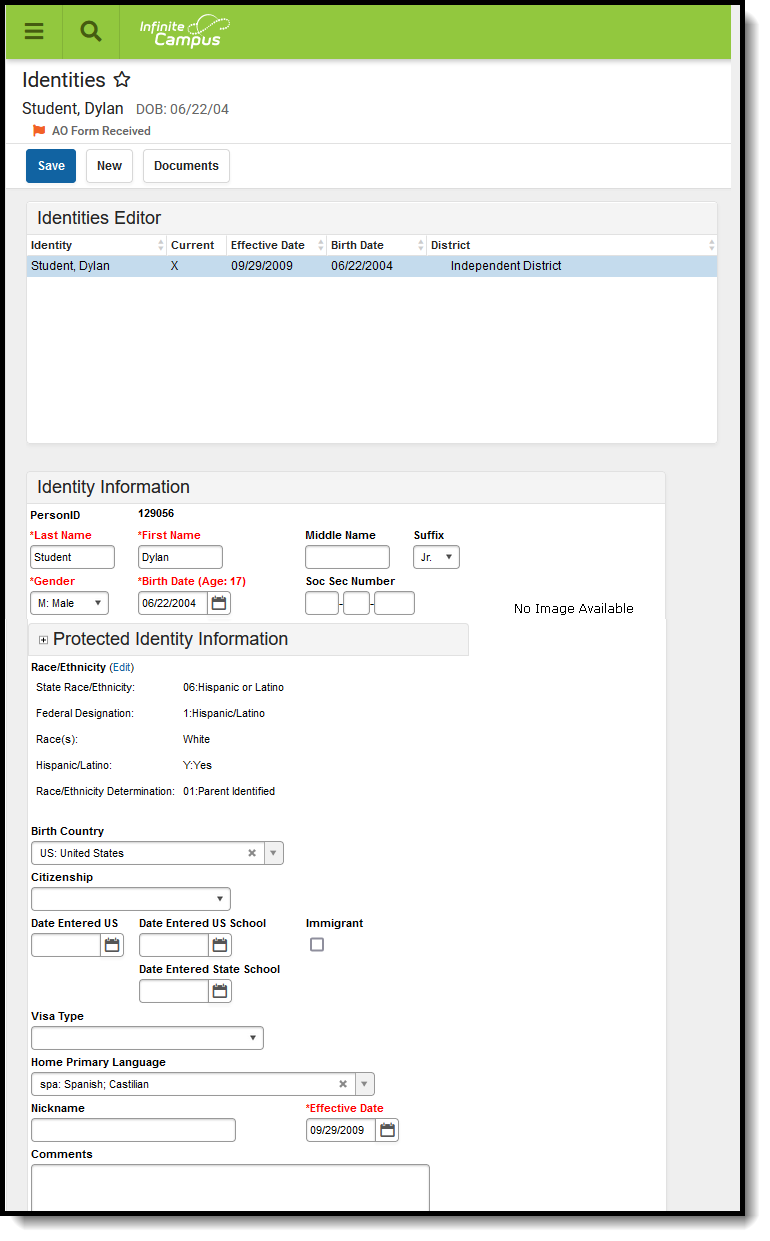
👁 Screenshot of the Identities tool.
Identities Editor
Last Name, First Name, Middle Name and Suffix (Jr., III, etc.) are the legal names of the person.
| Field | Definition | Database Location | Ad hoc Inquiries |
|---|---|---|---|
| Last Name | The person's last name. | Identity.lastName | Student > Demographics > student.lastName |
| First Name | The person's first name. | Identity.firstName | Student > Demographics > student.firstName |
| Middle Name | The person's middle name. | Identity.middleName | Student > Demographics > student.middleName |
| Suffix | Indication of a generational name (Jr., III, etc.). | Identity.suffix | Student > Demographics > student.suffix |
Reports:
Assessment Tool (Idaho CTE Tooling)
Staff Demographics (ISEE Extracts) (Idaho)
Indicates the person's gender. At this time, the state of Idaho acknowledges Male and Female gender only.
Database Location:
Identity.gender
Ad Hoc Inquiries:
Student > Demographics > student.gender
Reports:
Staff Demographics (ISEE Extracts) (Idaho)
Indicates the person's date of birth.
Database Location:
Identity.birthDate
Ad Hoc Inquiries:
Student > Demographics > student.birthDate
Reports:
Staff Demographics (ISEE Extracts) (Idaho)
The Federal government has adopted standards for defining racial and ethnic data to be used by the Department of Education. See the Race/Ethnicity article for more information.
Indicates whether the student is of Hispanic descent.
Database Location:
Identity.hispanicLatinoEthnicity
Ad Hoc Inquiries:
Student > Demographics > student.hispanicEthnicity
Reports:
Indicates the person's race/ethnicity.
Database Location:
Identity.raceEthnicity
Ad Hoc Inquiries:
Student > Demographics > student.raceEthnicity
Reports:
The Birth Country is the country listed on the student’s birth certificate during initial enrollment. Please refer to the International Organization of Standards directory for more information on country codes.
Database Location:
Identity.birthCountry
Ad Hoc Inquiries:
Student > Demographics > student.birthCountry
Reports:
Indicates whether the student is a US Citizen.
Database Location:
Identity.usCitizen
Ad Hoc Inquiries:
Student > Demographics > Identity History > ident.usCitizen
Reports:
Indicates the date the student entered the United States.
Database Location:
Identity.dateEnteredUS
Ad Hoc Inquiries:
Student > Demographics > Identity History > ident.dateEnteredUS
Reports:
Indicates the date on which the student enrolled in a US school.
Database Location:
Identity.dateEnteredUSSchool
Ad Hoc Inquiries:
Student > Demographics > Identity History > ident.dateEnteredUSSchool
Report:
Indicates the date on which the student enrolled in a school in the state of Idaho.
Database Location:
Identity.dateEnteredUSSchool
Ad Hoc Inquiries:
Not available
Report:
Not reported
Indicates the person is an immigrant.
Database Location:
Identity.immigrant
Ad Hoc Inquiries:
Student > Demographics > student.immigrant
Student > Demographics > Identity History > ident.immigrant
Report:
Indicates the student's Visa type.
Database Location:
Identity.visaType
Ad Hoc Inquiries:
Student > Demographics > Identity History > ident.visaType
Report:
The Home Primary Language field allows a district to record the language spoken in the student's home, as determined by the student's home language survey. Please refer to the International Organization of Standards directory for more information on language codes.
Database Location:
Identity.homePrimaryLanguage
Ad Hoc Inquiries:
Student > Demographics > student.homePrimaryLanguage
Student > Demographics > Identity History > ident.homePrimaryLanguage
Report:
The Demographics tool is the basic area for viewing general person information within Campus. All people for whom data is tracked, including students, staff, parents/guardians, household members, etc., have a Demographics record, which includes name and gender from the Identities record, student and staff identification numbers and contact information.
See the core Demographics article for information on necessary tool rights, available Ad hoc fields, and guidance on adding and printing Demographics records.
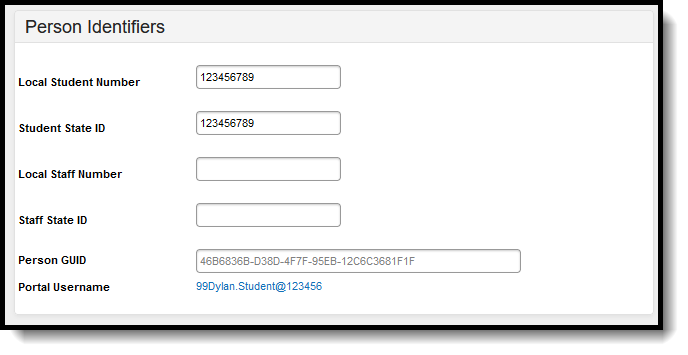
Person Identifiers like Student Number and Student State ID are used in state reports to identity student records. Staff identification - Local Staff ID, State Staff ID - are also recorded here.
Follow district guidelines when creating or importing these values.
👁 Screenshot of the Person Identifiers section of Identities.
Person Identifiers
Student Unique State ID is a unique state identification number for the student provided by the Department of Education.
Database Location:
Person.studentStateID
Ad Hoc Inquiries:
Student > Demographics > student.stateID
Reports:
Assessment Tool (Idaho CTE Tooling)
Gifted And Talented Students (ISEE Extracts) (Idaho)
Special Education Students (ISEE Extracts) (Idaho)
Staff Demographics (ISEE Extracts) (Idaho)
Local Student Number is a unique identification number for the student assigned by the district.
Database Location:
Person.studentNumber
Ad Hoc Inquiries:
Student > Demographics > student.studentNumber
Reports:
Staff Unique State ID is a unique state identification number for the staff person provided by the Department of Education If this field is left blank, any courses or students tied to the staff member fail to report.
Database Location:
Person.staffStateID
Ad Hoc Inquiries:
Student > Demographics > Identity History > Staff State ID History > staffStateIDHist.staffStateID
Reports:
CTS Attendance Tooling (Idaho CTE Tooling)
Local Staff Number is a unique identification number for the staff person assigned by the district.
Database Location:
Person.staffNumber
Ad Hoc Inquiries:
Student > Demographics > Identity History > Staff Number History > staffNumHist.staffNumber
Reports:
Not reported
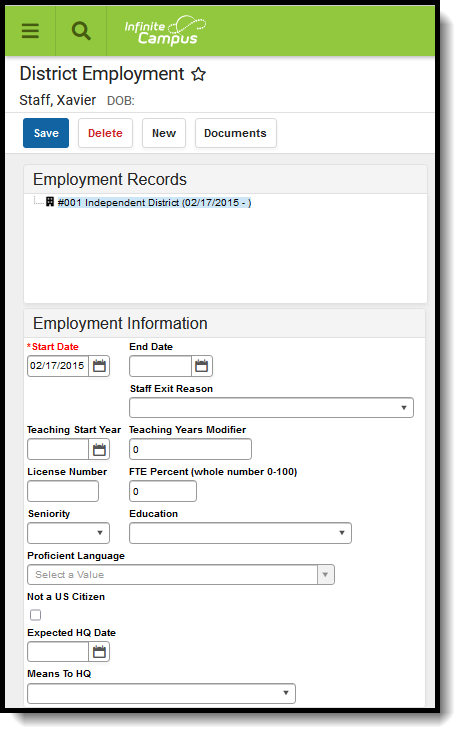
District Employment must have active district employment record. This record indicates the student is actively (no end date) or has been (end date) employed at the district. A District Assignment record is needed to indicate employment at a particular school/building within the district.
See the core District Employment article for information on necessary tool rights, available Ad hoc fields, and guidance on adding and printing employment records.
👁 Screenshot of an Employment record in the District Employment tool.
District Employment Record
The date the employee was first hired by the school district.
Database Location:
Employment.startDate
Ad Hoc Inquiries:
Person > Staff > District Employment > employment.districtStartDate
Reports:
Indicates the date the employee was no longer employed at the school district.
Database Location:
Employment.endDate
Ad Hoc Inquiries:
Person > Staff > District Employment > employment.DistrictEndDate
Reports:
The reason an employee reported last year is not reported this year. See the Staff Exit Reason Code List following this table. Reports District Employment Staff Exit Reason.
| Code | Description |
|---|---|
| 01 | To work for another educational institution in ID |
| 02 | To work for another educational institution outside of ID |
| 03 | Leaving the education profession |
| 04 | Returning to school |
| 05 | Spouse transferred |
| 06 | Retirement |
| 07 | Death |
| 08 | Reduction in force |
| 09 | Personal reasons |
| 10 | Involuntary termination |
| 11 | Leave of absence |
| 12 | Parental/family obligation |
| 13 | Service in foreign country |
| 14 | Military |
| 15 | Contractor no longer paid on district payroll |
| 16 | Early retirement incentive program (IC 33-1004G Only) |
| 17 | Certificated to non-certificated |
| 18 | Non-certificated to certificated |
| 19 | Resign |
Database Location:
Employment.exitReason
Ad Hoc Inquiries:
Person > Staff > District Employment > employment.exitReason
Reports:
Indicates the date in which the staff person began teaching (when the teaching license was received). This reports as the Certification Year on the Staff Demographics report for Type 02 Staff.
Database Location:
Employment.teachingStartYear
Ad Hoc Inquiries:
Person > Staff > District Employment > employment.teachingStartYear
Reports:
Database Location:
Employment.licenseNumber
Ad Hoc Inquiries:
Person > Staff > District Employment > employment.licenseNumber
Reports:
Indicates the level of schooling the staff person has.
Database Location:
Employment.educationLevel
Ad Hoc Inquiries:
Person > Staff > District Employment > employment.educationLevel
Reports:
Indicates the staff person is proficient in a language other than English.
Database Location:
Employment.proficientLanguage
Ad Hoc Inquiries:
Person > Staff > District Employment > Custom Employment > CustomEmployment.proficientLanguage
Reports:
Identifies the staff person as NOT being a US citizen.
Database Location:
Employment.nonUSCitizen
Ad Hoc Inquiries:
Person > Staff > District Employment > Custom Employment > CustomEmployment.nonUSCitizen
Reports:
Indicates the date a teacher is expected to become Highly Qualified.
Database Location:
Employment.expectedHQDate (CustomEmployment.expectedHQDate)
Ad Hoc Inquiries:
Person > Staff > District Employment > Custom Employment > CustomEmployment.expectedHQDate
Database Location:
Employment.expectedHQDate (CustomEmployment.meansToHQT)
Ad Hoc Inquiries:
Person > Staff > District Employment > Custom Employment > CustomEmployment.meantsToHQT
Reports:
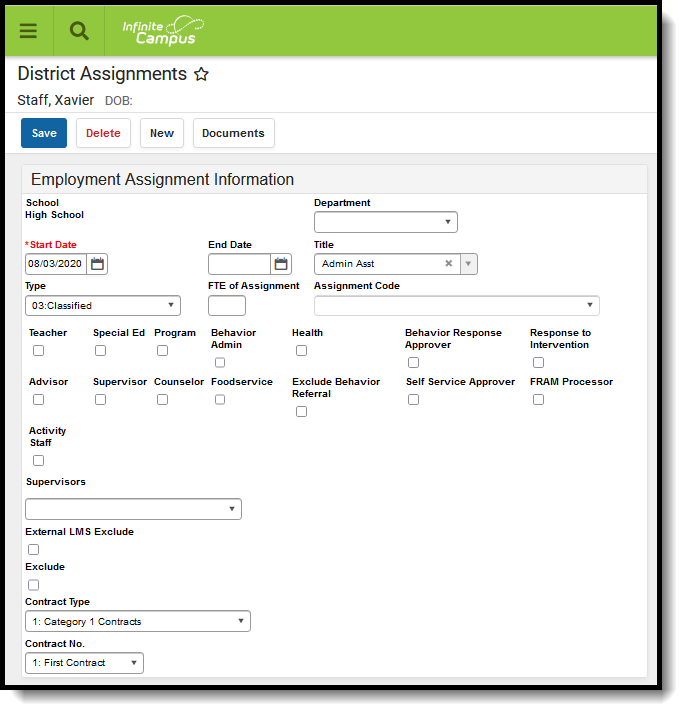
The District Assignments tool lists the location where the staff member is working. Users can view the school where the person works, the start date and title, type of employment and assignment code. Fields that are specific to the state of Idaho are further described below.
Staff with multiple Titles have multiple District Assignments to the same school.
See the core District Assignments article for information on necessary tool rights, available Ad hoc fields, and guidance on adding and printing District Assignments records.
👁 Screenshot of an assignment record in the District Assignments tool.
District Assignment Editor
Lists the staff person's position - Teacher, Coach, etc. Options can be modified in the Attribute/Dictionary.
Database Location:
EmploymentAssignment.title
Ad Hoc Inquiries:
Person > Staff > Assignment > schoolEmployment.title
Reports:
Not reported
Indicates the start date of employment at the specific school. This is the very first date the staff member was employed at the school.
Database Location:
EmploymentAssignment.startDate
Ad Hoc Inquiries:
Person > Staff > Assignment > schoolEmployment.assignmentStartDate
Reports:
Indicates the end date of employment assignment. This is the very last date the staff member was employed at the school.
Database Location:
EmploymentAssignment.endDate
Ad Hoc Inquiries:
Person > Staff > Assignment > schoolEmployment.assignmentEndDate
Reports:
Indicates the classification of the staff's employment assignment.
Database Location:
EmploymentAssignment.type
Ad Hoc Inquiries:
Person > Staff > Assignment > schoolEmployment.Type
Reports:
Indicates what portion of the employee’s FTE percent this particular district assignment represents.
The field accepts both decimal and whole numbers (e.g., .5 or 50 to represent a half-time assignment). It is important for consistency and accuracy of reporting that the same numbering system is used for all employees (e.g. FTE of Assignment in decimal format for all employees).
FTE of Assignment is different than the FTE Percent on the District Employment editor.
This value is linked to the District Assignment on the Section Staff History tool.
For Non-Teaching Assignments, the entered value reports on the Staff Assignment Extract.
For Teaching Assignments that are not active on the Last Friday in September, the entered value in this field is divided by the total number of sections the staff person is actively teaching during the Staff Assignment Extract reporting period that are not active on the Last Friday in September. This logic enables Sections not active on the last Friday in September to report the FTE captured on the teacher's linked district assignment, divided by the cumulative number of sections taught.
For Teaching Assignments that are active on the Last Friday in September, the entered value is divided by the total number of sections the teacher is actively teaching during the reporting period that are active on the Last Friday in September. This logic enables Sections active on the last Friday in September to report the same FTE value through the end of the year.
Database Location:
EmploymentAssignment.fte
Ad Hoc Inquiries:
Person > Staff > Assignment > schoolEmployment.fteInAssignment
Reports:
Indicates the type of certified staff contract.
Database Location:
EmploymentAssignment.contractType
Ad Hoc Inquiries:
Person > Staff > Assignment > schoolEmployment.contractType
Reports:
Indicates the order of one or more contracts by greatest total FTE per District Employment that may have one or more District Assignments tied to each contract.
Database Location:
EmploymentAssignment.contractNo (CustomEmploymentAssignment.value)
Ad Hoc Inquiries:
Person > Staff > Assignment > Custom Employment Assignment > customEmployment.contractNo
Reports:
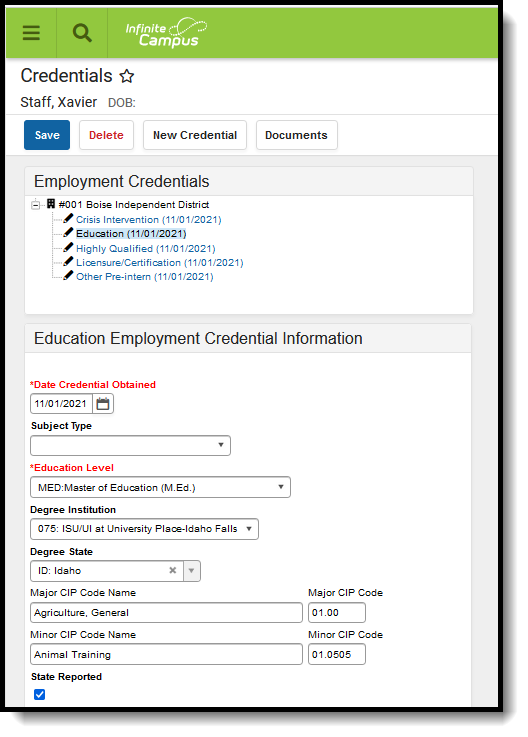
The Credentials tool lists the credential types of a staff member. Credentials are based on the date when the credential was earned. There are five types of credentials that can be added for a person. Multiple credentials can be entered for a staff member. The staff member may be highly qualified in two subject areas or may have multiple degrees.
See the core Credentials article for information on necessary tool rights, available Ad hoc fields, and guidance on adding and printing Credentials records.
👁 Screenshot of a credentials record in the Credentials tool.
Credentials Editor
Indicates the type of credential the staff person has earned. This list is visible when creating a new credential and in the list of previously entered credentials.
There are five credential types that can be assigned to staff. The Education Credential and the values entered for that credential type are used in state extracts.
Database Location:
EmploymentCredential.employmentCredentialType
Ad Hoc Inquiries:
Person > Staff > Credential > employmentCredential.credentialType
Reports:
Not reported
Indicates the date the Credential was granted to the staff person.
Database Location:
EmploymentCredential.date
Ad Hoc Inquiries:
Person > Staff > Credential > employmentCredential.date
Reports:
Indicates the level of education the staff person has received.
Database Location:
EmploymentCredential.degreeType
Ad Hoc Inquiries:
Person > Staff > Credential > employmentCredential.degreeType
Reports:
Lists the university or college where the staff person obtained their degree.
Database Location:
EmploymentCredential.campusCode
Ad Hoc Inquiries:
Person > Staff > Credential > employmentCredential.educationInstitution
Reports:
Lists the state in which the staff person obtained their degree.
Database Location:
EmploymentCredential.eduState
Ad Hoc Inquiries:
Person > Staff > Credential > employmentCredential.eduState
Reports:
Lists the name and code of the degree the staff person received for their major course of study. CIP names and codes are federally maintained.
Database Location:
EmploymentCredential.majorCipCode
Ad Hoc Inquiries:
Person > Staff > Credential > employmentCredential.majorCipCode
Reports:
Lists the name and code of the degree the staff person received for their minor course of study. CIP names and codes are federally maintained.
Database Location:
EmploymentCredential.minorCipCode
Ad Hoc Inquiries:
Person > Staff > Credential > employmentCredential.minorCipCode
Reports:
Indicates that the data in this record is reported as the primary education information in the Staff Demographics and Employment record.
Database Location:
EmploymentCredential.stateReported
Ad Hoc Inquiries:
Person > Staff > Credential > employmentCredential.stateReported
Reports:
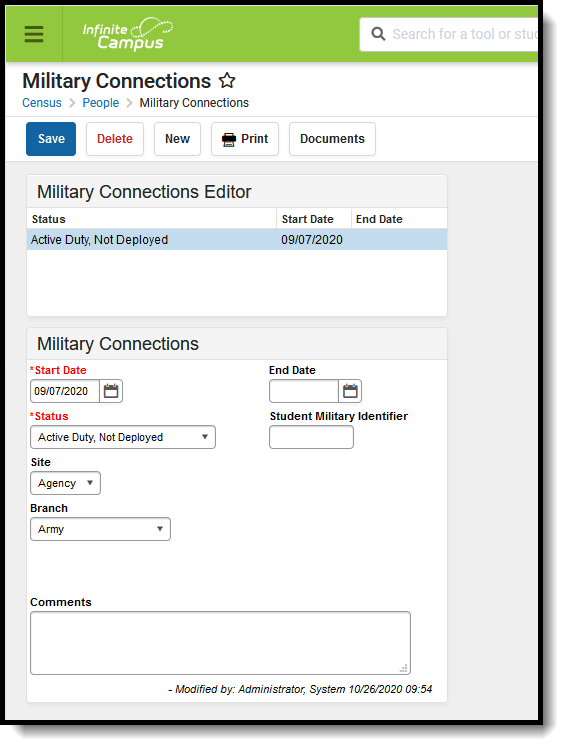
The Military Connections tool tracks parent/guardian data for those who are military personnel. This tool works in conjunction with the Impact Aid tool, which tracks parents/guardians who are employed at federal sites (armed forces locations, reservation lands, etc.).
See the core Military Connections article for information on necessary tool rights, available Ad hoc fields, and guidance on adding and printing Military Connections records.
👁 Screenshot of the Military Connections tool.
Military Connections
Indicates the enlistment status of the parent/guardian.
Database Location:
MilitaryConnections.status
Ad Hoc Inquiries:
Student > Demographics > Military Connections > militaryConnections.status
Person > Demographics > Military Connections > militaryConnections.status
Reports: