Tool Search: Resync State Data
The Resync State Data tool may be used by district and/or state administrators to manually (re)synchronize batches of district-level data to the state.
District-level users, please see the Resync State Data (District) article. This tool is only applicable in a district/state operating as part of an Infinite Campus State or Regional Edition.
To view State and District ownership over fields within each product area, see the Synchronization Field Settings tool. This tool indicates which fields are locked at the district level and trigger a sync event when modified at the state level.
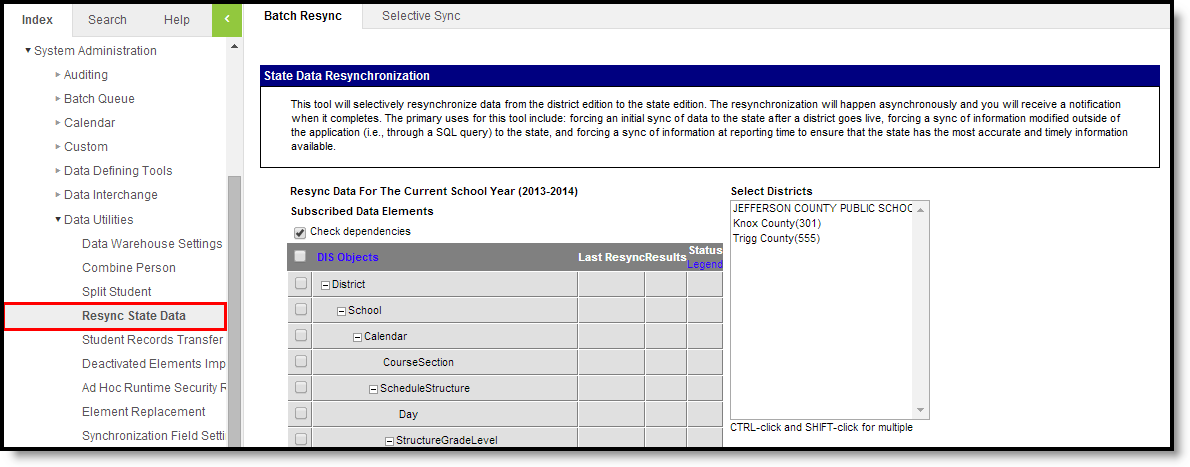
👁 Screenshot of Resync State Data Tool - State Edition
Manually Resync Data
To ensure a state/regional database has the most current and accurate information available, it may be necessary for districts to resync - or push - batches of data to the state/regional level. The state can require a resync of district data, as needed.
Performing a manual resync may slow system performance.
Resync Scenarios
A district can resync its data to the state, as needed. However, the following resync scenarios are mandatory:
- End of a school year - A resync must be performed at the end of a school year, after districts have finished entering all data for that year. This resync must be completed before the scoped year of the district/state zones is switched to the new school year. This should be a full resync.
- Start of a school year - A resync must be performed at the beginning of a school year, after all enrollments have been rolled forward and the scoped year of the district/state Zones has been updated to match the new school year. This should be a full resync.
- Database modifications - A resync must be performed if data is modified directly within the database, instead of within the Campus interface. Modifying data within the database is not recommended. This may be a partial or full resync.
- State resync request - The state may request a resync for the purpose of state reporting, gathering attendance snapshots, pulling end-of-year attendance summaries, etc. Districts cannot deny or prevent a resync initiated by the state. This may be a partial or full resync.
Infinite Campus strongly recommends using the state Verification Summary tool to generate district/state verification reports before resynching a scenario not listed above. Comparing verification report results will indicate whether or not a resync is necessary.
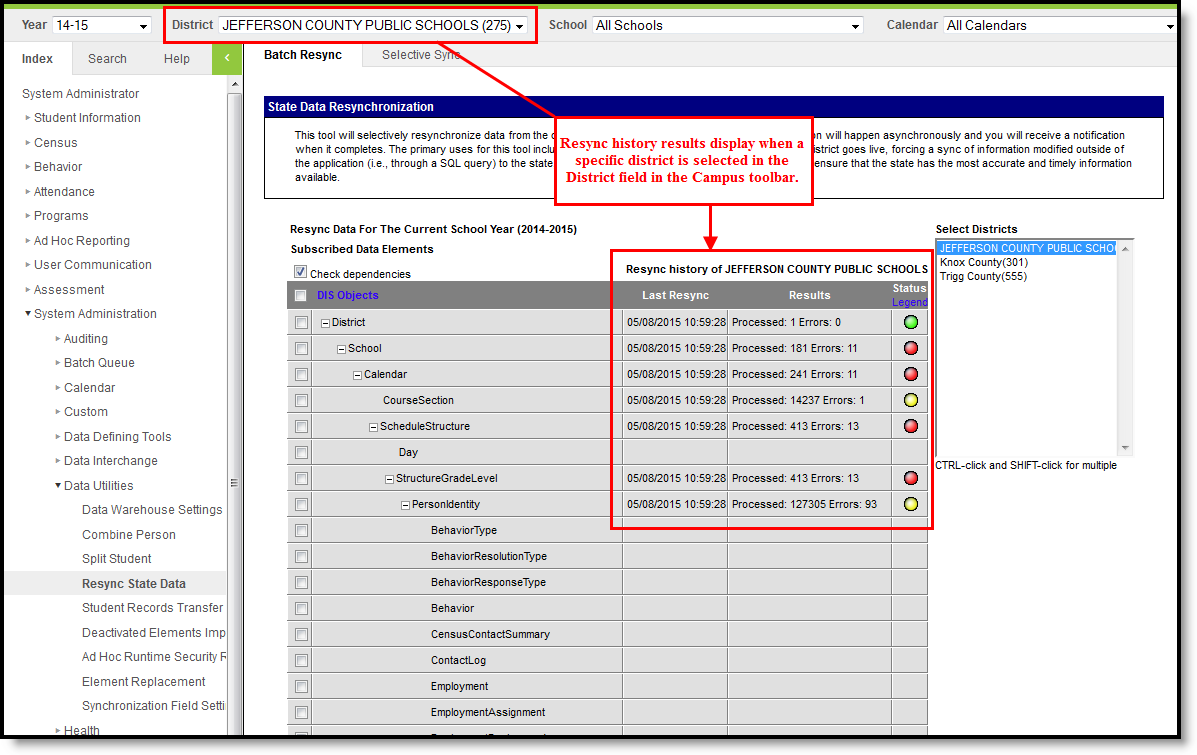
District-Specific View (Shows History Columns)
The resync history/results columns will only appear when a district is selected from the District field of the Campus toolbar:
👁 Screenshot of State Resync Tool (with History Columns)
If no resync has been performed, the resync history/results columns will be blank.
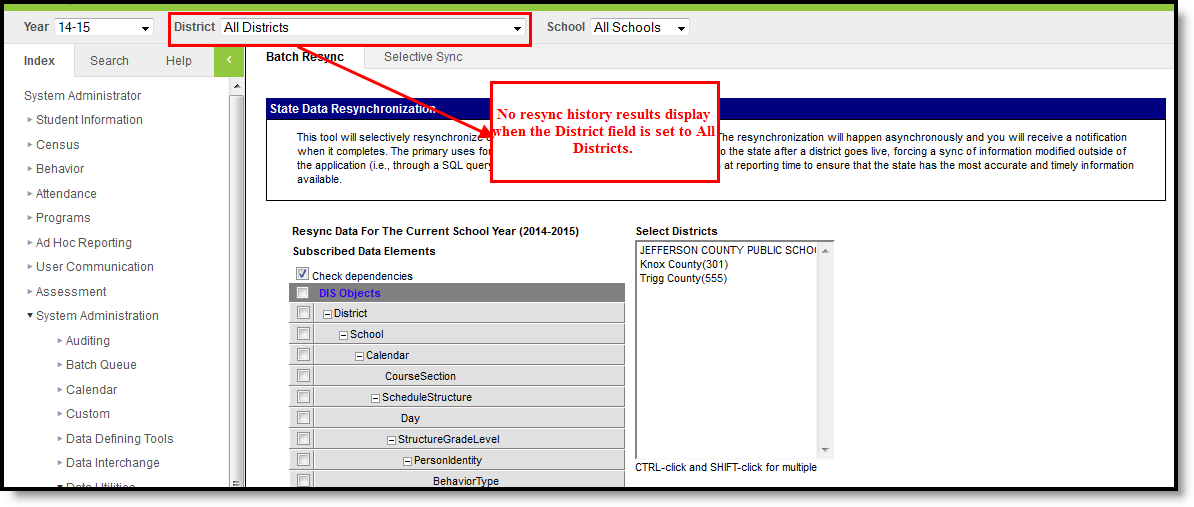
"All District" View (No History Shown)
No history/results columns will appear if "All Districts" is selected in the District field of the Campus toolbar:
👁 Screenshot of State Resync Tool (No History Columns)
Use the Resync State Data Tool
The Resync State Data tool is accessible at both the district and state levels. The state can require its districts to resync some or all data. When a resync is initiated by the state, the data is automatically pulled and no action is required of the district.
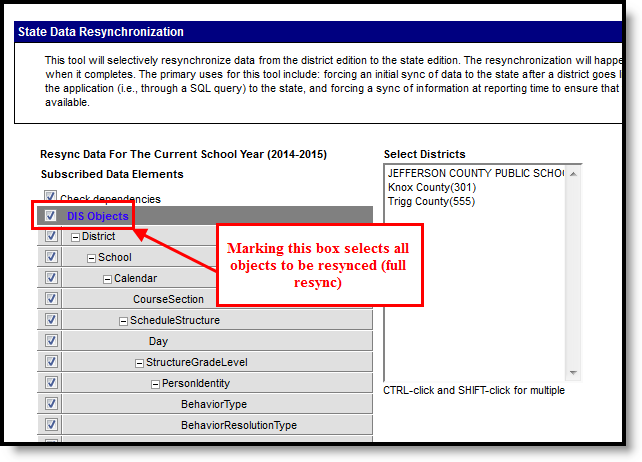
Full Resync
A full resync indicates all data objects that report to the state will be resynched. This process will automatically follow the chain of object dependencies that support the Campus hierarchy.
👁 Screenshot of Full Resync (All Objects)
- Select a district(s) to resync from the Select Districts box. If a district is set in the the District field of the Campus toolbar, it will already be selected in this box.
- Select the DIS Objects checkbox in the top left column of the table. All data objects listed on the tool will be selected.
- Click the Request Resync button, located below the table.
- Click the OK button on the verification pop-up window. All data objects will be resynched from the district-level database to the state-level database.
Partial Resync
When a full resync is unnecessary, a partial resync may be performed. A partial resync involves specific data objects selected for resync by a user (instead of resynching all objects).
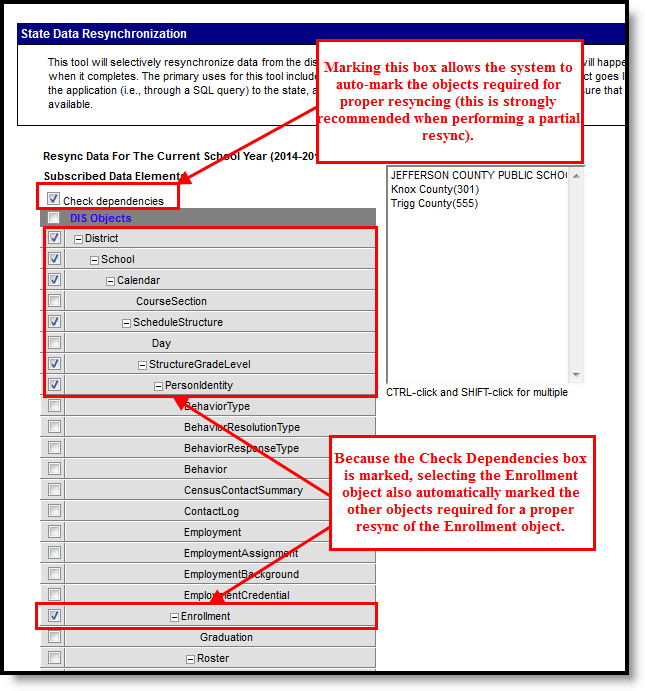
The Check Dependencies box should be marked when performing a partial resync. This ensures synching of all necessary parent objects (on which the desired resync object is dependent). Please refer to the Understanding Campus Object Dependencies and Hierarchy section of this page for more information related to synching and dependent relationships between parent/child objects. 👁 Screenshot of Partial Resync with Check Dependencies Box Selected
- Select a district(s) to resync from the Select Districts box.
- Mark the Check Dependencies checkbox.
- Mark the checkboxes of the data objects to be resynched.
- Click the Request Resync button located below the table.
- Click the OK button on the verification pop-up window. All data objects will be resynched from the district-level database to the state-level database.
Resync Data from the Previous or Next School Year
This option is only available to districts that have been configured to sync data for the previous and/or next school year (in addition to the current year).
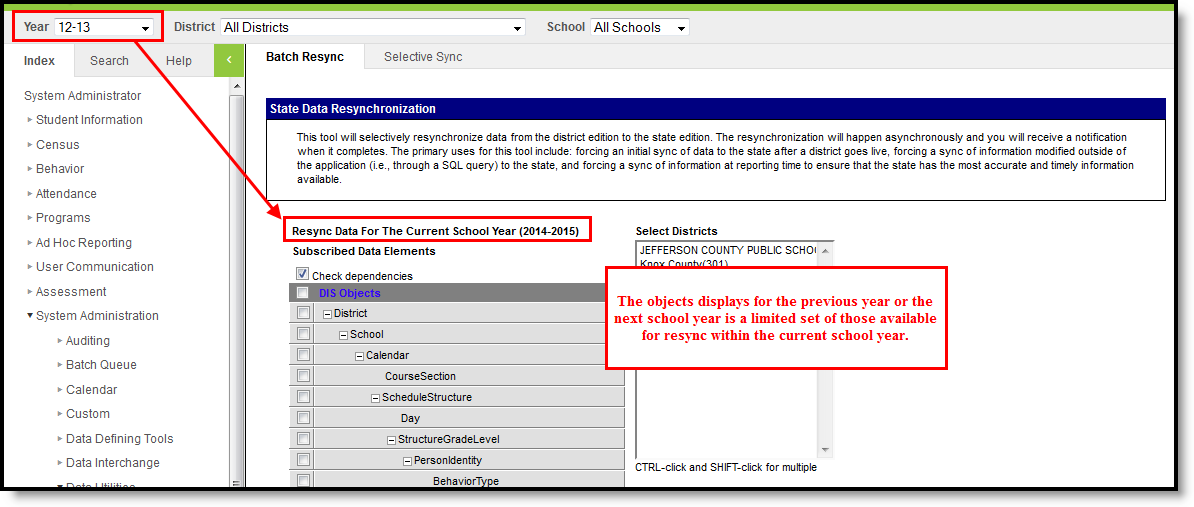
If the district has been configured to sync data for the previous and/or next school year (in addition to the current year), the data objects available for resync will be limited. To resync data from the previous or next school year, the Year field of the Campus toolbar must be set to the desired year. A limited set of objects will be displayed.
Objects that appear on the Resync State Data tool when the previous/next school year is selected will meet both of the following criteria:
- Objects are related specifically to the school year displayed in the Year field of the Campus toolbar.
- Objects have been configured to sync for the school year displayed in the Year field of the Campus toolbar.
Objects that do NOT appear on the Resync State Data tool when the previous/next school year is selected will meet one or both of the following criteria:
- Objects that are not tied to a school year will not display when the previous/next year is selected in the Year field of the Campus toolbar. To resync these objects, the current school year must be selected in the Year field of the Campus toolbar.
- Objects that are not configured to sync for the previous/next school year will not appear.
👁 Screenshot of Sync Data from a Previous School Year
A resync of the previous/next school year may be performed in the same manner(s) as the current year, as listed in the Using the Resync State Data Tool (State Level) section.
Analyze Resync Attempts and Results
The manual resync process may warrant user analysis of resync attempts and results. The Resync State Data tool displays basic details related to state resync requests:
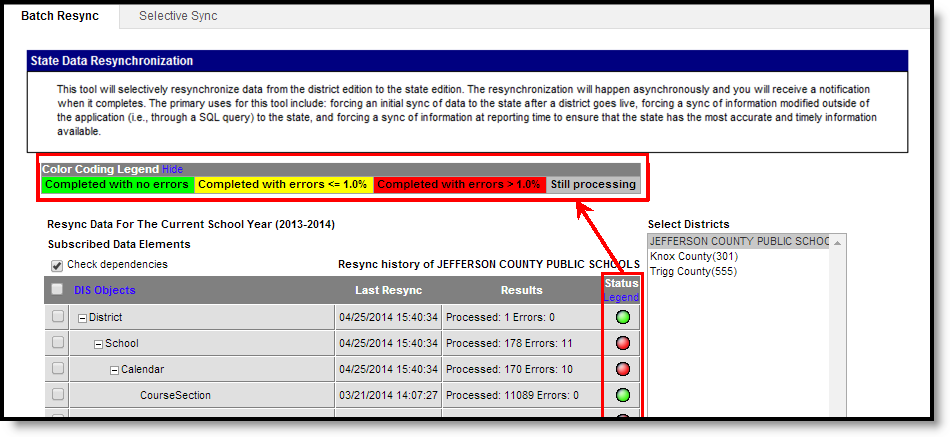
👁 Screenshot of Resync Summary
- Last Resync column - Displays the date and time the last resync was started for the object.
- Results column -Hovering over a result will indicate the total number of records sent for resync. This column displays two types of results for the object:
- Status column - Displays a colored dot indicating the level of sync success. Clicking on the Legend link in the header of this column will show a key that explains the logic used for the colored dots in this column.
- Green - Indicates that the sync finished without any errors.
- Yellow - Indicates that the sync finished with less than or equal to 1% of sync attempts resulting in error.
- Red - Indicates that the sync finished with more than 1% of sync attempts resulting in error.
- Gray - Indicates that the sync is currently in-progress.
The following tools may also be used for additional analysis of resync attempts:
Understand Campus Object Dependencies and Hierarchy
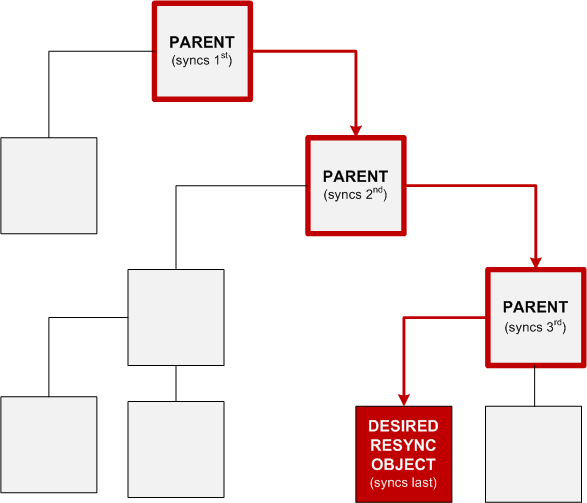
Campus data objects exist in a hierarchical structure enforced by database dependencies. Database tables use foreign keys to link related tables/data objects. This creates a dependency chain of parent/child relationships between objects which require the “parent” to be synchronized before the “child.” When all available data objects are resynchronized, the process follows the natural order of object dependencies.
👁 Screenshot of Resync Object Dependencies and Hierarchy
However, when only select data objects should be resynched, the system must follow a specific order to sync all appropriate “parent” object(s) before the desired “child” object(s). Resynching certain data objects (instead of all objects) will result in error if the necessary parent object(s) have not been properly resynched first. The Resync State Data tool allows the system to properly sync objects in the intended parent/child order.
Campus Object Hierarchies
Campus resync object hierarchies are explained in the following key and table.
- Resync Object column -- Lists the data objects available for manual resynching on the Resync State Data tool. This is the object selected for resynching by user.
- Parent Objects column -- Lists the "parent" objects on which the Resync Object is dependent. Parent objects are listed in dependency order (top-level parent listed first, immediate parent listed last). The immediate "parent" of the Resync Object is bolded and indicated by an asterisk [*].
- Child Objects column -- Lists the "child" objects that are dependent on the Resync Object. Child objects are listed in alphabetical order. The immediate "child" object(s) of the Resync Object are bolded and indicated by an asterisk [*].
All sync objects are listed in the table below; however, not all objects are applicable to all districts/states/regions.
Resync Object | Parent Objects | Child Objects |
|---|
AttendanceBIEAbsentDays | District
School
Calendar
ScheduleStructure
PersonIdentity
Enrollment* | No dependent objects |
AttendanceExactCount | District
School
Calendar
ScheduleStructure
PersonIdentity
Enrollment* | No dependent objects |
AttendanceGroupKY | District
School
Calendar
ScheduleStructure
PersonIdentity
Enrollment* | No dependent objects |
AttendanceKYMinute | District
School
Calendar
ScheduleStructure
PersonIdentity
Enrollment* | No dependent objects |
AttendanceMTSnapshot | District
School
Calendar
ScheduleStructure
PersonIdentity
Enrollment* | No dependent objects |
AttendanceSDMinute | District
School
Calendar
ScheduleStructure
PersonIdentity
Enrollment* | No dependent objects |
| AttendanceExcuse | District
School
Calendar* | AttDayAggregation |
| AttDayAggregation | District
School
Calendar AttendanceExcuse
ScheduleStructure PeriodSchedule Day StructureGradeLevel
PersonIdentity* | No dependent objects |
Behavior | District
School
Calendar
ScheduleStructure
PersonIdentity* | No dependent objects |
Calendar | District
School* | AttendanceBIEAbsentDays
AttendanceExactCount
AttendanceGroupKY
AttendanceKYMinute
AttendanceMTSnapshot
AttendanceSDMinute
Behavior
CensusContactSummary
ContactLog
CourseSection*
CustomStudent
Day
Employment
EmploymentAssignment
EmploymentBackground
EmploymentCredential
Enrollment
ESSKY
Form
FRYSCGroupProgramKY
FRYSCGroupStatusKY
FRYSCStatusKY
GiftedStatusKY
Graduation
HealthScreening
ImmCertificate
LEPKY
MedicaidInsurance
NASIS
PersonIdentity
PersonIdentityNoStateIDOnly
Plan
PlanProgressReport
POSEligbility
PreSchoolKY
ProcessMessage
ProgramParticipation
Roster
ScheduleStructure*
StructureGradeLevel
TEDSKY
Test
TestScore
Title1KY
TranscriptCourseSE
Transportation
Truancy
VaccineShot |
CensusContactSummary | District
School
Calendar
ScheduleStructure
PersonIdentity* | No dependent objects |
ContactLog | District
School
Calendar
ScheduleStructure
PersonIdentity* | No dependent objects |
CourseCode | No parent dependencies | No dependent objects |
CourseSection | District
School
Calendar* | No dependent objects |
CustomStudent | District
School
Calendar
ScheduleStructure
PersonIdentity
Enrollment* | No dependent objects |
CTEDataME | District
School
Calendar
ScheduleStructure
PersonIdentity* | No dependent objects |
| EarlyWarningScoreDaily | District
School
Calendar
ScheduleStructure
PersonIdentity* | No dependent objects |
| EarlyWarningScoreMonthly | District
School
Calendar
ScheduleStructure
PersonIdentity* | No dependent objects |
| EarlyWarningScoreYearly | District
School
Calendar
ScheduleStructure
PersonIdentity* | No dependent objects |
Day | District
School
Calendar
ScheduleStructure
PersonIdentity* | No dependent objects |
District | No parent dependencies | AttendanceBIEAbsentDays
AttendanceExactCount
AttendanceGroupKY
AttendanceKYMinute
AttendanceMTSnapshot
AttendanceSDMinute
Behavior
CensusContactSummary
ContactLog
CourseSection
CustomStudent
Day
Employment
EmploymentAssignment
EmploymentBackground
EmploymentCredential
Enrollment
ESSKY
Form
FRYSCGroupProgramKY
FRYSCGroupStatusKY
FRYSCStatusKY
GiftedStatusKY
Graduation
HealthScreening
ImmCertificate
LEPKY
MedicaidInsurance
NASIS
PersonIdentity
PersonIdentityNoStateIDOnly
Plan
PlanProgressReport
POSEligbility
PreSchoolKY
ProcessMessage
ProgramParticipation
Roster
ScheduleStructure
School
StructureGradeLevel
TEDSKY
Test
TestScore
Title1KY
TranscriptCourseSE
Transportation
Truancy
VaccineShot |
Employment | District
School
Calendar
ScheduleStructure
PersonIdentity* | No dependent objects |
EmploymentAssignment | District
School
Calendar
ScheduleStructure
PersonIdentity* | No dependent objects |
EmploymentBackground | District
School
Calendar
ScheduleStructure
PersonIdentity* | No dependent objects |
EmploymentCredential | District
School
Calendar
ScheduleStructure
PersonIdentity* | No dependent objects |
Enrollment | District
School
Calendar
ScheduleStructure
PersonIdentity* | AttendanceBIEAbsentDays*
AttendanceExactCount*
AttendanceGroupKY*
AttendanceKYMinute*
AttendanceMTSnapshot*
AttendanceSDMinute*
CustomStudent*
ESSKY*
FRYSCStatusKY*
Graduation*
PreSchoolKY*
Roster*
Evaluation*
TeamMember*
Title1KY* |
ESSKY | District
School
Calendar
ScheduleStructure
PersonIdentity
Enrollment* | No dependent objects |
Evaluation | District
School
Calendar
ScheduleStructure
PersonIdentity* | No dependent objects |
Form | District
School
Calendar
ScheduleStructure
PersonIdentity* | No dependent objects |
FRYSCGroupProgramKY | District
School
Calendar
ScheduleStructure
PersonIdentity* | FRYSCGroupStatusKY* |
FRYSCGroupStatusKY | District
School
Calendar
ScheduleStructure
PersonIdentity*
FRYSCGroupProgramKY* | No dependent objects |
FRYSCStatusKY | District
School
Calendar
ScheduleStructure
PersonIdentity
Enrollment* | No dependent objects |
GiftedStatusKY | District
School
Calendar
ScheduleStructure
PersonIdentity* | No dependent objects |
Graduation | District
School
Calendar
ScheduleStructure
PersonIdentity
Enrollment* | No dependent objects |
HealthScreening | District
School
Calendar
ScheduleStructure
PersonIdentity* | No dependent objects |
ImmCertificate | District
School
Calendar
ScheduleStructure
PersonIdentity * | No dependent objects |
ISEPResidentialCertification | No parent dependencies | No dependent objects |
ISEPResidentialVerification | No parent dependencies | No dependent objects |
LepKY | District
School
Calendar
ScheduleStructure
PersonIdentity* | No dependent objects |
MedicaidInsurance | District
School
Calendar
ScheduleStructure
PersonIdentity* | No dependent objects |
NASIS | District
School
Calendar
ScheduleStructure
PersonIdentity* | No dependent objects |
PersonIdentity | District
School
Calendar
ScheduleStructure* | AttendanceBIEAbsentDays
AttendanceExactCount
AttendanceGroupKY
AttendanceKYMinute
AttendanceMTSnapshot
AttendanceSDMinute
Behavior*
CensusContactSummary*
ContactLog*
CustomStudent
Employment*
EmploymentAssignment*
EmploymentBackground*
EmploymentCredential*
Enrollment*
ESSKY
Form*
FRYSCGroupProgramKY*
FRYSCGroupStatusKY
FRYSCStatusKY
GiftedStatusKY*
Graduation
Health Screening*
ImmCertificate*
LEPKY*
MedicaidInsurance*
NASIS*
Plan*
PlanProgressReport
POSEligbility*
PreSchoolKY
ProcessMessage*
ProgramParticipation*
Roster
TEDSKY*
Test*
TestScore
Title1KY
TranscriptCourseSE *
Transportation*
Truancy*
VaccineShot* |
PersonIdentityNoStateIDOnly | District
School
Calendar
ScheduleStructure* | No dependent objects |
Plan | District
School
Calendar
ScheduleStructure
PersonIdentity* | No dependent objects |
PlanProgressReport | District
School
Calendar
ScheduleStructure
PersonIdentity
Plan* | No dependent objects |
POSEligibility | District
School
Calendar
ScheduleStructure
PersonIdentity* | No dependent objects |
PreSchoolKY | District
School
Calendar
ScheduleStructure
PersonIdentity
Enrollment* | No dependent objects |
ProcessMessage | District
School
Calendar
ScheduleStructure
PersonIdentity* | No dependent objects |
ProgramParticipation | District
School
Calendar
ScheduleStructure
PersonIdentity* | No dependent objects |
| PublishedTabCustomStudent | District
School
Calendar
ScheduleStructure
Day
StructureGradeLevel
PersonIdentity* | No dependent Objects |
ReportingEntity No longer available for Montana users. | District* | (ONLY WHEN THE REPORTING ENTITY OBJECT IS USED)
AttendanceBIEAbsentDays
AttendanceExactCount
AttendanceGroupKY
AttendanceKYMinute
AttendanceMTSnapshot
AttendanceSDMinute
Behavior
CensusContactSummary
ContactLog
CourseSection
CustomStudent
Day
Employment
EmploymentAssignment
EmploymentBackground
EmploymentCredential
Enrollment
ESSKY
Form
FRYSCGroupProgramKY
FRYSCGroupStatusKY
FRYSCStatusKY
GiftedStatusKY
Graduation
HealthScreening
ImmCertificate
LEPKY
MedicaidInsurance
NASIS
PersonIdentity
PersonIdentityNoStateIDOnly
Plan
PlanProgressReport
POSEligbility
PreSchoolKY
ProcessMessage
ProgramParticipation
Roster
ScheduleStructure
School*
StructureGradeLevel
TEDSKY
Test
TestScore
Title1KY
TranscriptCourseSE
Transportation
Truancy
VaccineShot |
Roster | District
School
Calendar
ScheduleStructure
StructureGradeLevel
PersonIdentity
Enrollment* | No dependent objects |
ScheduleStructure | District
School
Calendar* | AttendanceBIEAbsentDays
AttendanceExactCount
AttendanceGroupKY
AttendanceKYMinute
AttendanceMTSnapshot
AttendanceSDMinute
Behavior
CensusContactSummary
ContactLog
CustomStudent
Day*
Employment
EmploymentAssignment
EmploymentBackground
EmploymentCredential
Enrollment
ESSKY
Form
FRYSCGroupProgramKY
FRYSCGroupStatusKY
FRYSCStatusKY
GiftedStatusKY
Graduation
HealthScreening
ImmCertificate
LEPKY
MedicaidInsurance
NASIS
PersonIdentity*
PersonIdentityNoStateIDOnly*
Plan
PlanProgressReport
POSEligbility
PreSchoolKY
ProcessMessage
ProgramParticipation
Roster
StructureGradeLevel*
TEDSKY
Test
TestScore
Title1KY
TranscriptCourseSE
Transportation
Truancy
VaccineShot |
School | District | AttendanceBIEAbsentDays
AttendanceExactCount
AttendanceGroupKY
AttendanceKYMinute
AttendanceMTSnapshot
AttendanceSDMinute
Behavior
Calendar*
CensusContactSummary
ContactLog
CourseSection
CustomStudent
Day
Employment
EmploymentAssignment
EmploymentBackground
EmploymentCredential
Enrollment
ESSKY
Form
FRYSCGroupProgramKY
FRYSCGroupStatusKY
FRYSCStatusKY
GiftedStatusKY
Graduation
HealthScreening
ImmCertificate
LEPKY
MedicaidInsurance
NASIS
PersonIdentity
PersonIdentityNoStateIDOnly
Plan
PlanProgressReport
POSEligbility
PreSchoolKY
ProcessMessage
ProgramParticipation
Roster
ScheduleStructure
StructureGradeLevel
TEDSKY
Test
TestScore
Title1KY
TranscriptCourseSE
Transportation
Truancy
VaccineShot |
StructureGradeLevel | District
School
Calendar
ScheduleStructure* | No dependent objects |
TeamMember | District
School
Calendar
ScheduleStructure
PersonIdentity* | No dependent objects |
TEDSKY | District
School
Calendar
ScheduleStructure
PersonIdentity* | No dependent objects |
Test | District
School
Calendar
ScheduleStructure
PersonIdentity* | TestScore* |
TestScore | District
School
Calendar
ScheduleStructure
PersonIdentity*
Test* | No dependent objects |
Title1KY | District
School
Calendar
ScheduleStructure
PersonIdentity
Enrollment* | No dependent objects |
TranscriptCourseSE | District
School
Calendar
ScheduleStructure
StructureGradeLevel
PersonIdentity* | No dependent objects |
Transportation | District
School
Calendar
ScheduleStructure
PersonIdentity* | No dependent objects |
Truancy | District
School
Calendar
ScheduleStructure
PersonIdentity* | No dependent objects |
VaccineShot | District
School
Calendar
ScheduleStructure
PersonIdentity* | No dependent objects |
Technical Information
The DISBatchHistory database table stores historical information related to resync requests. Though only the most recent request summary information appears in the user interface, historical resync summary data is stored in the table.