|
VOOZH | about |
|
VOOZH | about |
Tool Search: Resync State Data - Batch
The Batch Resync tool may be used by district and/or state administrators to manually (re)synchronize batches of district-level data to the state.
State-level users, please see the Resync State Data (State) article. This tool is only applicable in a district/state operating as part of an Infinite Campus State or Regional Edition. It does not appear in all districts.
See the Resync State Data Tool Rights article for information about related tool rights.
To view State and District ownership over fields within each product area, see the Synchronization Field Settings tool. This tool indicates which fields are locked at the district level and trigger a sync event when modified at the state level.
To ensure a state/regional database has the most current and accurate information available, it may be necessary for districts to resync - or push - batches of data to the state/regional level.
Performing a manual resync may slow system performance.
A district can resync its data to the state, as needed. However, the following resync scenarios are mandatory:
Infinite Campus strongly recommends using the Verification Summary tool to generate district/state verification reports before resynching a scenario not listed above. Comparing verification report results will indicate whether or not a resync is necessary.
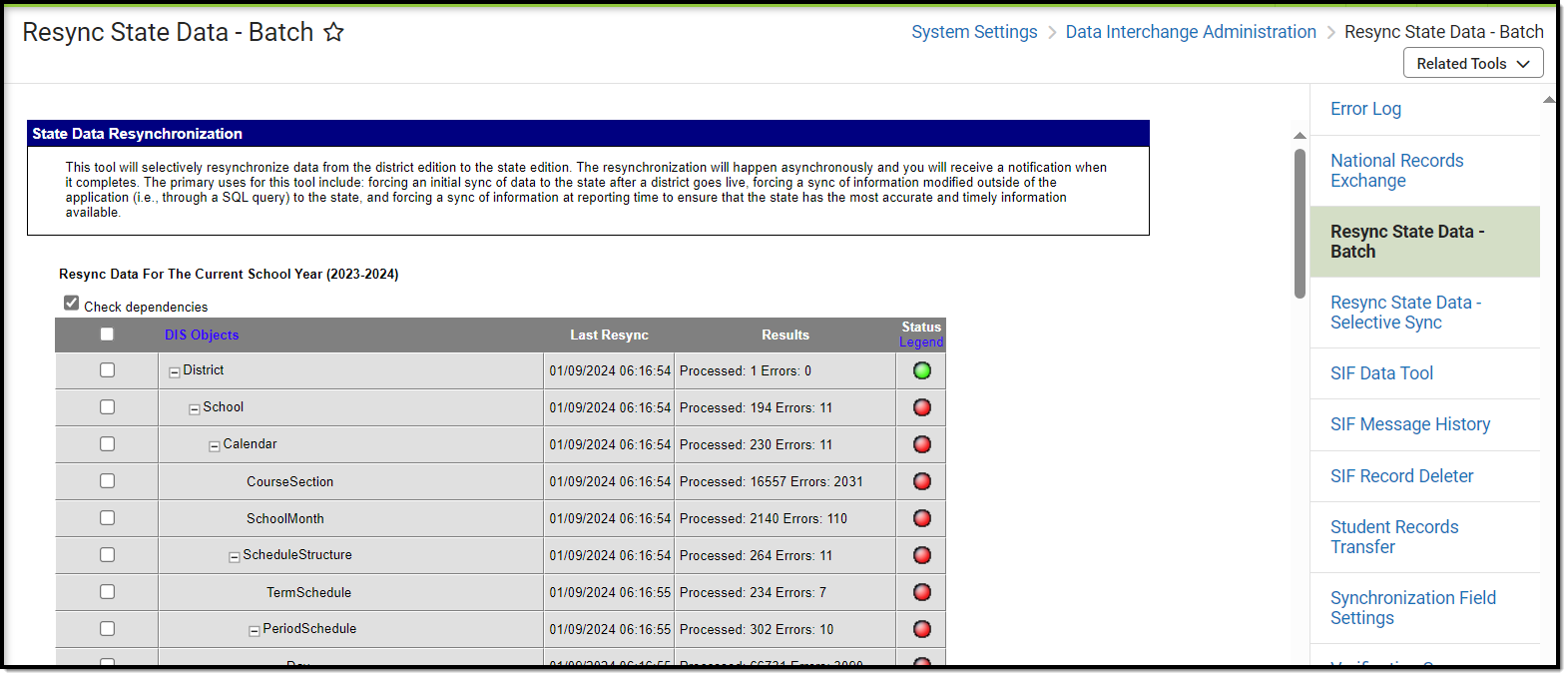
The Resync State Data tool is accessible at both the district and state levels. At the district level, it allows a district to push a resync of selected data objects to the state. When a district resyncs its data to the state, the district is in control of what information is manually pushed to the state. Similarly, if the state requests a resync of a district, it can choose which types of information it wants resynced.
Resyncs should only be performed by system administrators and/or Campus Support personnel who are familiar with Campus object hierarchies and dependencies.
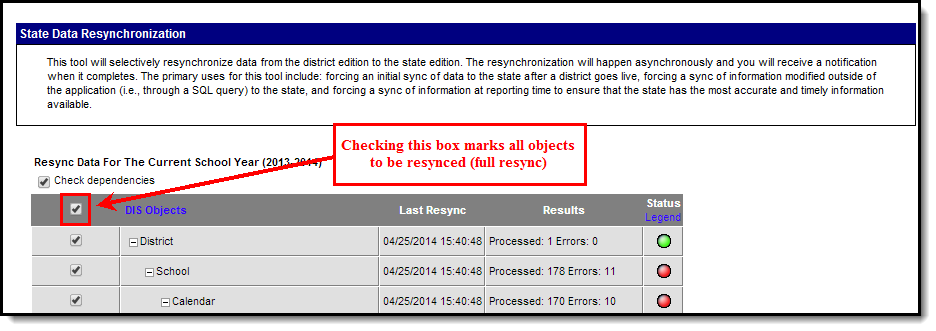
A full resync indicates all data objects that report to the state will be resynched. This process will automatically follow the chain of object dependencies that support the Campus hierarchy.
👁 Screenshot of Full Resync (All Objects)
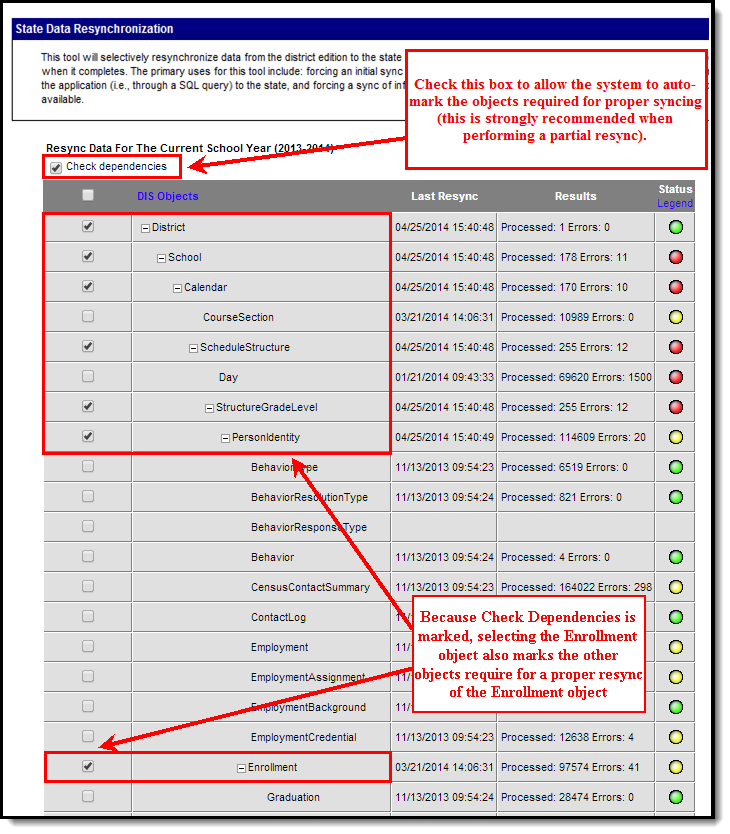
When a full resync is unnecessary, a partial resync may be performed. A partial resync involves specific data objects selected for resync by a user (instead of resynching all objects).
The Check Dependencies box should be marked when performing a partial resync. This ensures synching of all necessary parent objects (on which the desired resync object is dependent). Please refer to the Understanding Campus Object Dependencies and Hierarchy section of this page for more information related to synching and dependent relationships between parent/child objects.
👁 Screenshot of Partial Resync with Check Dependencies Box Selected
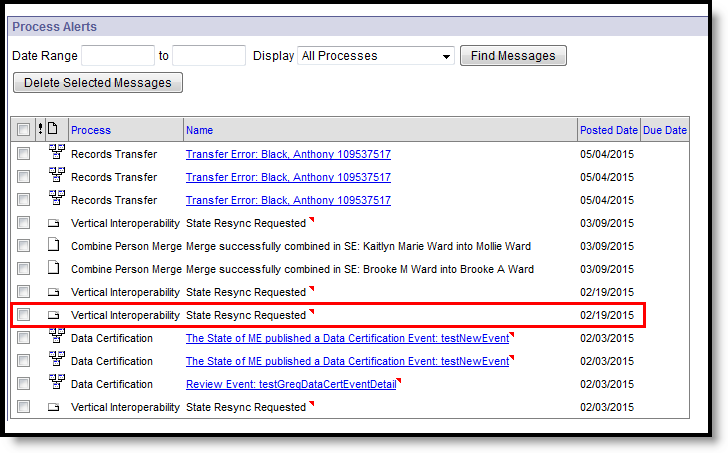
When the state requests a resync of a district, a notification appears in the Process Alerts of the district and state-level users with proper tool rights. The message will be categorized as a Vertical Interoperability message and named as "State Resync Requested".
👁 Screenshot of State-Initiated Resync Notification in District Process Alerts
A district user cannot stop or prevent a resync that has been initiated by the state, nor can he/she view the objects requested for resync.
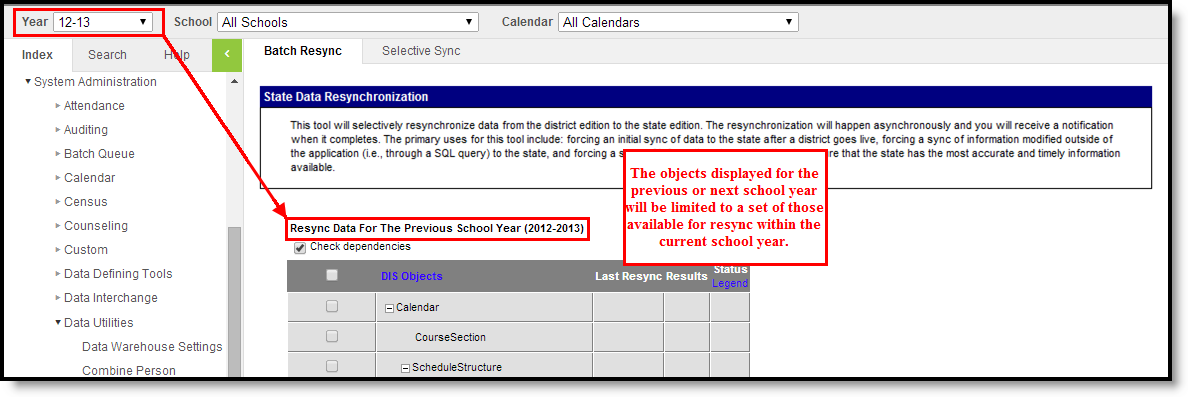
This option is only available to districts that have been configured to sync data for the previous and/or next school year (in addition to the current year). Districts that fall into this category should review the Synching Data from Multiple School Years section from State Edition Process Information page before attempting to resync data from the previous and/or next school year.
If the district has been configured to sync data for the previous and/or next school year (in addition to the current year), the data objects available for resync will be limited. To resync data from the previous or next school year, the Year field of the Campus toolbar must be set to the desired year. A limited set of objects will be displayed.
Objects that appear on the Resync State Data tool when the previous/next school year is selected will meet both of the following criteria:
Objects that do NOT appear on the Resync State Data tool when the previous/next school year is selected will meet one or both of the following criteria:
👁 Screenshot of Sync Data from a Previous School Year
A resync of the previous/next year's data may be performed in the same manner(s) as that of the current year, as listed in the Using the Resync State Data Tool (District Level) section.
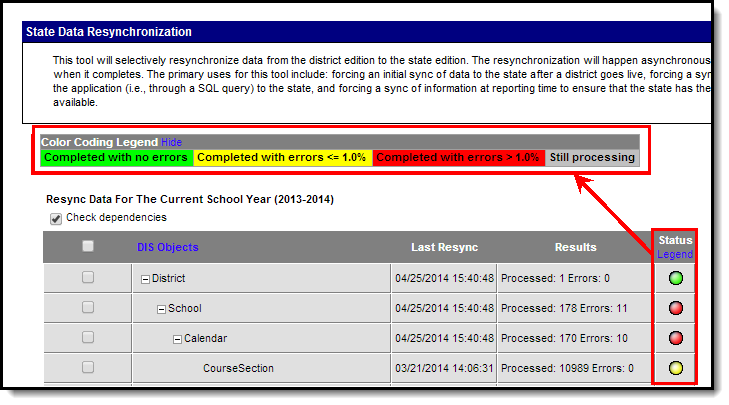
The manual resync process may warrant user analysis of resync attempts and results. The Resync State Data tool displays basic details related to district resync requests:
👁 Screenshot of Resync Summary
The Errors number includes sync failures as well as attempts to sync records that are not allowed to sync to the state (i.e., state-excluded enrollments, state-excluded grade levels, state-excluded calendars, etc.). Checking the district agent's log on the Agents tool will allow system administrators to review errors.
The following tools may also be used for additional analysis of resync attempts:
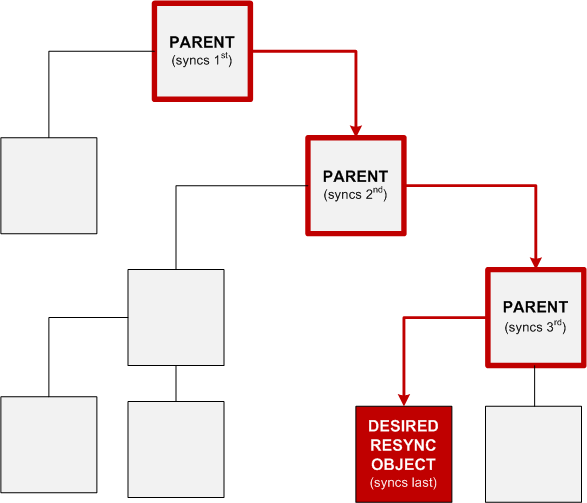
Campus data objects exist in a hierarchical structure enforced by database dependencies. Database tables use foreign keys to link related tables/data objects. This creates a dependency chain of parent/child relationships between objects which require the “parent” to be synchronized before the “child.” When all available data objects are resynchronized, the process follows the natural order of object dependencies.
👁 Screenshot of Resync Object Dependencies and Hierarchy
However, when only select data objects should be resynched, the system must follow a specific order to sync all appropriate “parent” object(s) before the desired “child” object(s). Resynching certain data objects (instead of all objects) will result in error if the necessary parent object(s) have not been properly resynced first. The Resync State Data tool allows the system to properly sync objects in the intended parent/child order.
Campus resync object hierarchies are explained in the following key and table.
All sync objects are listed in the table below; however, not all objects are applicable to all districts/states/regions.
|
Resync Object |
Parent Objects |
Child Objects |
|---|---|---|
|
AttendanceBIEAbsentDays |
District
|
No dependent objects |
|
AttendanceExactCount |
District
|
No dependent objects |
|
AttendanceGroupKY |
District
|
No dependent objects |
|
AttendanceKYMinute |
District
|
No dependent objects |
|
AttendanceSDMinute |
District
|
No dependent objects |
|
Behavior |
District
|
No dependent objects |
|
Calendar |
District
|
AttendanceBIEAbsentDays
|
|
CensusContactSummary |
District
|
No dependent objects |
|
ContactLog |
District
|
No dependent objects |
|
CourseCode |
No parent dependencies |
No dependent objects |
|
CourseSection |
District
|
No dependent objects |
|
CustomStudent |
District
|
No dependent objects |
|
CTEDataME |
District
|
No dependent objects |
|
Day |
District
|
No dependent objects |
|
District |
No parent dependencies |
AttendanceBIEAbsentDays
|
|
Employment |
District
|
No dependent objects |
|
EmploymentAssignment |
District
|
No dependent objects |
|
EmploymentBackground |
District
|
No dependent objects |
|
EmploymentCredential |
District
|
No dependent objects |
|
Enrollment |
District
|
AttendanceBIEAbsentDays*
|
|
ESSKY |
District
|
No dependent objects |
|
Form |
District
|
No dependent objects |
|
FRYSCGroupProgramKY |
District
|
FRYSCGroupStatusKY* |
|
FRYSCGroupStatusKY |
District
|
No dependent objects |
|
FRYSCStatusKY |
District
|
No dependent objects |
|
GiftedStatusKY |
District
|
No dependent objects |
|
Graduation |
District
|
No dependent objects |
|
HealthScreening |
District
|
No dependent objects |
|
ImmCertificate |
District
|
No dependent objects |
|
ISEPResidentialCertification |
No Parent Dependencies |
No dependent objects |
|
ISEPResidentialVerification |
No Parent Dependencies |
No dependent objects |
|
LepKY |
District
|
No dependent objects |
|
MedicaidInsurance |
District
|
No dependent objects |
|
NASIS |
District
|
No dependent objects |
|
PersonIdentity |
District
|
AttendanceBIEAbsentDays
|
|
PersonIdentityNoStateIDOnly |
District
|
No dependent objects |
|
Plan |
District
|
No dependent objects |
|
PlanProgressReport |
District
|
No dependent objects |
|
POSEligibility |
District
|
No dependent objects |
|
PreSchoolKY |
District
|
No dependent objects |
|
ProcessMessage |
District
|
No dependent objects |
|
ProgramParticipation |
District
|
No dependent objects |
|
ReportingEntity No longer available for Montana users as of Release Pack .1501 |
District* |
(ONLY WHEN THE REPORTING ENTITY OBJECT IS USED)
|
|
Roster |
District
|
No dependent objects |
|
ScheduleStructure |
District
|
AttendanceBIEAbsentDays
|
|
School |
District |
AttendanceBIEAbsentDays
|
|
StructureGradeLevel |
District
|
No dependent objects |
|
TeamMember |
District
|
No dependent objects |
|
TEDSKY |
District
|
No dependent objects |
|
Test |
District
|
TestScore* |
|
TestScore |
District
|
No dependent objects |
|
Title1KY |
District
|
No dependent objects |
|
Transportation |
District
|
No dependent objects |
|
Truancy |
District
|
No dependent objects |
|
VaccineShot |
District
|
No dependent objects |
All of the following requirements must be true for scores to sync via batch syncing:
The DISBatchHistory database table stores historical information related to resync requests. Though only the most recent request summary information appears in the user interface, historical resync summary data is stored in the table.