|
VOOZH | about |
|
VOOZH | about |
Tool Search: Demographics
Census tracks every person's entry in Infinite Campus—parents, staff, students, emergency contacts, doctors, etc. Demographic data is used throughout Campus, utilizing each person's historical and current details. Census fields that are specific to the state of Indiana and/or impact state reporting are detailed below.
See the core Identities article for information on necessary tool rights, available Ad hoc fields, and guidance on adding and printing Identities records.
Tool Search: Identities
The Identities tool acts as a historical record of the person's demographic information. While the information on the Demographics tool is displayed on the Identities record, changes should be made here.
Types of changes include:
When modified, previous identity information is not lost, but an end date is entered for the previous identity, and a start date is entered for the new identity.
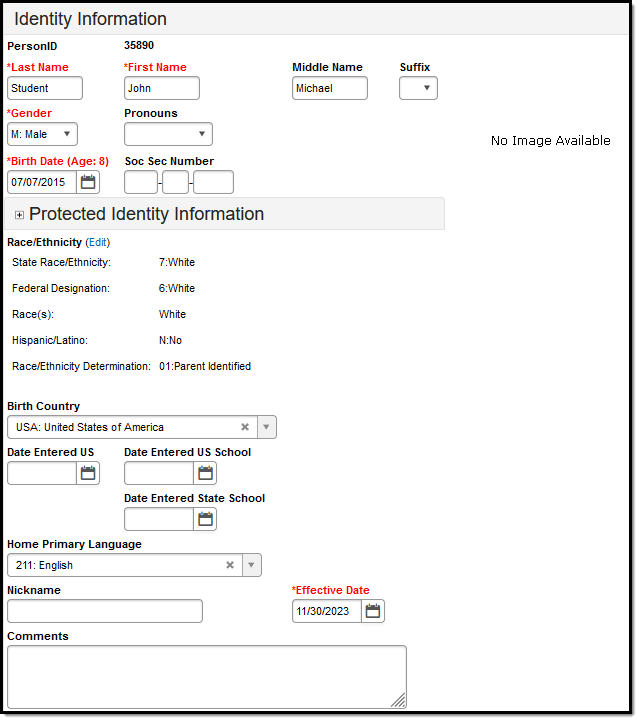
👁 Image of the Identities Information Editor.
Identities Information Editor
Last Name, First Name, Middle Name, and Suffix (Jr., III, etc.) are the legal names of the person.
| Field | Definition | Database Location | Ad hoc Inquiries |
|---|---|---|---|
| Last Name | The person's last name. | Identity.lastName | Student > Demographics > student.lastName |
| First Name | The person's first name. | Identity.firstName | Student > Demographics > student.firstName |
| Middle Name | The person's middle name. | Identity.middleName | Student > Demographics > student.middleName |
| Suffix | Indication of a generational name (Jr., III, etc.). | Identity.suffix | Student > Demographics > student.suffix |
Ed-Fi Resource(s):
* Ed-Fi Resources report legal information as documented under the Protected Identity Information section of a person's current identity record before considering preferred information. If all fields of the Protected Identity Information section are blank, the resources report the preferred information documented in the current identity record's Identity Information section.
Indicates the person's gender. Currently, the state of Indiana recognizes only male and female genders.
Database Location:
Identity.gender
Ad hoc Inquiries:
Student > Demographics > student.gender
Ed-Fi Resource(s):
* Ed-Fi Resources report legal information as documented under the Protected Identity Information section of a person's current identity record before considering preferred information. If all fields of the Protected Identity Information section are blank, the resources report the preferred information documented in the current identity record's Identity Information section.
Indicates the person's date of birth.
Database Location:
Identity.birthDate
Ad hoc Inquiries:
Student > Demographics > student.birthDate
Ed-Fi Resource(s):
The Birth Country is the country listed on the student’s birth certificate during initial enrollment. Please refer to the International Organization of Standards directory for more information on country codes.
Database Location:
Identity.birthCountry
Ad Hoc Inquiries:
Student > Demographics > student.birthCountry
Ed-Fi Resource(s):
Indicates the date the student entered the United States.
Database Location:
Identity.dateEnteredUS
Ad hoc Inquiries:
Student > Demographics > Identity History > ident.dateEnteredUS
Ed-Fi Resource:
Indicates the date on which the student enrolled in a US school.
Database Location:
Identity.dateEnteredUSSchool
Ad hoc Inquiries:
Student > Demographics > Identity History > ident.dateEnteredUSSchool
Ed-Fi Resource:
The Home Primary Language field allows a district to record the language spoken in the student's home, as determined by the student's home language survey. Please refer to the International Organization of Standards directory for more information on language codes.
Database Location:
Identity.homePrimaryLanguage
Ad hoc Inquiries:
Student > Demographics > student.homePrimaryLanguage
Student > Demographics > Identity History > ident.homePrimaryLanguage
Ed-Fi Resource:
The Federal government has adopted standards for defining racial and ethnic data to be used by the Department of Education. See the Race/Ethnicity article for more information.
Indicates whether the student is of Hispanic descent.
Database Location:
Identity.hispanicLatinoEthnicity
Ad hoc Inquiries:
Student > Demographics > student.hispanicEthnicity
Ed-Fi Resource(s):
Indicates the person's race/ethnicity.
Database Location:
Identity.raceEthnicity
Ad hoc Inquiries:
Student > Demographics > student.raceEthnicity
Ed-Fi Resource(s):
Tool Search: Demographics
The Demographics tool allows you to view general person information within Campus. All people for whom data is tracked, including students, staff, parents/guardians, household members, etc., have a Demographics record, which includes name and gender from the Identities record, student and staff identification numbers, and contact information.
See the core Demographics article for information on necessary tool rights, available Ad hoc fields, and guidance on adding and printing Demographics records.
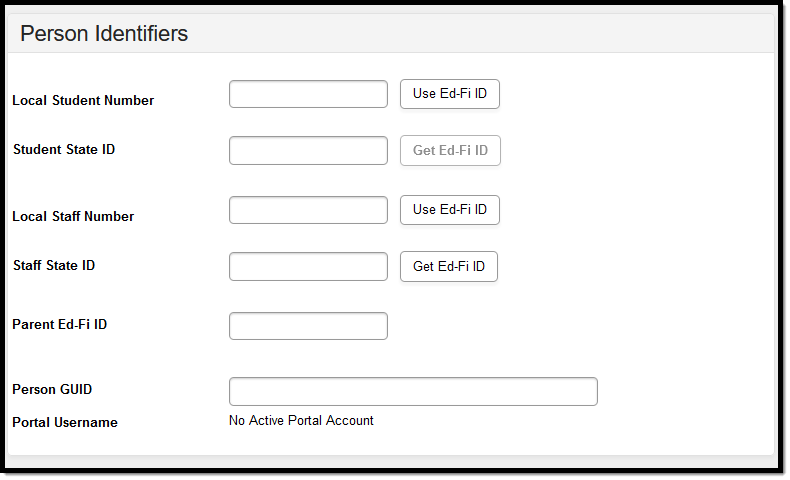
Person Identifiers like Student Numbers and State IDs are used in state reports and Ed-Fi resources to identify student records. Staff identifiers—local Staff Number and staff State ID—are also recorded here.
Follow district guidelines when creating or importing these values.
👁 Image of the Person Identifiers Editor.
Person Identifiers Editor
A unique identifier ties the person's records within Campus to their Ed-Fi record within the Ed-Fi system. When an Ed-Fi ID is used, the Student State ID, Staff State ID, Local Student Number, and Local Staff Number all use this number. See the Indiana Ed-Fi IDs article for more information.
Database Location:
Person.edFiID
Ad hoc Inquiries:
Student > Demographics > student.edFiID
Ed-Fi Resource(s):
Staff Unique State ID is a unique state identification number for the staff person provided by the Department of Education If this field is left blank, any courses or students tied to the staff member fail to report.
Database Location:
Person.staffStateID
Ad hoc Inquiries:
Student > Demographics > Identity History > Staff State ID History > staffStateIDHist.staffStateID
Ed-Fi Resource(s):
Local Staff Number is a unique identification number for the staff person assigned by the district.
Database Location:
Person.staffNumber
Ad hoc Inquiries:
Student > Demographics > Identity History > Staff Number History > staffNumHist.staffNumber
Ed-Fi Resource(s):
Student Unique State ID is a unique state identification number for the student provided by the Department of Education.
Database Location:
Person.studentStateID
Ad hoc Inquiries:
Student > Demographics > student.stateID
Ed-Fi Resource(s):
Local Student Number is a unique identification number for the student assigned by the district.
Database Location:
Person.studentNumber
Ad hoc Inquiries:
Student > Demographics > student.studentNumber
Ed-Fi Resource(s):
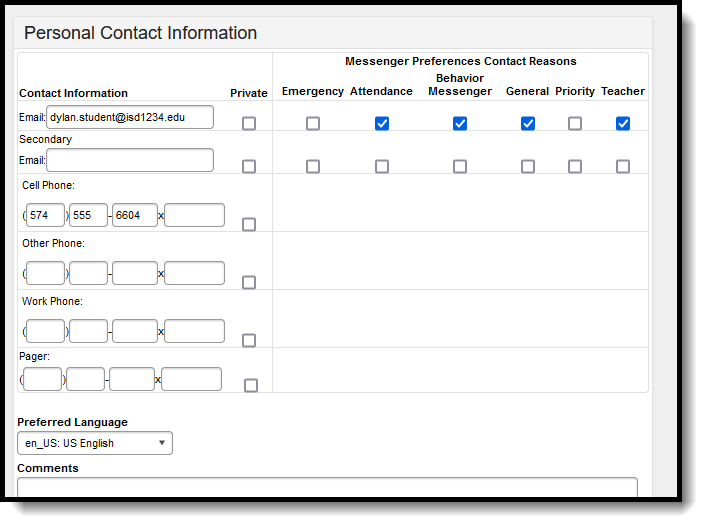
The Personal Contact Information editor contains phone numbers, messaging preferences, and the language preferred for receiving messages.
👁 Image of the Personal Contact Information Editor.
Personal Contact Information Editor
Lists the person's email address.
Database Location:
Contact.email
Ad hoc Inquiries:
Student > Census > pcontact.email
Ed-Fi Resource(s):
Lists the person's mobile number.
Database Location:
Contact.cellPhone
Ad hoc Inquiries:
Student > Census > pcontact.cellPhone
Ed-Fi Resource(s):
Lists the person's work number.
Database Location:
Contact.workPhone
Ad hoc Inquiries:
Student > Census > pcontact.workPhone
Ed-Fi Resource(s):
Lists the person's landline home phone number or other phone number different from the Cell, Work, or Pager numbers.
Database Location:
Contact.homePhone
Ad hoc Inquiries:
Student > Census > pcontact.homePhone
Ed-Fi Resource(s):
Lists the person's pager number.
Database Location:
Contact.pager
Ad hoc Inquiries:
Student > Census > pcontact.pager
Ed-Fi Resources:
Tool Search: District Employment
District Employment must have an active district employment record. This record indicates the employee is actively (no end date) or has been (end-dated) employed at the district. A District Assignment record is needed to indicate employment at a particular school/building within the district.
See the core District Employment article for information on necessary tool rights, available Ad hoc fields, and guidance on adding and printing employment records.
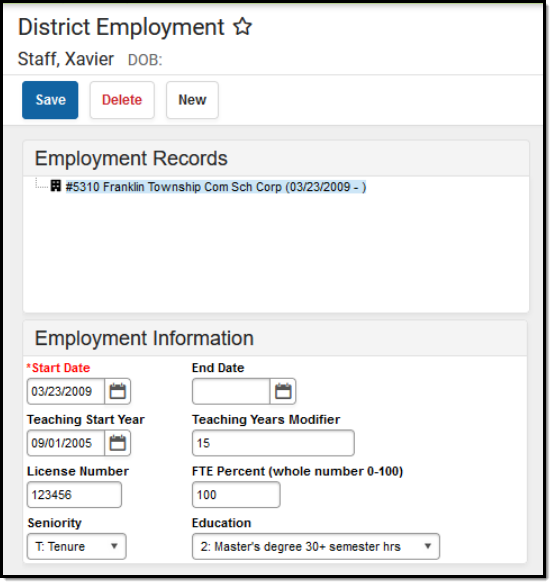
👁 Image of the District Employment Information Editor.
District Employment Information Editor
Indicates the date the staff person began teaching (when the teaching license was received).
Database Location:
Employment.teachingStartYear
Ad hoc Inquiries:
Person > Staff > District Employment > employment.teachingStartYear
Ed-Fi Resource(s):
Indicates the level of schooling the staff person has.
Database Location:
Employment.educationLevel
Ad hoc Inquiries:
Person > Staff > District Employment > employment.educationLevel
Ed-Fi Resource(s):
Database Location:
Employment.licenseNumber
Ad hoc Inquiries:
Person > Staff > District Employment > employment.licenseNumber
Ed-Fi Resource(s):
Tool Search: District Assignment
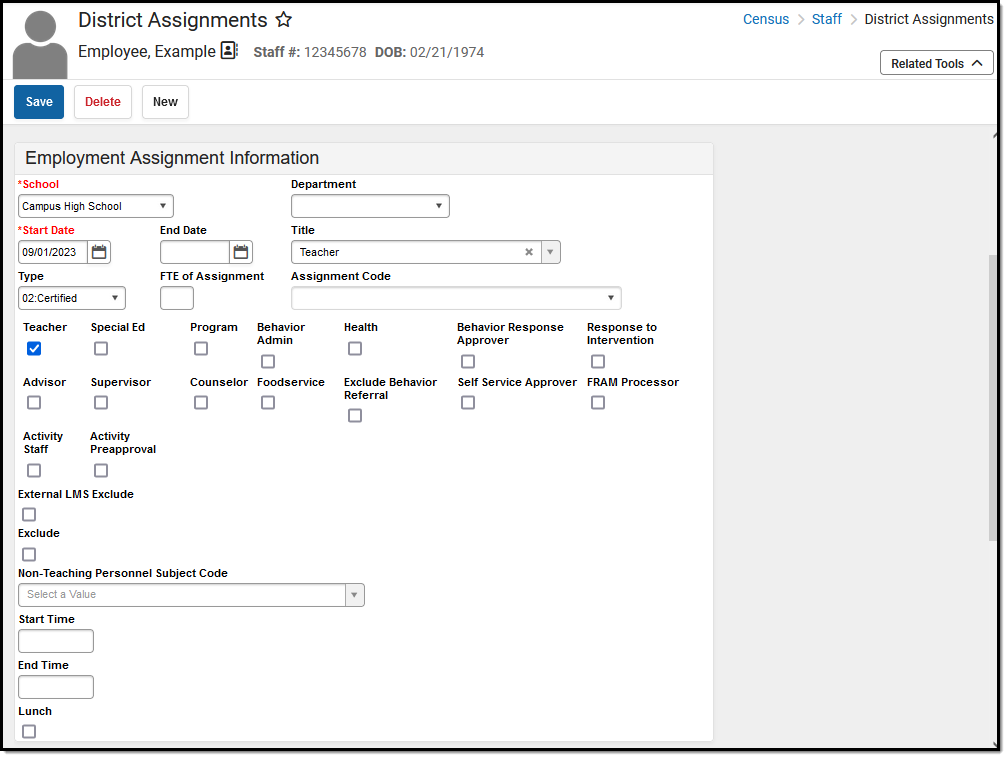
The District Assignments tool lists the location where the staff member is working. Users can view the school where the person works, the start date and title, the type of employment, and the assignment code. Fields specific to the state of Indiana are described below.
Staff with multiple Titles will have multiple District Assignments to the same school.
See the core District Assignments article for information on necessary tool rights, available Ad hoc fields, and guidance on adding and printing District Assignments records.
👁 Image of the Employment Assignment Information editor under the District Assignments tool.
District Assignment Editor
Lists the staff person's position - Teacher, Coach, etc. Options can be modified in the Attribute/Dictionary.
Database Location:
EmploymentAssignment.title
Ad hoc Inquiries:
Person > Staff > Assignment > schoolEmployment.title
Ed-Fi Resource(s):
Indicates the start date of employment at the specific school. This is the very first date the staff member was employed at the school.
Database Location:
EmploymentAssignment.startDate
Ad hoc Inquiries:
Person > Staff > Assignment > schoolEmployment.assignmentStartDate
Ed-Fi Resource(s):
Indicates the end date of employment assignment. This is the last date the staff member was employed at the school.
Database Location:
EmploymentAssignment.endDate
Ad hoc Inquiries:
Person > Staff > Assignment > schoolEmployment.assignmentEndDate
Ed-Fi Resource(s):
Tool Search: Credentials
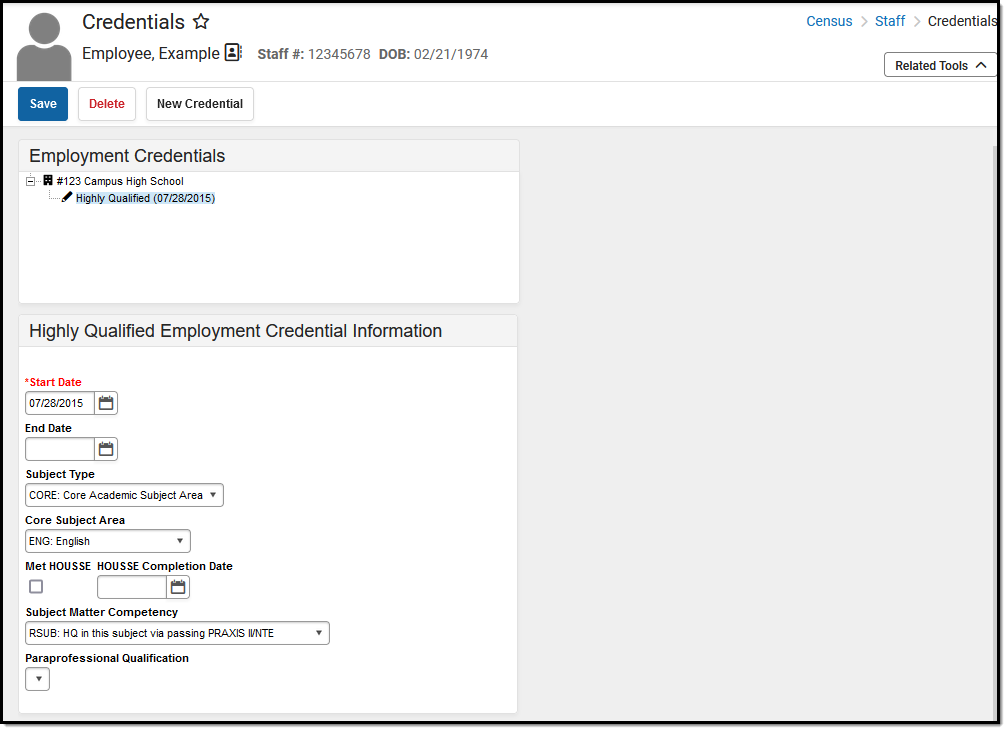
The Credentials tool lists a staff member's credential types based on the date earned. Multiple credentials can be entered since the staff member may be highly qualified in two subject areas or have multiple degrees.
See the core Credentials article for information on necessary tool rights, available Ad hoc fields, and guidance on adding and printing Credentials records.
👁 Image of the Credentials Editor.
Credentials Editor
Indicates the type of credential the staff person has earned. This list is visible when creating a new credential and in the list of previously entered credentials.
Database Location:
EmploymentCredential.employmentCredentialType
Ad hoc Inquiries:
Person > Staff > Assignment > employmentCredential.credentialType
Ed-Fi Resource(s):
Indicates the number of licenses assigned when the credential was granted.
Database Location:
EmploymentCredential.licenseNumber
Ad hoc Inquiries:
Person > Staff > Assignment > employmentCredential.licenseNumber
Ed-Fi Resource(s):
Households help identify which persons live in the same home. The list of Members identifies family and non-family members at a shared address and the Address information lists where that household is located.
See the core Households article for information on necessary tool rights, available Ad hoc fields, and guidance on adding and printing household records.
Tool Search: Household Members
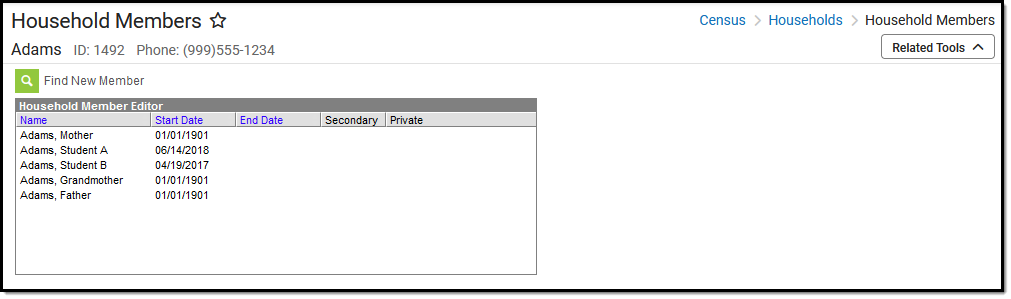
The Members tool lists all persons who have lived in the selected household. Due to legacy issues, it is recommended that members are not deleted from the household but rather end-dated. This is used to determine whether a student currently lives with their parents.
👁 Image of the household members editor.
Household Members
Tool Search: Household Addresses
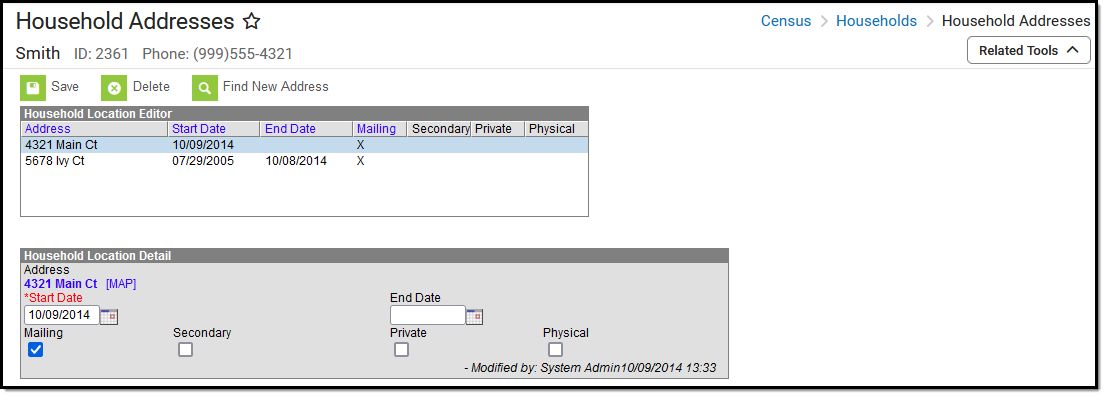
The Household Addresses tool displays all addresses where the family has resided. For legacy purposes, addresses should not be deleted; they should only be ended when a family moves. Like the household information to which they are tied, the addresses are used to generate reports sent home and in location extracts.
👁 Image of the Household Address Location and Detail Editors.
Household Address Location and Detail Editors
Lists the house number, street name, street tag, and direction of the household residence.
Database Location:
Ad hoc Inquiries:
Student > Census > Addresses > address.number, address.street, address.tag. address.prefix, address.dir, address.apt
Person > Census > Addresses > address.number, address.street, address.tag. address.prefix, address.dir, address.apt
Ed-Fi Resources:
Indicates the date the family began living at that address.
Database Location:
HouseholdLocation.startDate
Ad hoc Inquiries:
Student > Census > Addresses > address.startDate
Person > Census > Addresses > address.startDate
Ed-Fi Resources:
Indicates the date the family stopped living at that address.
Database Location:
HouseholdLocation.endDate
Ad hoc Inquiries:
Student > Census > Addresses > address.endDate
Person > Census > Addresses > address.endDate
Ed-Fi Resources:
Indicates the family receives mail at this address.
Database Location:
HouseholdLocation.mailing
Ad hoc Inquiries:
Student > Census > Mailing Addresses
Person > Census > Mailing Addresses
Ed-Fi Resources:
This is a secondary address for the household. A household can only have one primary physical address at any given time. In the situation where a household has two physical addresses, one of them needs to be marked as secondary.
Database Location:
HouseholdLocation.secondary
Ad hoc Inquiries:
Student > Census > Mailing Addresses > mailingAddress.secondary
Person > Census > Mailing Addresses > mailingAddress.secondary
Ed-Fi Resources:
Indicates the address information should remain at the school (not given to third-party mailings).
Database Location:
HouseholdLocation.private
Ad hoc Inquiries:
Student > Census > Mailing Addresses > mailingAddress.privateAddress
Person > Census > Mailing Addresses > mailingAddress.privateAddress
Ed-Fi Resources:
Indicates the address is the household's physical location.
Database Location:
HouseholdLocation.physical
Ad hoc Inquiries:
Student > Census > Mailing Addresses > mailingAddress.physicalAddress
Person > Census > Mailing Addresses > mailingAddress.physicalAddress
Ed-Fi Resources:
Tool Search: Relationships
The Relationships tool displays established relationships between people in Campus. Relationships include the other individuals residing in the same household as the selected individual and those who may reside in other households but have an association with the selected person (emergency contacts, divorced parents, etc.).
See the core Relationships article for information on necessary tool rights, available Ad hoc fields, and guidance on adding and printing Demographics records.
👁 Screenshot of the Indiana relationships tool editor.
Relationships Editor
Designates the type of relationship between two people. Both people - the selected individual and the name of the person in the row - are affected by the selected. Relationship types are defined for the district in the Relationship Type tool.
Database Location:
RelationshipType.name
Ad Hoc Inquiries:
Student > Census > Household Contact Summary > contacts.Summary
Person > Census > Household Contact Summary > contacts.Summary
Ed-Fi Resource(s):
Provides a visual indication of the listed person's priority for contact in an emergency situation. This is a numeric value. The person that should be notified first should have a 1. If there is no priority, the school uses discretion when contacting individuals.
Database Location:
RelatedPair.seq
Ad hoc Inquiries:
Not Available
Ed-Fi Resource(s):
When checked, indicates which person has authority when making decisions on behalf of the student. This designation is used in several reports and messaging tools.
Database Location:
RelationshipType.guardian
Ad hoc Inquiries:
Ed-Fi Resource(s):
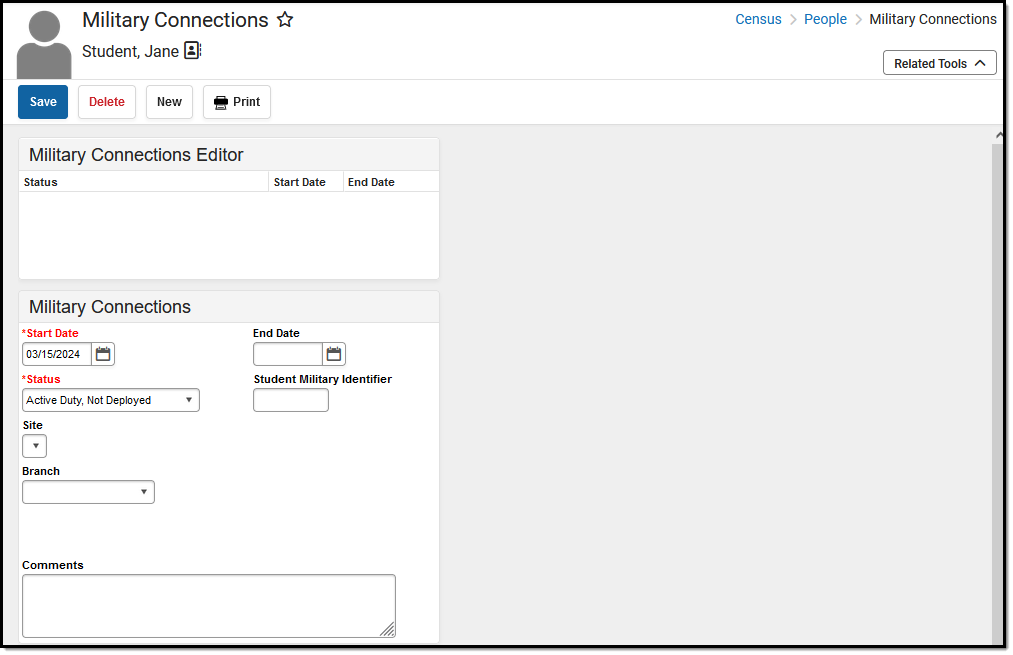
Tool Search: Military Connections
The Military Connections tool tracks parent/guardian data for military personnel. It works with the Impact Aid tool, which tracks parents/guardians employed at federal sites (armed forces locations, reservation lands, etc.).
See the core Military Connections article for information on necessary tool rights, available Ad hoc fields, and guidance on adding and printing Military Connections records.
👁 Image of the Military Connections Editor.
Military Connections Editor
Indicates the enlistment status of the parent/guardian.
Database Location:
MilitaryConnections.status
Ad hoc Inquiries:
Student > Demographics > Military Connections > militaryConnections.status
Person > Demographics > Military Connections > militaryConnections.status
Ed-Fi Resource:
Thank you!