Building a Convolutional Neural Network using PyTorch
Last Updated : 12 May, 2026
importingConvolutional Neural Networks (CNNs) are deep learning models used for image processing and analysis. They learn hierarchical features from images using layers like convolution and pooling.
Extract features such as edges, textures, and patterns automatically.
Use convolution, pooling, and fully connected layers for learning.
Implemented in PyTorch for building, training, and evaluating models.
Implementation
1. Importing necessary libraries
We are importing necessary modules from the PyTorch library.
2. Preparing Dataset
Preparing the CIFAR-10 dataset in PyTorch by applying image transformations, loading the data, and using data loaders for batching and shuffling. The dataset consists of 10 class labels.
3. Define CNN Architecture
Defining a CNN model in PyTorch using a custom class.
Create class Net inheriting from nn.Module.
Use two convolutional layers with ReLU and max pooling.
Add three fully connected (dense) layers.
Flatten feature maps before passing to dense layers.
Instantiate the model as net.
4. Defining Loss Function and Optimizer
Setting up the training components for the model.
nn.CrossEntropyLoss(): Computes loss for multi-class classification.
optim.SGD: Updates model weights using stochastic gradient descent.
Learning rate (0.001) & momentum (0.9): Control update speed and stability.
5. Training Network
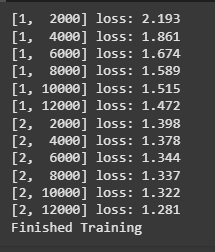
Train the model (net) for 2 epochs.
Use the defined loss function and optimizer for updates.
Print average loss every 2000 mini-batches to monitor training.