|
VOOZH | about |
|
VOOZH | about |
Large Language Models (LLMs) have transformed different tasks in natural language processing (NLP) such as translation, summarization, and text generation. Hugging Face's Transformers library offers a wide range of pre-trained models that can be customized for specific purposes through fine-tuning. Adjusting an LLM with task-specific data through fine-tuning can greatly enhance its performance in a certain domain, especially when there is a lack of labeled datasets.
This article will examine how to fine-tune an LLM from Hugging Face, covering model selection, the fine-tuning process, and an example implementation.
The initial step before fine-tuning is choosing an appropriate pre trained LLM. Hugging Face provides a range of models such as GPT, BERT, T5, among others that are suitable for text classification, generation, or question answering tasks. You have the option to select a model based on what your task demands.
You can search for a model on Hugging Face's model hub based on your task and dataset to choose a model. The pre-trained models typically come with fine-tuned versions for various tasks such as sentiment analysis, summarization, and others.
After choosing the model, the next step involves adjusting it on a dataset that is specific to the domain. The process of fine-tuning typically includes these steps:
Fine-tuning a language model (LLM) can significantly enhance its performance on specific tasks, such as sentiment analysis. In this section, we will walk through the process of fine-tuning a DistilBERT model using the Hugging Face Transformers library. We'll focus on the Yelp Polarity dataset, a well-known dataset for binary sentiment classification (positive or negative reviews).
Requirements
Before we dive into the code, ensure you have the following libraries installed:
pip install transformers datasets torch gradioWe start by importing the necessary libraries and loading the DistilBERT model and its tokenizer.
Next, we will load the Yelp Polarity dataset. This dataset contains text reviews labeled as either positive or negative.
We need to tokenize the text data so that it can be processed by the model. We define a function to tokenize the dataset and apply it to both the training and testing splits.
Now, we specify the training parameters, such as learning rate, batch size, number of epochs, and evaluation strategy.
With the model, tokenizer, and training arguments ready, we can initialize the Trainer.
Now, we can proceed to fine-tune the model on the training data.
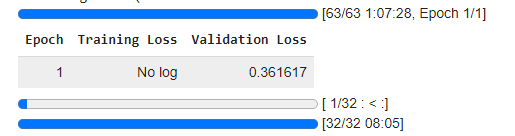
Output:
After training, we should evaluate the model's performance on the test dataset.
Finally, we save the fine-tuned model and tokenizer for future use.
To use our fine-tuned model for sentiment analysis, we define a function that takes a text input, tokenizes it, and predicts the sentiment.
To make our model more user-friendly, we can create a simple web interface using Gradio.
Output:
Fine-tuning a language model from Hugging Face enables you to customize robust pretrained models for your individual needs, enhancing results and reducing lengthy training durations. By utilizing pre-existing knowledge, it is possible to fine-tune models with less data and in less time, making it perfect for a range of natural language processing tasks. The transformers library from Hugging Face streamlines this task by providing strong APIs and a model hub, enabling you to concentrate on the task at hand rather than the intricacies of training complex models from the beginning.