U‑Net is a deep learning architecture designed specifically for image segmentation tasks. Its encoder‑decoder structure allows the model to capture both global context and fine‑grained details, making it highly effective for medical imaging, satellite imagery, and other pixel‑level classification problems.
Uses skip connections for precise localization Works well with limited training data Delivers accurate segmentation results across diverse applications Step By Step Implemenation Here we will implement U-Net for semantic segmentation on a custom dataset containing RGB images and masks.
Step 1: Import Required Libraries Step 2: Define Model Validation and Testing Utilities summary() extracts layer details for comparison. comparator() checks expected vs actual layers. Step 3: Mount Google Drive and Load Dataset Paths Google Drive is mounted for accessing image data. Image and mask directories are defined. File paths are filtered and sorted. You can download Image Segmentation Dataset from Kaggle
Step 4: Visualize Sample Image and Mask Displays the image and its mask side by side using subplots. Supports both 2D and 3D masks, shown in grayscale with axes hidden. Output:
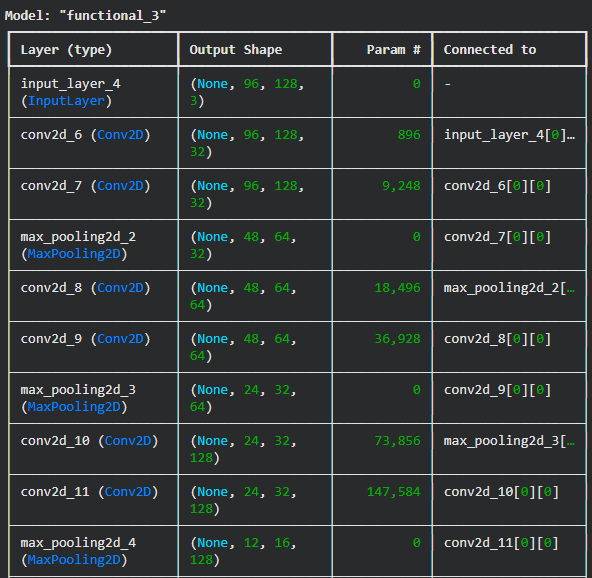
Step 5: Create TensorFlow Dataset Converts image and mask file paths into TensorFlow constant tensors. Pairs each image path with its corresponding mask path. Creates a TensorFlow dataset using from_tensor_slices for efficient data loading. Step 6: Dataset Preprocessing Pipeline process_path( ) reads image and mask files from disk, decodes them and converts them into tensors preprocess( ) resizes image and mask, normalizes the image and prepares them for model input Step 7: U-Net Building Blocks (Encoder and Decoder) conv_block( ) extracts features using two convolution layers and returns a pooled output with a skip connection. upsampling_block( ) upsamples feature maps using transposed convolution and merges them with encoder features. Applies two convolutions after concatenation to refine spatial details in the decoder path. Step 8: Build the U-Net Model Defines the U-Net architecture with encoder, bottleneck and decoder using skip connections. Initializes the model with a 96×128 RGB input and multi-class output. Compiles the model using Adam optimizer and Sparse Categorical Crossentropy loss. Displays the model summary showing layers, parameters and output shapes. Output:
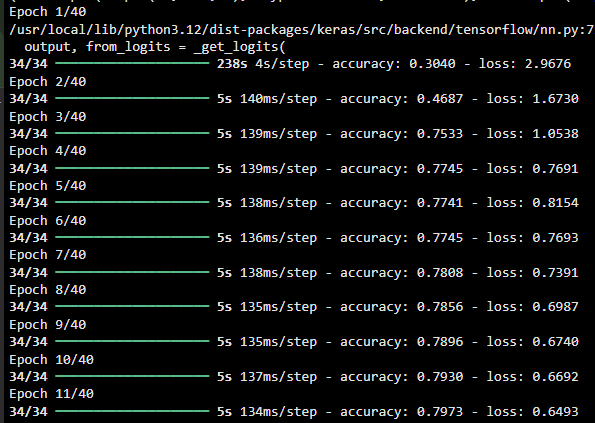
👁 unet25 Unet Model Step 9: Train U-Net Model Hyperparameters like epochs, batch size, buffer size and validation splits are set for training. Dataset is cached, shuffled and batched for efficient training. The U-Net model is trained on the prepared dataset using fit() for the specified number of epochs. Output:
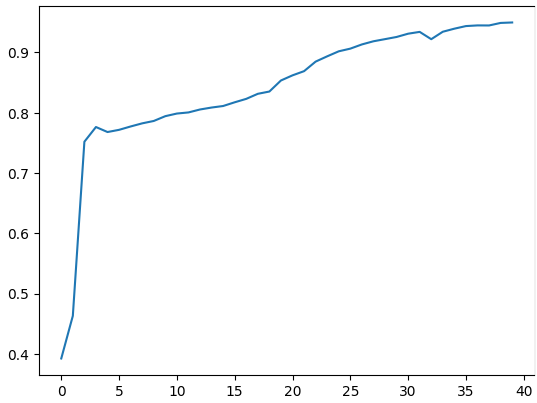
👁 Unet27 Unet Traning Step 10: Training Accuracy Visualization Plots how the model’s accuracy changes over epochs during training.
Output:
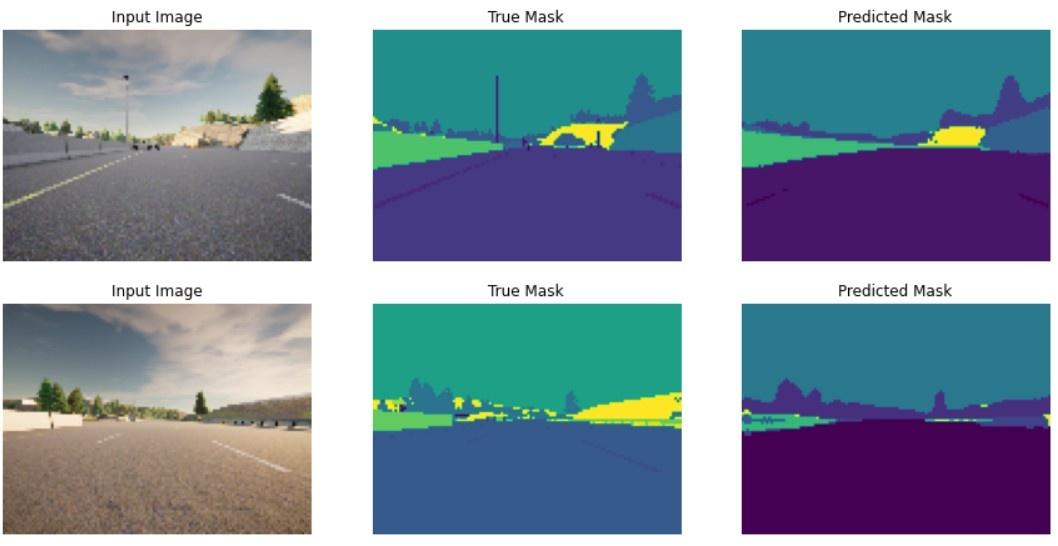
👁 unet28 Training Accuracy Step 11: Visualizing U-Net Predictions show_predictions displays input images, ground truth masks and predicted masks side by side. Uses create_mask to convert model output probabilities into single-channel masks for visualization. Helps qualitatively assess model performance on training or sample data. Output:
👁 unetunet Output We an see our model is working fine.
You can download full code from here